




COLOR LASERJET 2820
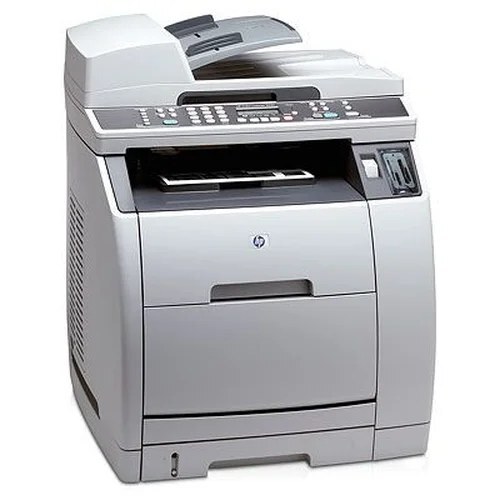
A step up the 2800-series ladder, the Color LaserJet 2820 is the fuller-featured all-in-one of its family — the machine an office chose when a single device had to carry the whole document workload. Its toner bay is the family standard, and one color is stocked on its own here: the yellow 122A cartridge (Q3962A), sold as a high-yield single. The other three — black Q3960A, cyan Q3961A and magenta Q3963A — ride in the four-color sets listed below, which come in standard and premium-quality builds.
An all-in-one earns its place by being busy, and a busy multifunction machine works its color cartridges harder than a print-only device doing the same page count — every color copy and every scanned-to-print job draws on the same four cartridges. That makes cartridge strategy a real running cost on the 2820 rather than an afterthought. The good news is that the 2820 shares its toner bay with the rest of the 2550 and 2800 lines, so nothing about its supplies is exotic: the codes are common, the sets are stocked in depth, and a small office can keep this machine fed without special orders or long waits.
Toner Cartridges for COLOR LASERJET 2820
| Cartridge | Color | Page Yield |
|---|---|---|
| Q3962A | Yellow | See product page |
| HP 122A 4 Color Set (Q3960A, Q3961A, Q3962A, Q3963A) | Black, cyan, yellow, magenta | See product page |
| HP 122A Premium Quality 4 Color Set (Q3960A, Q3961A, Q3962A, Q3963A) | Black, cyan, yellow, magenta | See product page |
| HP 2820 4 Color Set | Black, cyan, yellow, magenta | See product page |
Which cartridge should you buy?
Start from how the machine actually empties. Yellow is the one color you can top up alone, and its single listing is the high-yield build, so a yellow warning is a one-cartridge fix. Black, cyan and magenta are stocked as sets on this page, which changes the math: if two of them are fading together, a four-color set is the sensible buy and the leftover part-used cartridges become shelf spares. If only one set-carried color is low and the others are fresh, the set still wins on convenience — one order refreshes the whole bay. Between the two 122A set builds, the standard set covers everyday office output, while the premium-quality set is the pick for an office that wants the closest match to the original cartridges' build. The 2820-named set carries the same four codes in model packaging.
Chip, toner and everyday use
Each cartridge in the 2820 reports its own level, and the printer recognizes a fresh cartridge on its own once it is seated — push the unit in until it settles, close the door, and let the machine finish its start-up routine before judging the first page. If a cartridge that has sat in the machine through a quiet month prints pale on one side, take it out and rock it gently side to side a few times; toner settles in storage and redistributing it often restores even coverage. Keep unopened spares sealed, upright and out of direct sunlight, and remember that rated page counts assume roughly 5% coverage per page — a color-heavy newsletter run will empty a cartridge far sooner than the same count of memos.
Frequently Asked Questions
Can I buy the black Q3960A on its own for the 2820?
Not as a single on this page — black ships inside the four-color sets, alongside cyan, yellow and magenta. Yellow is the only color stocked as a standalone cartridge here, so plan black replacements around a set purchase and keep the part-used colors from the old set as spares.
What is the difference between the standard and premium 122A sets?
Both sets carry exactly the same four codes — Q3960A, Q3961A, Q3962A and Q3963A — and either one refills the 2820 completely. The premium-quality set is built as the closer match to the original cartridges; the standard set is the everyday value option. The choice is about build preference, not fit.
Do I have to change all four cartridges at the same time?
No. Each cartridge in the 2820 runs on its own level and can be swapped independently, and the supplies status tells you which of the four is actually low. In practice the set-only colors are usually refreshed together, but nothing in the machine forces a full change.
Will a compatible 122A cartridge work properly in the 2820?
Yes — the 2820 works with compatible 122A cartridges as well as genuine HP, as long as the code on the box matches the Q3960A family. Clever Supplies compatible cartridges carry a 1-year warranty and 1-year returns, so a cartridge that misbehaves is covered.
More printers that use the same cartridges
The same toner bay appears across the 2550 and 2800 lines: COLOR LASERJET 2550L, COLOR LASERJET 2550N, COLOR LASERJET 2830, Color LaserJet 2550, Color LaserJet 2550LN, Color LaserJet 2800, Color LaserJet 2840, HP 122A.