




Laser B5460DN
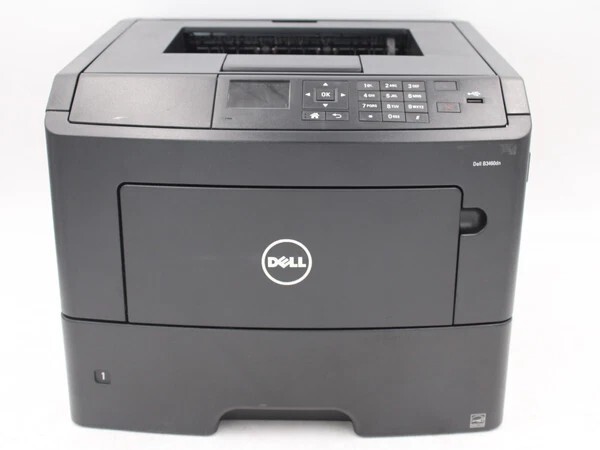
The Dell B5460DN is the networked workhorse of Dell's B-series: up to 60 ppm (A4), Gigabit Ethernet, and a 275,000-page monthly duty cycle, with security features like PIN-protected printing and SNMPv3 for enterprise environments. Optional trays grow input capacity to 4,400 sheets for uninterrupted long runs.
High volume demands high-yield thinking. The extra-high-yield cartridge option prints roughly 45,000 pages — at about a cent a page in Dell's own math — and compatible cartridges push the economics even further. For a printer this fast, feeding it economically matters as much as the speed itself.
Toner Cartridges for Dell B5460DN
This printer works with the following toner cartridges:
- Dell 2TTWC
- Dell 331-9755
- Dell 331-9756
- Dell 331-9757
- Dell 331-9795
- Dell 331-9797
- Dell 593-11185
- Dell 593-11187
- Dell 593-11190
- Dell 593-11194
- Dell 593-BBYR
- Dell 71MXV
- Dell FGVX0
- Dell G7TY4
- Dell GDFKW
- Dell GW3G4
- Dell J1X2W
- Dell PG6NR
- Dell T6J1J
- Dell X5GDJ
- Dell YT3W1
Frequently Asked Questions
Which supplies fit the Dell B5460DN?
The B5460DN uses the same 21-code set as the base B5460: 331-9755, 331-9756, 331-9757, 331-9795, 331-9797, 593-11185, 593-11187, 593-11190, 593-11194, 593-BBYR, 2TTWC, 71MXV, FGVX0, G7TY4, GDFKW, GW3G4, J1X2W, PG6NR, T6J1J, X5GDJ, and YT3W1.
How do I deploy the B5460DN on an office network?
Connect via Ethernet, install the driver on each workstation, and set duplex plus toner-save as defaults. A shared high-volume B5460DN burns through toner quickly, so keep at least one spare cartridge from the listed codes on hand.
Our B5460DN keeps running out of toner mid-week - solutions?
A B5460DN serving a whole office needs the highest-yield cartridges in its list plus a standing spare. Also check whether heavy graphics coverage is inflating usage - draft mode for internal documents helps a lot.