




Color Laser Laser B5460DN
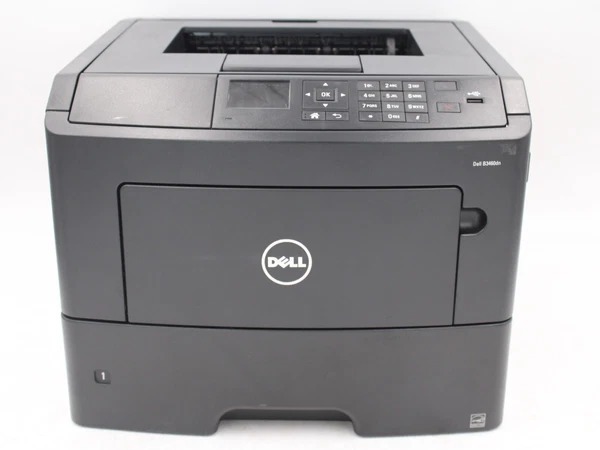
Enterprise IT departments spec the Dell B5460DN for control as much as for speed: PIN-authenticated secure printing, SNMPv3 and IPsec encryption, and firmware integrity checks, all wrapped around a shared 60-ppm network engine. The cartridge stocked on this page is the extra-high-yield 332-0131, available as a single cartridge and in packs of two, three, five and ten.
The hardware numbers support the fleet role — a 275,000-page monthly duty cycle and input capacity expandable to 4,400 sheets are not home-office figures. Machines like this are rarely bought one at a time, and that is the supply insight: a fleet of identical printers should drink from a single cartridge shelf, so that any spare in any stockroom fits any machine in the building.
Toner Cartridges for B5460DN
| Cartridge | Color | Page Yield |
|---|---|---|
| 332-0131 Black Toner — Single Cartridge | Black | See product page |
| 332-0131 Black Toner — 2 Pack | Black | See product page |
| 332-0131 Black Toner — 3 Pack | Black | See product page |
| 332-0131 Black Toner — 5 Pack | Black | See product page |
| 332-0131 Black Toner — 10 Pack | Black | See product page |
Which cartridge should you buy?
Standardize on the 332-0131 and buy it the way fleets buy: the 10 pack for a central stockroom that feeds several B5460DNs, the 5 pack for a large department, the 2 pack wherever one machine works alone but cannot be allowed to stop. A single cartridge only makes sense for a pilot installation. One cartridge number for the whole fleet means fewer supply orders for IT to process, one spare pool instead of many, and a cost per page that can be forecast instead of discovered.
Chip, toner and everyday use
In a managed environment the swap itself is the smallest part of the job: pull the old unit, seat the new cartridge until it clicks, and let the machine register the chip and reset its gauge — then verify from the control panel that the level reads full before walking away. Keep sealed spares near the machines they serve rather than in a central store three floors away; on a printer with this duty cycle, the walk takes longer than the changeover.
Frequently Asked Questions
How do I find the right cartridge for the Dell B5460DN?
Look at the part number on the cartridge you are removing. The cartridge stocked for this model on this page is the extra-high-yield 332-0131, in single and multi-pack listings — order against that number and the match is certain.
Do I need a print server for the B5460DN?
No. Like the other DN models, it carries its own network connection and is shared directly by the workgroup; no separate server or always-on PC is required to pass jobs to it.
What does the B5460DN's secure printing actually do?
With PIN authentication, a job is held at the machine instead of printing immediately, and is only released when its owner enters a PIN at the control panel — so confidential documents never sit in an output tray waiting to be collected by the wrong person.
Why standardize the whole fleet on one cartridge?
Three reasons: any spare fits any machine, so no printer waits for its own special delivery; purchasing consolidates into fewer, larger orders; and the cost per page across the fleet becomes one predictable number instead of a different surprise per department.
More printers that use the same cartridges
The same extra-high-yield family serves the rest of Dell's flagship B-series. Fleets that also run the models below can hold one cartridge stock for all of them: Dell B5460, Dell B5465DNF, Dell 331-9797, Dell B5460, Dell B5460DN, Dell B5465, Dell B5465DN, Dell B5465DNF.