






 See Compatible Printers
 Read more about our ink!
Ricoh
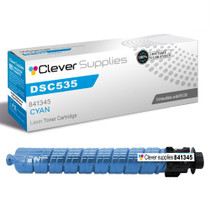
Compatible Ricoh DSC545 (841345) Toner Cartridge Cyan
- Page Yield:
- Color: 17000
- Availability:
- In Stock
- Shipping:
- Free Shipping

Amazon Price:

- Page Yield:
- Color: 17000
- Availability:
- In Stock
- Shipping:
- Free Shipping
- Compatible Printers
- Specifications
- SKU:
- CS-Ricoh-DSC535-DSC545-C
- Printer Brand:
- Ricoh
- OEM Number:
- 841345
- Ink Color:
- Cyan
- Page Yield:
- Color: 17000
- Printer Type:
- Laser Cartridge
- Condition:
- New Compatible
- Description
- Reviews



Produce high-quality prints with the Ricoh DSC535 toner cartridge series, including 841342 Black, 841345 Cyan, 841344 Magenta, and 841343 Yellow. These compatible Ricoh cartridges are designed to deliver sharp text and vivid colors for a wide range of printing tasks. Built for reliability, the Ricoh DSC535 toner cartridge offers consistent performance and professional results page after page. Whether youre printing colorful images or detailed business documents, these cartridges ensure clarity and precision in every print. Compatible with DSC535 and DSC545 printers, these toner cartridges integrate seamlessly into your Ricoh device for smooth operation and easy installation. Their design helps reduce maintenance and keep your printer performing at its best. Count on the Ricoh DSC535 toner cartridge to provide excellent value, high yield, and exceptional quality for all your printing needs. Ideal for both office and commercial environments, these cartridges deliver long-lasting results you can trust.
Cross-reference: Ricoh 841345, the Type MPC4500A cyan print cartridge. This cartridge fits the Gestetner DSc535 and DSc545 — the same machine platform also sold as the Ricoh Aficio MP C3500 and MP C4500, the Savin C3535 and C4540, and the Lanier LD435c and LD445c.
Frequently Asked Questions
Why does cyan seem to run out on its own schedule, out of step with the other colors?
Because color cartridges drain according to what you print, not in lockstep. Offices that run a lot of charts, diagrams, presentations, and anything with skies or corporate blue branding pull cyan far harder than the other two colors. It is completely normal for cyan to hit empty months before or after magenta and yellow on the same machine.
What do prints look like when the cyan cartridge is fading?
The shift is easy to spot once you know it: blues lose their depth and slide toward purple, greens turn yellowish and dull, and photos take on a warm, washed cast. If your charts suddenly look like they were printed on a different machine, low cyan is the first suspect.
Is this cyan cartridge specific to the DSC545 in the listing title?
Not exclusively. The listing names the DSC545, but the honest picture is that this cartridge fits the entire Ricoh Aficio MP C4503/C5503 platform — the DSC545 is the Gestetner-badged member of that family. You can see the platform models here: Gestetner DSC535 and Gestetner DSC545. If your machine is among them, this is its cyan cartridge regardless of the badge it wears.
The low-cyan warning just appeared, but our prints still look fine — do we swap it now?
There is no need to rush. The warning fires early by design, and there is typically a useful amount of toner left after it first shows. Judge by the output: keep printing while the color still looks right, and order the replacement so it is on hand when the fade actually starts.
Why is the color yield on this platform rated lower than the black yield?
The black cartridge is rated at 23,000 pages while each color is rated at 17,000, and the gap simply reflects how the ratings are set for this machine family. In real use, most offices find colors last longer in calendar time anyway, because the bulk of everyday pages are black text with only occasional color work mixed in.
What if this cartridge leaks or the color looks wrong from day one?
Send it back — it carries a one-year warranty and returns stay free for a full year after purchase. The process is spelled out on our shipping and returns page, and our support team is on hand Monday through Friday, 9 AM to 5 PM CST if you want help first.
How can we be sure cyan is the fading color before we spend money replacing it?
Run one test page with charts or a photo containing strong blues and greens. When cyan fades, blues lose depth and slide toward purple and greens turn yellowish and dull, while reds and black text stay honest — that selective pattern points at cyan specifically. If instead the reds look wrong, your suspicion should move to magenta. A single test page separates a cartridge problem from a file or machine problem before anything is ordered.
How do we avoid mixing cyan up with the other colors when we reorder?
Order by the complete part code. Cyan for this platform is 841345; magenta is 841344 and yellow is 841343, so the three codes sit one digit apart and are easy to transpose when ordering from memory or by color name. Read the full number off the cartridge you are replacing and match it digit for digit. It is a ten-second habit that prevents the most common wrong-color order on this machine family.
Cyan seems to run out at unpredictable times here. Does keeping a spare actually make sense for it?
It does, precisely because its schedule is unpredictable. Cyan drains according to what your office prints — charts, diagrams, and branded material pull it far harder than text does — so its empty date refuses to follow the calendar. A sealed spare waits without deteriorating, and when the fade starts you judge by the output, swap the cartridge, and reorder. The alternative is discovering an empty cyan on the morning of a client presentation.
What do we do with the spent cyan cartridge once its replacement is in?
First confirm the new cartridge's output looks right — blues deep, greens clean — then place the empty into the box the new one arrived in and hold it for your recycling collection. Keeping the empty boxed and dated avoids it being confused with stock later, and batching empties together makes whichever collection or recycling route your office uses simpler to manage at the end of the month.
About This Cyan Toner Cartridge for the DSC545
This Clever Supplies compatible cyan cartridge (841345) is rated at 17,000 pages and is listed under the Gestetner DSC545 name on the Ricoh Aficio MP C4503/C5503 platform. At $62.51, cyan works out to about 0.37 cents per rated page — a fair price for keeping your blues and greens honest on a machine that earns its keep in color. The rest of the set lives in our Ricoh toner range, and orders ship from our warehouses in IL, PA, GA, and CA.
Related Items


Ricoh
Compatible Ricoh DSC535 (841345) Toner Cartridge Cyan

Ricoh
Compatible Ricoh DSC535 (841345) Toner Cartridge Cyan


Ricoh
Compatible Ricoh DSC545 (841342, 841345, 841344, 841343) Toner Cartridge 4 Color Set

Ricoh
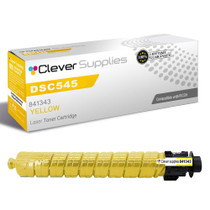
Compatible Ricoh DSC545 (841343) Toner Cartridge Yellow