






 See Compatible Printers
 Read more about our ink!
Epson
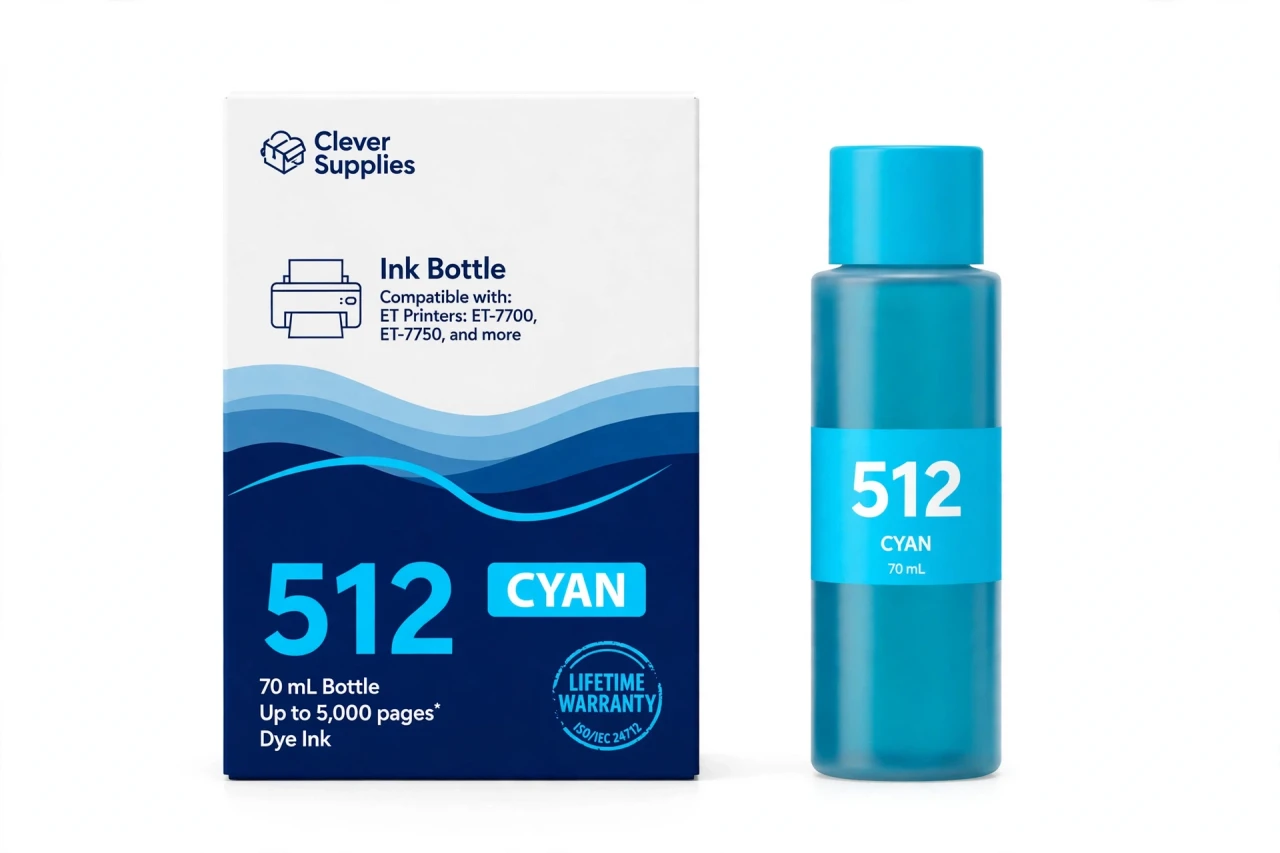
Compatible Epson 512 T512220 Cyan Ink Bottle
- Page Yield:
- Up to 5,000 pages (ISO/IEC 24712, Epson methodology)
- Shipping:
- Calculated at Checkout

Amazon Price:

- Page Yield:
- Up to 5,000 pages (ISO/IEC 24712, Epson methodology)
- Shipping:
- Calculated at Checkout
- Compatible Printers
- Specifications
- SKU:
- CS-EP-512-C
- Condition:
- New Compatible
- OEM Part #:
- T512220-S
- Color:
- Cyan
- Ink Type:
- Dye
- Volume:
- 70 mL
- Page Yield:
- Up to 5,000 pages (ISO/IEC 24712, Epson methodology)
- Chip:
- None (chipless bottle)
- Warranty:
- Lifetime Warranty
- Returns:
- 1-Year Free Returns
- Description
- Reviews
In a five-color photo printer, cyan is quietly the hardest-working dye in the box. Skies, water, denim, teal packaging in product shots — an outsized share of real photographs leans on cyan, which is why this tank so often dips first on the ET-7700 and ET-7750. Our compatible T512220-S bottle refills it with 70 mL of dye cyan ink, rated up to 5,000 pages on the ISO/IEC 24712 pattern with Epson's methodology.
Dye is the correct formula here, and it is what Epson specifies for every color position in the 512 family: it spreads evenly through photo paper for smooth gradients, so a sky fades from horizon to zenith without steps. When cyan runs low the symptom shows up in pictures before it shows in documents — skies go pale and slightly magenta, water loses its blue. A fresh bottle restores the balance in one two-minute refill.
The 512 color bottles share one body and differ by their keyed nozzles: the cyan bottle seats only on the cyan tank, the fill auto-stops at full, and there is no chip anywhere in the system. This bottle fits exactly two printers — the Expression Premium ET-7700 and ET-7750 — and no 502 or 522 machine. Covered by our lifetime warranty, with free returns for the first year.
Shop the Epson 512 family: T512020 Black Ink Bottle · T512120 Photo Black Ink Bottle · T512320 Magenta Ink Bottle · T512420 Yellow Ink Bottle · Set of 5 Ink Bottle
Browse by series: Expression Premium ET
Frequently Asked Questions
Which tank does this bottle refill?
The cyan tank only. Each 512 bottle is keyed to its own position — T512220-S is cyan; magenta is T512320-S, yellow is T512420-S, photo black is T512120-S and document black is T512020-S.
What yield should I expect?
Up to 5,000 pages per Epson's ISO/IEC 24712 rating for the 512 color bottles. Photo-heavy printing uses ink faster than the test pattern, so treat the figure as a comparison benchmark rather than a promise per print.
My photos have a pink cast. Is cyan the problem?
Very likely, yes. A magenta-leaning cast is the classic signature of a cyan tank running low or a cyan nozzle partially blocked. Refill first if the level is down, then run a nozzle check from the printer's maintenance menu.
Is 512 cyan the same as 502 or 522 cyan?
No. Three different families, three different keys — and different ratings (502 colors: 6,000 pages; 522 colors: 7,500; 512 colors: 5,000). A 512 printer only takes 512 bottles.
Dye or pigment?
Dye — matching Epson's specification for all four 512 color positions. Only the 512 black bottle (T512020-S) is pigment in this family.
Which models does it fit?
Expression Premium ET-7700 and Expression Premium ET-7750. Those are the only two printers in the 512 family, each verified in Epson's documentation.
Can the printer reject this bottle?
There is nothing to reject — bottles carry no chip. The keyed nozzle either seats (right tank) or doesn't (wrong tank); the electronics aren't involved.
Do I have to refill all colors at once?
No. Top up cyan on its own whenever it dips. The full 5-bottle set is there for complete resets; singles exist precisely so one low tank doesn't force a full purchase.
What happens if I overfill?
The EcoFit design stops the flow automatically when the tank reaches full, so a normal refill can't overflow. Stop when the flow stops and recap the bottle for next time.
How should I keep a spare bottle?
Sealed, upright, room temperature, out of direct sun.
Is this an Epson-made bottle?
No — a Clever Supplies compatible built to the T512220-S specification, clearly labeled compatible. Not manufactured by Epson.
Warranty and returns?
Lifetime warranty on the bottle — if it ever fails to perform, we replace it — and free returns within the first year.
How much of the bottle will a typical refill actually use?
It depends on how low you let the tank go. The T512220-S is a 70 mL bottle, and the ET-7700 and ET-7750 cyan tanks rarely take a whole bottle at once unless they are nearly empty — the EcoFit nozzle stops the flow at full either way. Most owners top up in partial fills and keep the recapped remainder for the next dip, which is exactly how the system is meant to be used; there is no need to force the whole bottle in.
Why does cyan drain so much faster when I print photographs?
Because the 5,000-page rating for the T512220-S is measured on the ISO/IEC 24712 pattern, where color coverage per page is modest. A full-bleed photograph covers nearly the whole sheet, and skies, water and foliage lean heavily on cyan, so a run of photo prints can use several times the ink per page that the test pattern assumes. If a big photo project is coming, check the cyan tank window first and top up beforehand rather than mid-run.
Related Items

Epson
Compatible Epson 522 T522220 Cyan Ink Bottle
Here's the pleasant surprise of the 522 family: the colors are the marathon runners. Our compatible T522220-S bottle holds 65 mL of dye cyan ink rated up to 7,500 pages (ISO/IEC 24712, Epson...


Epson
Compatible Epson 502 T502220 Cyan Ink Bottle
Cyan is the quiet bottleneck of every EcoTank: it is the color that drains first on sky-heavy photos, charts and school projects, and a single empty tank stops color printing entirely. This...

Epson
Compatible Epson 552 T552220 Cyan Ink Bottle
Cyan is the foundation color of every photograph with weather in it — skies, sea, swimming pools, winter light. In the six-color Claria ET Premium system of the ET-8500 and

Epson
Compatible Epson 512 T512020 Black Ink Bottle
This is the bottle that makes the 512 family unusual: a pigment document black living inside a photo printer. Our compatible T512020-S bottle carries 140 mL of pigment black ink — twice the volume of...