





 See Compatible Printers
 Read more about our ink!
Epson
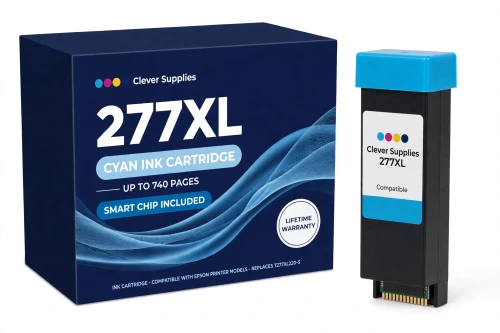
Compatible Epson 277XL T277XL220 Cyan Ink Cartridge
- Page Yield:
- Up to 740 pages (ISO/IEC 24711)
- Shipping:
- Calculated at Checkout

Amazon Price:

- Page Yield:
- Up to 740 pages (ISO/IEC 24711)
- Shipping:
- Calculated at Checkout
- Compatible Printers
- Specifications
- SKU:
- CS-EP-277-CXL
- Condition:
- New Compatible
- OEM Part #:
- T277XL220-S
- Color:
- Cyan
- Ink Type:
- Dye
- Page Yield:
- Up to 740 pages (ISO/IEC 24711)
- Chip:
- New compatible chip (ink-level reporting)
- Warranty:
- Lifetime Warranty
- Returns:
- 1-Year Free Returns
- Description
- Reviews
Cyan is one of the three core colors in the six-ink Claria Photo HD set: our compatible T277XL220-S is a dye cyan rated up to 740 pages (ISO/IEC 24711 and 24712 pattern), more than double the standard T277220's 360 pages. Code 220 is cyan in every 277 printer.



It carries a new compatible chip for ink-level reporting. This cartridge carries a new compatible chip. If your printer's firmware has been updated, recognition issues can occasionally occur — if a warning appears, reseat the cartridge firmly and restart the printer before assuming the cartridge is at fault. The rest of the set: T277XL120-S black (up to 500 pages) and T277XL320-S magenta, T277XL420-S yellow, T277XL520-S light cyan and T277XL620-S light magenta (up to 740 pages each).
It fits the five verified 277 printers — XP-850, XP-860, XP-950, XP-960 and XP-970 — and no other family. Covered by our lifetime warranty, with free returns for the first year.
Shop the Epson 277 family: T277XL120 Black Ink Cartridge · T277XL320 Magenta Ink Cartridge · T277XL420 Yellow Ink Cartridge · T277XL520 Light Cyan Ink Cartridge · T277XL620 Light Magenta Ink Cartridge · Set of 6 All Colors Ink Cartridge · Set of 13 3 Black 2 Each Color Ink Cartridge
Browse by series: Expression
Frequently Asked Questions
How many pages does the T277XL220 print?
Up to 740 pages on Epson's published rating for the genuine XL cyan (ISO/IEC 24711 and 24712 pattern). Epson expresses the color rating as a composite figure; it is listed per color cartridge here, as Epson's own listings do.
Which printers take it?
The five verified Expression Photo models: XP-850, XP-860, XP-950, XP-960 and XP-970.
Dye or pigment?
Dye — all six Claria Photo HD inks in this family are dye-based, per Epson's fact sheet. There is no pigment cartridge in a 277 printer.
Does it have a chip?
Yes — a new compatible chip that reports ink levels. This cartridge carries a new compatible chip. If your printer's firmware has been updated, recognition issues can occasionally occur — if a warning appears, reseat the cartridge firmly and restart the printer before assuming the cartridge is at fault.
Can I replace only the cyan?
Yes. Six individual cartridges; replace the flagged color and leave the rest. XL and standard cartridges mix freely in the same machine.
How is cyan different from light cyan here?
They are separate cartridges in separate slots: cyan (220) carries the saturated color, light cyan (520) lays down the pale tones that smooth skies and skin. One cannot substitute for the other.
Is this standard or high capacity?
High capacity — the XL (740 pages). The standard T277220 is rated 360 pages and is not part of our compatible range for this family.
Is a millilitre volume available?
No — Epson's US documentation states no volume for 277 cartridges, so the Volume field is left blank rather than filled with a reseller figure.
Is it a genuine Epson cartridge?
No — a Clever Supplies compatible built to the T277XL220-S specification, labeled compatible on the box and this page.
What if prints look wrong after installing?
Run a nozzle check first — a clogged nozzle mimics a faulty cartridge. If the pattern is clean and cyan is still off, contact us; the lifetime warranty covers the cartridge.
Does it fit the XP-980?
No. The XP-980 is the 279 family's only printer. This cyan fits the five 277 models listed here — including the XP-960, which belongs to 277, not 279.
Single or set?
The single when only cyan is low. When several colors are close, the Set of 6 or Bulk Set of 13 costs less per cartridge; both are linked from this page.
Why does cyan drain faster than the 740-page rating suggests on my photo prints?
The 740-page figure for the T277XL220 is an ISO test rating based on a standard pattern with modest coverage. Real photos are heavier: skies, water and blue-heavy scenes lay cyan down across most of the page, so a run of large photo prints can use this cartridge noticeably faster than the test pattern would. Document-style pages with small graphics run the other way and stretch it further. Both are normal — the rating is a comparison yardstick, not a promise for any one photo.
How do I avoid ordering cyan when the empty cartridge is actually light cyan?
Read the code on the cartridge you remove, not just the color name on screen. This full-strength cyan is T277XL220; its pale partner in the next slot is T277XL520 Light Cyan, and the two are easy to confuse at a glance because both look blue. Match the number — 220 for this cartridge — against the empty in your hand before ordering, and the replacement will land in the right slot.
Related Items

Epson
Compatible Epson 277XL T277XL520 Light Cyan Ink Cartridge
Light cyan is why a six-color printer beats a four-color one at photographs: pale blue ink laid down in skies and water, where full-strength cyan would grain. Our compatible T277XL520-S is a Claria...


Epson
Compatible Epson 277XL T277XL320 Magenta Ink Cartridge
Magenta does the emotional work in a six-color photo set — skin tones, sunsets, reds. Our compatible T277XL320-S is a Claria Photo HD dye magenta rated up to 740 pages (ISO/IEC 24711 and 24712...

Epson
Compatible Epson 277XL T277XL420 Yellow Ink Cartridge
Yellow sits inside nearly every warm tone and green a photo printer makes, so in a six-color set it works harder than it looks. Our compatible T277XL420-S is a Claria Photo HD dye yellow rated up to...

Epson
Compatible Epson 277XL T277XL120 Black Ink Cartridge
Read the code carefully, because this family breaks the pattern its neighbours set: in the 277 family, 120 is Black — the printer's only black. Our compatible T277XL120-S is a Claria Photo HD dye...