




PCD440
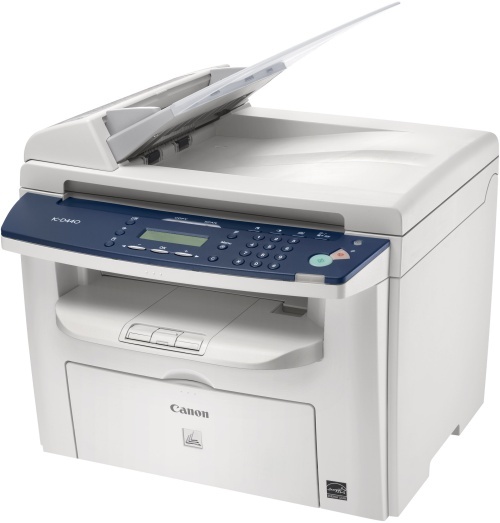
The PC-D440 replaced the PC-D320 and PC-D340 as Canon's desktop digital personal copier, and the formula moved decisively forward: 22 ppm output, printing and even color scanning alongside copying, automatic duplexing as standard — and USB 2.0 as the only connection, with no network option at all. A true desk-side machine. Its cartridge is the Canon 104, rated for 2,000 pages, with a high-yield build of the same cartridge also listed for this model.
USB-only sounds like a limitation until the machine's job is understood: it belongs to one person, within arm's reach, and it never joins a queue. That single-user pattern makes supply simple to manage — consumption is predictable, one cartridge design covers everything the machine prints or copies, and the only real question is whether the standard or the high-yield version better matches how much that one desk produces.
Toner Cartridges for PCD440
| Cartridge | Color | Page Yield |
|---|---|---|
| Canon 104 Black | Black | 2,000 pages |
| Canon 104 High Yield Black | Black | See product page |
| Canon 104 Black 2 Pack | Black | 2,000 pages per cartridge |
| Canon 104 Black 3 Pack | Black | 2,000 pages per cartridge |
| Canon 104 Black 5 Pack | Black | 2,000 pages per cartridge |
| Canon 104 Premium Quality Black 5 Pack | Black | 2,000 pages per cartridge |
| Canon 104 Black 10 Pack | Black | 2,000 pages per cartridge |
The standard and high-yield cartridges are interchangeable in the same slot; the packs below them are quantity options for the standard cartridge.
Which cartridge should you buy?
Light desk use points to the standard Canon 104: 2,000 pages is a long supply for occasional copying and printing, and a single cartridge keeps the investment small. A desk that prints daily — invoices, letters, scanned-and-reprinted documents — is better served by the high-yield cartridge, which stretches the interval between changes and lowers the cost per page. The multi-packs suit a different situation again: several Canon 104 machines in one office, where a shared shelf of spares keeps every desk running. Both cartridge builds sold here carry a 1-year warranty and 1-year returns.
Chip, toner and everyday use
As a laser device the PC-D440 recognizes its cartridge electronically, so push the replacement in until it seats fully and let the machine settle before printing. The 2,000-page rating assumes about 5% coverage; scanned documents reprinted with heavy graphics will use toner faster. Because the machine scans in color but prints in black, a faded scan printout is a toner matter, not a scanner fault. Keep the spare cartridge sealed until fitting day and store it flat in a cool spot.
Frequently Asked Questions
What toner does the PC-D440 take?
The Canon 104 black cartridge, rated at 2,000 pages in standard form. A high-yield version of the same cartridge is also available for this model.
Can the PC-D440 be shared over an office network?
No. The PC-D440 connects by USB 2.0 only — Canon offered no network option for it. It is designed as a personal, desk-side copier-printer for one workstation.
Does the PC-D440 print in color?
No. It prints and copies in black only; the color capability is on the scanning side, where it can capture color originals even though output stays monochrome.
Is duplexing automatic on this model?
Yes. Automatic two-sided printing and copying are standard on the PC-D440, which is one of the steps up it took over the PC-D320 and PC-D340 it replaced.
More printers that use the same cartridges
The Canon 104 family is one of the widest in the catalog, spanning these models:
ImageClass MF4140, ImageClass MF4150, ImageClass MF4270, ImageClass MF4320, ImageClass MF4320D, ImageClass MF4330, ImageClass MF4330D, ImageClass MF4340, ImageClass MF4340d, ImageClass MF4350, ImageClass MF4350D, ImageClass MF4350DN, ImageClass MF4370, ImageClass MF4370D, ImageClass MF4370DN, ImageClass MF4380, ImageClass MF4380D, ImageClass MF4380dn, ImageClass MF4680, ImageClass MF4690, ImageClass MF6570, PCD450, Satera MF4010, Satera MF4120, Satera MF4130, Satera MF4150, Satera MF4330, Satera MF4350, Satera MF4370, Satera MF4380, Satera MF6570, i-Sensys 4120, i-Sensys 4140, i-Sensys 4150, i-Sensys FAX-L120, i-Sensys FAX-L160, i-Sensys MF4010, i-Sensys MF4100, i-Sensys MF4110, i-Sensys MF4120, i-Sensys MF4140, i-Sensys MF4150, i-Sensys MF4270, i-Sensys MF4320, i-Sensys MF4320D, i-Sensys MF4330, i-Sensys MF4330d, i-Sensys MF4340, i-Sensys MF4340d, i-Sensys MF4350, i-Sensys MF4350D, i-Sensys MF4370, i-Sensys MF4370D, i-Sensys MF4370DN, i-Sensys MF4380, i-Sensys MF4380D, i-Sensys MF4380DN, i-Sensys MF4660PL, i-Sensys MF4690, i-Sensys MF4690PL, FaxPhone L110, FaxPhone L120, FaxPhone L90, ImageClass 4270, ImageClass 4350, ImageClass 4350D, ImageClass 4370, ImageClass 4370DN, ImageClass D420, ImageClass D480, ImageClass MF4100, ImageClass MF4120, ImageClass MF4122