




ImageClass MF4690
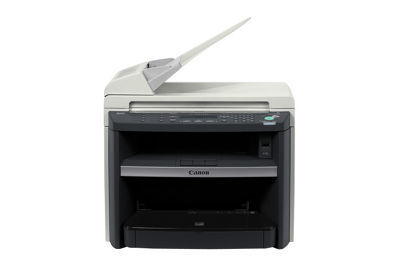
The imageCLASS MF4690 brings an i-SENSYS MF4690PL-class feature set to the US market: 21 ppm output on letter, a fax, SEND scan functions that move documents into the office workflow, built-in duplex printing and Ethernet, and PCL5e/6 printing for offices that speak that language. Underneath the connectivity, the supply story stays plain: the Canon 104 black toner cartridge, rated for 2,000 pages.
The SEND functions are the interesting part of this machine. Instead of scanning to a pile of paper, the MF4690 pushes documents onward into the business's systems, which made it a small office's document gateway as much as its printer. Gateways get used constantly and by everyone, so the cartridge behind the print side lives a busy life; a gateway that cannot print its confirmations, copies and incoming faxes is a conversation the office will have exactly once before someone orders a spare.
Toner Cartridges for ImageClass MF4690
| Cartridge | Color | Page Yield |
|---|---|---|
| Canon 104 Black | Black | 2,000 pages |
| Canon 104 Premium Quality Black 5 Pack | Black | 2,000 pages per cartridge |
| Canon 104 Black 2 Pack | Black | 2,000 pages per cartridge |
| Canon 104 Black 10 Pack | Black | 2,000 pages per cartridge |
| Canon 104 High Yield Black | Black | See product page |
| Canon 104 Black 3 Pack | Black | 2,000 pages per cartridge |
| Canon 104 Black 5 Pack | Black | 2,000 pages per cartridge |
Which cartridge should you buy?
Offices running PCL workflows tend to be deliberate buyers, and the deliberate choice here depends on volume. The standard cartridge's 2,000 pages is the unit of measure: a quiet MF4690 can live on singles, reordering as needed. A busy one should treat the high-yield cartridge as the default, since fewer swaps mean fewer interruptions to a machine the whole office routes through. The packs serve planned stocking: 2 and 3 packs for a shelf buffer, the 5 pack and premium quality 5 pack for a quarter's supply, the 10 pack when the MF4690 shares its cartridge with other printers on site. Printing language, network setup and scan workflow change nothing about the cartridge; only your page count should steer the size of the order.
Chip, toner and everyday use
Changing the cartridge follows the usual front-access routine: cover up, spent unit out, replacement rocked gently so the toner settles level, seal pulled, unit seated until it clicks, and the printer registers the new cartridge without setup. The 2,000-page figure assumes about 5 percent coverage, and gateway duty, with its mix of copies, fax pages and reports, usually spends toner faster than plain correspondence. Keep the spare beside the machine rather than in a central store, and store it sealed and flat. The compatible cartridges listed here carry a 1-year warranty with 1-year returns.
Frequently Asked Questions
Does PCL5e/6 printing change which cartridge the MF4690 needs?
No. PCL support is about how print jobs are described, not about hardware supplies. The MF4690 takes the same black 104 cartridge regardless of the language a job arrives in.
What toner does the imageCLASS MF4690 use?
The Canon 104 in black: a standard cartridge rated at 2,000 pages, plus a high-yield alternative for offices that print enough to feel every swap.
What do the SEND functions have to do with toner?
Indirectly, everything: a machine used as the office's scan-and-send gateway also prints the copies, faxes and confirmations around that traffic, all of it drawn from the one cartridge.
Is the MF4690 networked?
Yes, Ethernet is built in alongside duplex printing, so the machine serves a workgroup. Shared machines justify a spare on the shelf, which the multipacks above are for.
More printers that use the same cartridges
Across Canon's ranges, the models below all run on this same cartridge i-SENSYS machines: i-Sensys 4120, i-Sensys 4140, i-Sensys 4150, i-Sensys FAX-L120, i-Sensys FAX-L160, i-Sensys MF4010, i-Sensys MF4100, i-Sensys MF4110, i-Sensys MF4120, i-Sensys MF4140, i-Sensys MF4150, i-Sensys MF4270, i-Sensys MF4320, i-Sensys MF4320D, i-Sensys MF4330, i-Sensys MF4330d, i-Sensys MF4340, i-Sensys MF4340d, i-Sensys MF4350, i-Sensys MF4350D, i-Sensys MF4370, i-Sensys MF4370D, i-Sensys MF4370DN, i-Sensys MF4380, i-Sensys MF4380D, i-Sensys MF4380DN, i-Sensys MF4660PL, i-Sensys MF4690, i-Sensys MF4690PL; the Satera line: Satera MF4010, Satera MF4120, Satera MF4130, Satera MF4150, Satera MF4330, Satera MF4350, Satera MF4370, Satera MF4380, Satera MF6570; imageCLASS models: ImageClass 4270, ImageClass 4350, ImageClass 4350D, ImageClass 4370, ImageClass 4370DN, ImageClass D420, ImageClass D480, ImageClass MF4100, ImageClass MF4120, ImageClass MF4122, ImageClass MF4140, ImageClass MF4150, ImageClass MF4270, ImageClass MF4320, ImageClass MF4320D, ImageClass MF4330, ImageClass MF4330D, ImageClass MF4340, ImageClass MF4340d, ImageClass MF4350, ImageClass MF4350D, ImageClass MF4350DN, ImageClass MF4370, ImageClass MF4370D, ImageClass MF4370DN, ImageClass MF4380, ImageClass MF4380D, ImageClass MF4380dn, ImageClass MF4680, ImageClass MF6570; PC units: PCD440, PCD450; FAXPHONE printers: FaxPhone L110, FaxPhone L120, FaxPhone L90.