




FaxPhone L120
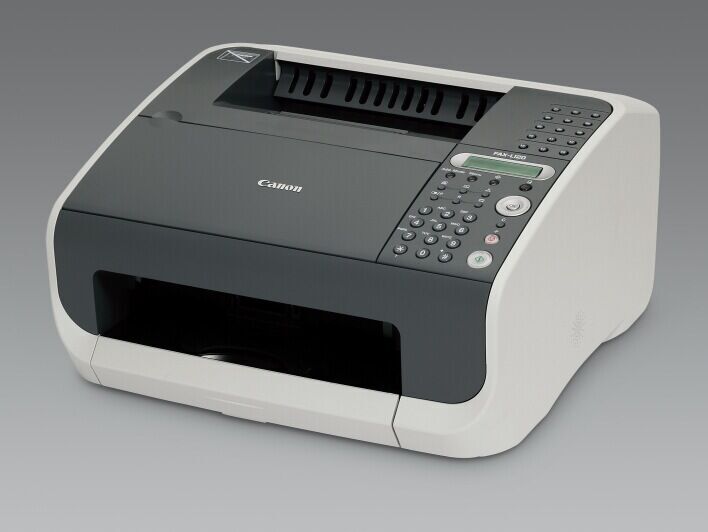
The Canon FaxPhone L120 was built for offices where faxes arrive in long runs and nobody has time to feed pages in one sheet at a time. A 30-sheet automatic document feeder and 340 pages of fax memory keep the incoming work moving, and everything the machine prints comes from a single supply: the Canon 104 black toner cartridge, rated for up to 2,000 pages.
Its 12-page-per-minute laser engine works at Super G3 33.6 Kbps speed on the phone line and takes USB print jobs from a PC, while the included handset keeps the line useful for ordinary voice calls. That combination made the L120 a natural shared fax point — the front desk of a medical office, a records department, a parts counter — anywhere multi-page documents still change hands by fax and a stack of originals needs to go out without babysitting.
Toner Cartridges for FaxPhone L120
| Cartridge | Color | Page Yield |
|---|---|---|
| Canon 104 Toner Cartridge — Single | Black | 2,000 pages |
| Canon 104 Toner Cartridges — 2 Pack | Black | 2,000 pages per cartridge |
| Canon 104 Toner Cartridges — 3 Pack | Black | 2,000 pages per cartridge |
| Canon 104 Toner Cartridges — 5 Pack | Black | 2,000 pages per cartridge |
| Canon 104 Premium Quality Toner Cartridges — 5 Pack | Black | 2,000 pages per cartridge |
| Canon 104 Toner Cartridges — 10 Pack | Black | 2,000 pages per cartridge |
| Canon 104 High Yield Toner Cartridge | Black | See product page |
Which cartridge should you buy?
For a lightly used L120, the standard Canon 104 cartridge is the straightforward pick at 2,000 pages. If the machine sits at a busy shared desk, look at the high-yield Canon 104 build instead: it runs longer between changes, which matters when the person who changes cartridges is not always the person who notices the warning light. The 2, 3 and 5 packs are for continuity — a spare already in the cupboard when the current cartridge gives out — and the 10 pack suits organizations running several Canon 104 machines and buying toner in one pass. The premium-quality 5 pack is the same cartridge family in a premium build for buyers who prefer it.
Chip, toner and everyday use
Compatible Canon 104 cartridges carry the chip the L120 expects, so toner status reporting works as it should. When output turns light partway through a long received fax, lift the cartridge out and rock it gently side to side; redistributing the toner inside often restores even coverage for the pages that remain. Store spares in their sealed packaging, flat and out of direct sunlight. Because the L120 holds received faxes in memory, a cartridge that runs dry overnight does not lose documents — they print once the new cartridge is installed. Compatible cartridges here carry a 1-year warranty with 1-year returns.
Frequently Asked Questions
What toner does the FaxPhone L120 take?
The Canon 104 cartridge, and nothing else — it is the machine's only supply, covering faxing, copying and PC printing in one black cartridge.
How many pages will I get from a Canon 104?
About 2,000 pages at the standard 5% coverage rating. Real fax traffic varies — a page of dense tables uses more toner than a short cover note — so treat the figure as a planning guide rather than a promise.
What does the high-yield Canon 104 change?
It is a longer-running build of the same cartridge: same fit, same machine, fewer changeovers. Check its product page for the exact rating, and choose it when the L120's fax line is busy enough that cartridge changes feel frequent.
Does the L120 need a separate drum unit?
No. The Canon 104 is the L120's only supply, so there is no second drum to order or schedule — when copy quality eventually fades, one cartridge change is the whole job.
More printers that use the same cartridges
The Canon 104 also serves a long list of other Canon machines — if any of these share your office, one cartridge shelf can cover them all: FaxPhone L110, FaxPhone L90, ImageClass 4270, ImageClass 4350, ImageClass 4350D, ImageClass 4370, ImageClass 4370DN, ImageClass D420, ImageClass D480, ImageClass MF4100, ImageClass MF4120, ImageClass MF4122, ImageClass MF4140, ImageClass MF4150, ImageClass MF4270, ImageClass MF4320, ImageClass MF4320D, ImageClass MF4330, ImageClass MF4330D, ImageClass MF4340, ImageClass MF4340d, ImageClass MF4350, ImageClass MF4350D, ImageClass MF4350DN, ImageClass MF4370, ImageClass MF4370D, ImageClass MF4370DN, ImageClass MF4380, ImageClass MF4380D, ImageClass MF4380dn, ImageClass MF4680, ImageClass MF4690, ImageClass MF6570, PCD440, PCD450, Satera MF4010, Satera MF4120, Satera MF4130, Satera MF4150, Satera MF4330, Satera MF4350, Satera MF4370, Satera MF4380, Satera MF6570, i-Sensys 4120, i-Sensys 4140, i-Sensys 4150, i-Sensys FAX-L120, i-Sensys FAX-L160, i-Sensys MF4010, i-Sensys MF4100, i-Sensys MF4110, i-Sensys MF4120, i-Sensys MF4140, i-Sensys MF4150, i-Sensys MF4270, i-Sensys MF4320, i-Sensys MF4320D, i-Sensys MF4330, i-Sensys MF4330d, i-Sensys MF4340, i-Sensys MF4340d, i-Sensys MF4350, i-Sensys MF4350D, i-Sensys MF4370, i-Sensys MF4370D, i-Sensys MF4370DN, i-Sensys MF4380, i-Sensys MF4380D, i-Sensys MF4380DN, i-Sensys MF4660PL, i-Sensys MF4690, i-Sensys MF4690PL