




ImageClass MF4350D
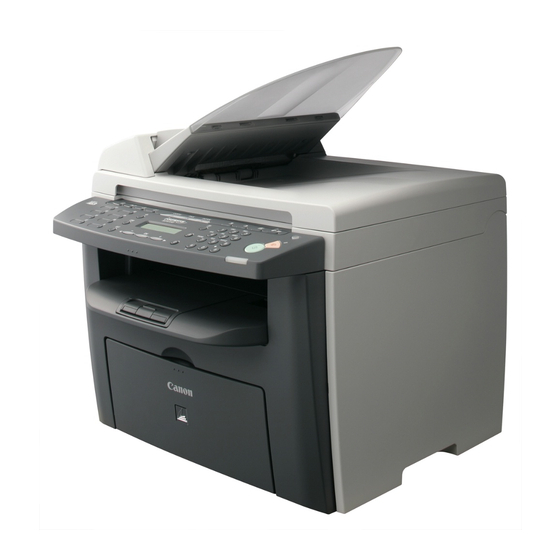
The long store name and the short one point at the same hardware: the imageCLASS MF4350D is the imageCLASS 4350D wearing its fuller badge. It pairs automatic duplex printing with a Super G3 fax on a 23 ppm letter engine, the quickest in this part of the range, and connects over USB only. Toner comes from one cartridge, the Canon 104 in black, good for up to 2,000 pages in its standard form.
Speed shapes this printer's place in an office. At 23 ppm it is the machine a busy desk leans on for same-hour contracts, statements and reports, and USB-only connection means it serves one workstation closely rather than a whole room loosely. That focus cuts both ways for supplies: one person's habits decide how fast the cartridge drains, but the pace is brisk, so a fast printer with an empty bay is a bottleneck with nobody else to blame.
Toner Cartridges for ImageClass MF4350D
| Cartridge | Color | Page Yield |
|---|---|---|
| Canon 104 Black | Black | Up to 2,000 pages |
| Canon 104 High Yield Black | Black | See product page |
| Canon 104 Black 3 Pack | Black | 2,000 pages per cartridge |
| Canon 104 Black 2 Pack | Black | 2,000 pages per cartridge |
| Canon 104 Premium Quality Black 5 Pack | Black | 2,000 pages per cartridge |
| Canon 104 Black 5 Pack | Black | 2,000 pages per cartridge |
| Canon 104 Black 10 Pack | Black | 2,000 pages per cartridge |
Which cartridge should you buy?
Start with the standard single if the printer's work is occasional; 2,000 pages still goes a long way at a few dozen pages a day. The more this machine behaves like the office's production engine, the stronger the case for the high-yield cartridge, which trades a higher shelf price for a longer stretch between interruptions. Multipacks solve the timing problem instead: a 2 or 3 pack means the replacement is already in the drawer when a deadline job fades halfway through, and the 5, premium 5 and 10 packs suit anyone running this engine hard or alongside other machines on the same cartridge. Judge by your worst week, not your average one.
Chip, toner and everyday use
Fitting the cartridge is a one-minute routine: open the front, slide out the spent unit, rock the new one gently from side to side, remove the sealing tape and push it in until it seats; the printer takes it from there. The standard rating assumes roughly 5 percent of the page carries toner, so heavy two-sided reports will come in under the headline figure. If a long job starts to fade near the end, rocking the installed cartridge can redistribute what remains and finish the run. Spares store best sealed, flat and away from heat, and compatible units here carry a 1-year warranty with 1-year returns.
Frequently Asked Questions
Is MF4350D toner the same as 4350D toner?
Yes. The MF4350D and the 4350D are one machine under two listings, and both are supplied by the black 104 cartridge sold on this page.
What is the standard cartridge's page rating?
Up to 2,000 pages at about 5 percent coverage. A high-yield version of the same cartridge is also listed for owners who would rather change cartridges less often.
Does the MF4350D print two-sided?
Automatically, yes. Duplex printing is built into this model, so two-sided documents need no manual sheet turning, and the cartridge supplies both sides alike.
Why is there no network port buying guide here?
Because the machine has none to guide: it is a USB-only printer. Its cartridge, though, is shared with the networked models in the family below.
More printers that use the same cartridges
One cartridge covers all of the following Canon hardware, near relatives and regional editions alike Satera editions: Satera MF4010, Satera MF4120, Satera MF4130, Satera MF4150, Satera MF4330, Satera MF4350, Satera MF4370, Satera MF4380, Satera MF6570; the FAXPHONE line: FaxPhone L110, FaxPhone L120, FaxPhone L90; imageCLASS models: ImageClass 4270, ImageClass 4350, ImageClass 4350D, ImageClass 4370, ImageClass 4370DN, ImageClass D420, ImageClass D480, ImageClass MF4100, ImageClass MF4120, ImageClass MF4122, ImageClass MF4140, ImageClass MF4150, ImageClass MF4270, ImageClass MF4320, ImageClass MF4320D, ImageClass MF4330, ImageClass MF4330D, ImageClass MF4340, ImageClass MF4340d, ImageClass MF4350, ImageClass MF4350DN, ImageClass MF4370, ImageClass MF4370D, ImageClass MF4370DN, ImageClass MF4380, ImageClass MF4380D, ImageClass MF4380dn, ImageClass MF4680, ImageClass MF4690, ImageClass MF6570; i-SENSYS machines: i-Sensys 4120, i-Sensys 4140, i-Sensys 4150, i-Sensys FAX-L120, i-Sensys FAX-L160, i-Sensys MF4010, i-Sensys MF4100, i-Sensys MF4110, i-Sensys MF4120, i-Sensys MF4140, i-Sensys MF4150, i-Sensys MF4270, i-Sensys MF4320, i-Sensys MF4320D, i-Sensys MF4330, i-Sensys MF4330d, i-Sensys MF4340, i-Sensys MF4340d, i-Sensys MF4350, i-Sensys MF4350D, i-Sensys MF4370, i-Sensys MF4370D, i-Sensys MF4370DN, i-Sensys MF4380, i-Sensys MF4380D, i-Sensys MF4380DN, i-Sensys MF4660PL, i-Sensys MF4690, i-Sensys MF4690PL; PC copiers: PCD440, PCD450.