




FaxPhone L90
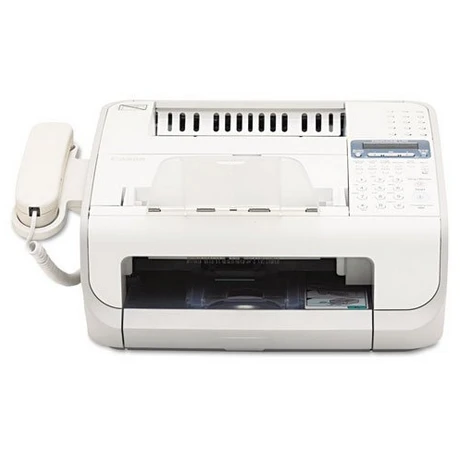
Speed is the FaxPhone L90's claim within its family: at 15 pages per minute in printing and 13 copies per minute, it is the fastest of its siblings. Super G3 faxing pairs with 346 pages of memory, a 30-sheet automatic document feeder and a handset for voice calls. All of that work runs on one cartridge, the Canon 104, rated at about 2,000 pages in standard form, with a high-yield version listed below for busier lines. The cartridges here are Clever Supplies compatibles built to the original specification.
A faster engine spends toner on a faster schedule, and the L90's owners feel that difference at reorder time: pages that arrive at 15 per minute accumulate quietly, and a cartridge that would last a slower machine a season can cycle noticeably sooner here. The 346-page memory means a mid-job cartridge change never loses incoming work, and the machine's single-cartridge design keeps the planning simple — one toner type, bought as singles, multipacks or the high-yield unit depending on how hard the line works.
Toner Cartridges for the FaxPhone L90
| Cartridge | Color | Page Yield |
|---|---|---|
| Canon 104 Toner Cartridge | Black | About 2,000 pages |
| Canon 104 High Yield Toner Cartridge | Black | See product page |
| Canon 104 Toner Cartridges, 2 Pack | Black | See product page |
| Canon 104 Toner Cartridges, 3 Pack | Black | See product page |
| Canon 104 Toner Cartridges, 5 Pack | Black | See product page |
| Canon 104 Premium Quality Toner Cartridges, 5 Pack | Black | See product page |
| Canon 104 Toner Cartridges, 10 Pack | Black | See product page |
Which cartridge should you buy?
Start with the standard cartridge at about 2,000 pages if your fax traffic is light — it is the lowest outlay and a fair match for a quiet line. Busier desks have two ways to stretch the interval between changes: the high-yield Canon 104, which puts more toner in a single unit (see its product page for the rating), or the multipacks, which hold several standard cartridges in reserve and lower the cost per page as the box size grows, up to the ten-pack and the premium quality five-pack. On a machine this quick, a spare in the building matters more than the exact format: toner warnings arrive sooner here than on its slower siblings. Every compatible cartridge carries a 1-year warranty and 1-year returns.
Chip, toner and everyday use
Changing the cartridge follows the family's routine: open the front cover, lift out the spent unit, rock the new one gently so the toner distributes evenly, and slide it in until it clicks. Yield figures are quoted at about 5% coverage; dense fax traffic — long contracts and fine print — spends toner faster per page than short memos, so judge a cartridge against the work it actually did. A gentle rock also revives a fading cartridge near the end of its life, evening out what toner remains. Store spares sealed and flat, and lean on the 346-page memory: it banks incoming faxes while you swap, so nothing is lost in the interval.
Frequently Asked Questions
What toner does the FaxPhone L90 use?
The Canon 104 black cartridge — one unit covering faxing, copying and printing. It is sold here as a standard cartridge rated near 2,000 pages and in a high-yield version for heavier use.
Is there a high-yield cartridge for the L90?
Yes. Alongside the standard Canon 104 there is a high-yield Canon 104 listing on this page; check its product page for the exact page rating, and weigh it against multipacks of the standard cartridge if your line is busy.
How fast does the L90 print and copy?
It prints at 15 pages per minute and copies at 13 pages per minute — the quickest of its FAXPHONE siblings, which is also why its toner cycles faster than theirs.
Will faxes be lost during a toner change?
No. The 346-page memory holds incoming faxes while the cartridge is out, and printing picks up again once the fresh cartridge is seated.
More printers that use the same cartridges
The Canon 104 is shared well beyond the fax line, across imageCLASS, i-SENSYS and Satera models as well:
ImageClass MF4370D, ImageClass MF4370DN, ImageClass MF4380, ImageClass MF4380D, ImageClass MF4380dn, ImageClass MF4680, ImageClass MF4690, ImageClass MF6570, PCD440, PCD450, Satera MF4010, Satera MF4120, Satera MF4130, Satera MF4150, Satera MF4330, Satera MF4350, Satera MF4370, Satera MF4380, Satera MF6570, i-Sensys 4120, i-Sensys 4140, i-Sensys 4150, i-Sensys FAX-L120, i-Sensys FAX-L160, i-Sensys MF4010, i-Sensys MF4100, i-Sensys MF4110, i-Sensys MF4120, i-Sensys MF4140, i-Sensys MF4150, i-Sensys MF4270, i-Sensys MF4320, i-Sensys MF4320D, i-Sensys MF4330, i-Sensys MF4330d, i-Sensys MF4340, i-Sensys MF4340d, i-Sensys MF4350, i-Sensys MF4350D, i-Sensys MF4370, i-Sensys MF4370D, i-Sensys MF4370DN, i-Sensys MF4380, i-Sensys MF4380D, i-Sensys MF4380DN, i-Sensys MF4660PL, i-Sensys MF4690, i-Sensys MF4690PL, FaxPhone L110, FaxPhone L120, ImageClass 4270, ImageClass 4350, ImageClass 4350D, ImageClass 4370, ImageClass 4370DN, ImageClass D420, ImageClass D480, ImageClass MF4100, ImageClass MF4120, ImageClass MF4122, ImageClass MF4140, ImageClass MF4150, ImageClass MF4270, ImageClass MF4320, ImageClass MF4320D, ImageClass MF4330, ImageClass MF4330D, ImageClass MF4340, ImageClass MF4340d, ImageClass MF4350, ImageClass MF4350D, ImageClass MF4350DN, ImageClass MF4370