




i-Sensys FAX-L120
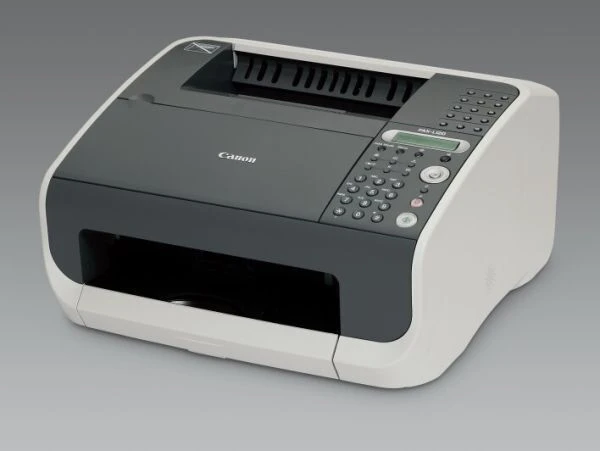
Europe knows this machine as the Canon i-SENSYS FAX-L120 — the same 12 ppm laser fax Canon also sold stateside under the FAXPHONE name. A Super G3 modem, 340 pages of fax memory and USB PC printing cover the essentials of a small-office fax station, and like its US twin it prints everything from one cartridge: the Canon 104 black, good for up to 2,000 pages. A high-yield 104 fits the same slot for stations that would rather open the machine less often.
A dedicated fax station lives by a different rule than a printer: its busiest hours may be the ones nobody is watching. The 340-page memory holds incoming faxes when the machine cannot print, but memory is a buffer, not a destination — those pages still need toner and paper to become real. The practical upshot is a standing spare: this is the one desk in the office where an empty cartridge is a genuine problem rather than an errand.
Toner Cartridges for i-Sensys FAX-L120
| Cartridge | Color | Page Yield |
|---|---|---|
| Canon 104 Black | Black | 2,000 pages |
| Canon 104 High Yield Black | Black | See product page |
| Canon 104 Black 5 Pack | Black | 2,000 pages per cartridge |
| Canon 104 Black 2 Pack | Black | 2,000 pages per cartridge |
| Canon 104 Black 10 Pack | Black | 2,000 pages per cartridge |
| Canon 104 Black 3 Pack | Black | 2,000 pages per cartridge |
| Canon 104 Premium 5 Pack | Black | 2,000 pages per cartridge |
Which cartridge should you buy?
For a fax station, buy for the buffer, not the average. The standard Canon 104 at 2,000 pages covers a light-traffic line for months; busier lines should fit the high-yield Canon 104 — its rating is on its product page — and still keep a standard cartridge in the drawer as the emergency spare. The 2 Pack is the simplest way to hold that pattern permanently: one in the machine, one in the drawer, reorder when the drawer empties. Offices whose cabinet also feeds other Canon 104 machines can step up to the 5 Pack or Premium 5 Pack. All of these compatibles include a 1-year warranty and 1-year returns.
Chip, toner and everyday use
Fax pages are light on toner — a page of typed text sits near the 5 percent coverage the 2,000-page rating assumes — so an L120 cartridge tends to live up to its number. When output first fades, slide the cartridge out and rock it gently; redistributed toner usually restores density for the remaining stretch. Fit the replacement with the machine on so its chip registers, and if the memory light is holding pages, let the stored faxes print before you judge the new cartridge by the first sheet. Keep the spare sealed in its box beside the machine; a fax station is no place for a supply run at midnight.
Frequently Asked Questions
What toner does the i-SENSYS FAX-L120 take?
The Canon 104 black cartridge, up to 2,000 pages — the same cartridge as its US twin, the FaxPhone L120. A high-yield 104 is the longer-life option.
What does the 340-page fax memory actually do?
It stores incoming pages when the machine cannot print them right away — paper out, or a cartridge being changed — and prints them once the machine is ready. It delays the need for toner; it does not remove it.
Can the L120 print from a computer too?
Yes, it offers USB PC printing alongside its fax work, and those pages come from the same Canon 104 cartridge as received faxes and copies.
How do we swap the cartridge on the L120?
Open the front cover, lift the old cartridge out, rock the replacement gently to level its toner, remove the seal, and set it in until it rests fully. Stored faxes will then print from memory.
More printers that use the same cartridges
The L120's cartridge is shared across a long list of Canon machines, including its American twin and the whole MF4100 generation:
i-Sensys MF4120, i-Sensys MF4140, i-Sensys MF4150, i-Sensys MF4270, i-Sensys MF4320, i-Sensys MF4320D, i-Sensys MF4330, i-Sensys MF4330d, i-Sensys MF4340, i-Sensys MF4340d, i-Sensys MF4350, i-Sensys MF4350D, i-Sensys MF4370, i-Sensys MF4370D, i-Sensys MF4370DN, i-Sensys MF4380, i-Sensys MF4380D, i-Sensys MF4380DN, i-Sensys MF4660PL, i-Sensys MF4690, i-Sensys MF4690PL, FaxPhone L110, FaxPhone L120, FaxPhone L90, ImageClass 4270, ImageClass 4350, ImageClass 4350D, ImageClass 4370, ImageClass 4370DN, ImageClass D420, ImageClass D480, ImageClass MF4100, ImageClass MF4120, ImageClass MF4122, ImageClass MF4140, ImageClass MF4150, ImageClass MF4270, ImageClass MF4320, ImageClass MF4320D, ImageClass MF4330, ImageClass MF4330D, ImageClass MF4340, ImageClass MF4340d, ImageClass MF4350, ImageClass MF4350D, ImageClass MF4350DN, ImageClass MF4370, ImageClass MF4370D, ImageClass MF4370DN, ImageClass MF4380, ImageClass MF4380D, ImageClass MF4380dn, ImageClass MF4680, ImageClass MF4690, ImageClass MF6570, PCD440, PCD450, Satera MF4010, Satera MF4120, Satera MF4130, Satera MF4150, Satera MF4330, Satera MF4350, Satera MF4370, Satera MF4380, Satera MF6570, i-Sensys 4120, i-Sensys 4140, i-Sensys 4150, i-Sensys FAX-L160, i-Sensys MF4010, i-Sensys MF4100, i-Sensys MF4110