




WorkCentre Pro 133
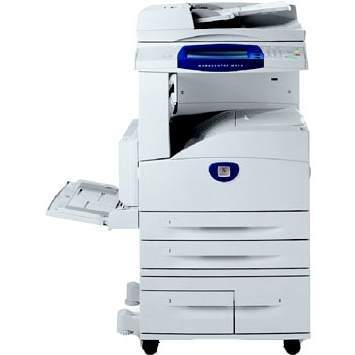
Printing, copying and scanning meet in one box in the Xerox WorkCentre Pro 133, a monochrome laser multifunction that handles the full document workflow of an office. Every one of those functions depends on a single supply: the 006R01184 cartridge, which prints on the order of 30,000 pages before it needs replacing. There is no separate copy supply and no color set — one cartridge number runs the machine.
A workflow hub earns its keep in the middle of the office routine, where a scanned contract becomes a printed copy becomes a filed document within the hour. That kind of constant, mixed use is kind to a one-cartridge design: whoever notices the low-toner warning, whatever they were doing with the machine, is looking at the same single replacement. Stocking stays simple enough that it never needs its own spreadsheet.
Toner Cartridges for WorkCentre Pro 133
| Cartridge | Color | Page Yield |
|---|---|---|
| 006R01184 | Black | 30,000 pages |
| 006R01184 — 3 Pack | Black | 30,000 pages per cartridge |
| 006R01184 — 5 Pack | Black | 30,000 pages per cartridge |
| 006R01184 — Premium 5 Pack | Black | 30,000 pages per cartridge |
Which cartridge should you buy?
The choice here is about quantity and grade, not compatibility. One cartridge is the trial purchase and the lightest commitment. The 3 Pack fits offices that replace on a predictable rhythm and want to pay less per cartridge for the habit. The 5 Pack pushes reordering far into the future, while the Premium Quality 5 Pack offers the same five cartridges built to the premium compatible standard. Whichever size you pick, the cartridge inside is the same 006R01184 with the same rated yield.
Chip, toner and everyday use
Seat the new cartridge firmly until it clicks; the machine reads its chip and resets the toner gauge on its own. Before fitting, a gentle side-to-side rock levels the toner for even first pages. Treat the page rating as an estimate made at 5% coverage — the standard yardstick — rather than a promise, because scanned images and bold headings consume toner faster than plain letters. Store spare cartridges sealed and flat, and keep one in reserve so a change never has to wait on a delivery.
Frequently Asked Questions
Does the WorkCentre Pro 133 need a separate drum?
No separate drum appears among the supplies listed for this model. The replaceable supply is the 006R01184 cartridge itself, which keeps the ordering list for this machine down to a single line.
What toner does the WorkCentre Pro 133 use?
The Xerox 006R01184 black cartridge, rated on the order of 30,000 pages. It serves printing, copying and scanning output alike.
Why is there only one cartridge to choose from?
The platform was designed around a single long-life cartridge instead of standard and high-yield tiers. The decision that remains is pack size — single, 3 Pack, or one of the two 5 Pack lines.
Will a cartridge bought for a Pro 123 work in this machine?
Yes. The WorkCentre Pro 123 and the Pro 133 belong to the same cartridge family and take the identical 006R01184 supply, so spares can be shared between them.
More printers that use the same cartridges
One cartridge covers the whole platform family — these models all take the same black cartridge: CopyCentre 123, CopyCentre 128, CopyCentre 133, CopyCentre 133C, CopyCentre C123, CopyCentre C128, CopyCentre C133, WorkCentre 123, WorkCentre 128, WorkCentre 133, WorkCentre 133M, WorkCentre M123, WorkCentre M128, WorkCentre M133, WorkCentre Pro 123, WorkCentre Pro 123, WorkCentre Pro 128, WorkCentre Pro 133P, WorkCentre Pro M123, WorkCentre Pro M128, WorkCentre Pro M133.