




Versalink C600
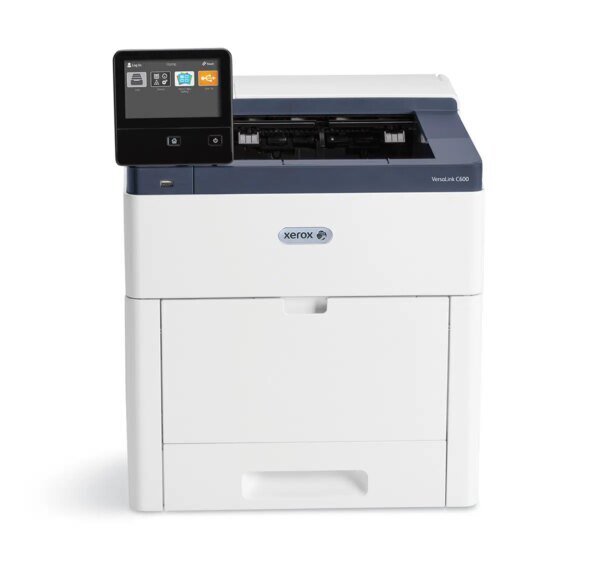
Up to 55 pages per minute in both color and black — that is the headline for the VersaLink C600, Xerox's high-performance color laser printer for demanding workgroups. It runs on one cartridge family: black 106R03899, cyan 106R03896, magenta 106R03897 and yellow 106R03898, each rated about 6,000 pages. Every listing on this page belongs to that family — four single cartridges, a black 2 pack and a complete four-color set — so anything you order here fits this printer.
A printer this fast sets the tempo for the whole workgroup, and its supplies have to keep up. At full speed, a busy month moves a surprising amount of toner through the machine, and the C600 rewards owners who stay one cartridge ahead of the warning light. The 6,000-page rating of each cartridge is measured at five percent coverage, so text documents track the estimate closely while color-heavy work spends it faster — worth knowing before you judge how long a set should last your team.
Toner Cartridges for Versalink C600
| Cartridge | Color | Page Yield |
|---|---|---|
| 106R03899 | Black | About 6,000 pages |
| 106R03896 | Cyan | About 6,000 pages |
| 106R03897 | Magenta | About 6,000 pages |
| 106R03898 | Yellow | About 6,000 pages |
| 106R03899 | Black — 2 Pack | About 6,000 pages each |
| 106R03899, 106R03896, 106R03897, 106R03898 | All four colors — 4 Color Set | About 6,000 pages each |
Which cartridge should you buy?
With a single cartridge family, the choice here is about pack shape, not tiers. Single cartridges are the right buy for replacing one faded color, since cyan, magenta and yellow almost never empty on the same day. The black 2 pack suits the text-heavy reality of most workgroups: black is spent on every page, so it leads the cycle, and a second cartridge on the shelf removes the wait for a delivery. Choose the four-color set when the printer is new to you, or when several slots report low together and one order should reset the whole machine. Whichever shape you pick, keep one black ahead — at this printer's speed, a spare is the difference between a two-minute swap and a stalled workgroup.
Chip, toner and everyday use
Before installing a cartridge, rock it gently from side to side a few times: toner settles in storage, and leveling it first keeps the opening pages even. The printer reads each cartridge's chip to confirm the slot and track the level, so push the cartridge in until it clicks and give it a moment to register before printing. Store spares sealed, flat and away from heat, and use the oldest cartridge first. If a nearly empty cartridge prints faintly near the end of its life, the same gentle rock usually coaxes out a few dozen more clean pages.
Frequently Asked Questions
What toner does the VersaLink C600 use?
One family of four cartridges: black 106R03899, cyan 106R03896, magenta 106R03897 and yellow 106R03898. Every product on this page is a member of that family.
How many pages does each cartridge print?
Each of the four is rated at about 6,000 pages, measured at five percent page coverage. Documents with heavy color coverage will finish a color cartridge sooner than that figure suggests.
Is there a two-pack option for the black cartridge?
Yes — the black cartridge is also sold as a 2 pack on this page, which suits workgroups that spend black fastest and want a spare ready.
Which other printer uses these same cartridges?
The Versalink C605 runs on this same cartridge family, so spares can be shared between the two machines.
More printers that use the same cartridges
One sibling model shares this cartridge family: the Versalink C605.