






 See Compatible Printers
 Read more about our ink!
Xerox
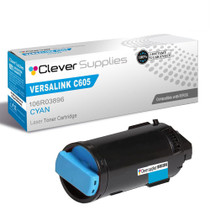
Compatible Xerox C600 (106R03896) Toner Cartridge Cyan
- Page Yield:
- Color: 6000
- Availability:
- In Stock
- Shipping:
- Free Shipping

Amazon Price:

- Page Yield:
- Color: 6000
- Availability:
- In Stock
- Shipping:
- Free Shipping
- Compatible Printers
- Specifications
- SKU:
- CS-Xerox-C600-C
- Printer Brand:
- Xerox
- OEM Number:
- 106R03896
- Ink Color:
- Cyan
- Page Yield:
- Color: 6000
- Printer Type:
- Laser Cartridge
- Condition:
- New Compatible
- Description
- Reviews

/> 

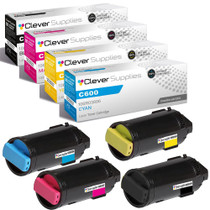
Produce sharp, high-definition prints with the Xerox C600 toner cartridge series, which includes 106R03899 Black, 106R03896 Cyan, 106R03897 Magenta, and 106R03898 Yellow. These compatible Xerox cartridges deliver rich black text and vibrant, true-to-life colors for all your printing projects. Crafted for consistent and reliable output, the Xerox C600 toner cartridge ensures every page meets the highest standards of quality. Whether you're printing everyday office reports or full-color presentations, these cartridges provide clarity and precision on every page. Compatible with VERSALINK C600 and VERSALINK C605 printers, these toner cartridges are designed for seamless integration and easy installation. Their advanced design helps minimize maintenance and supports uninterrupted productivity in demanding work environments. Count on the Xerox C600 toner cartridge to keep your documents looking professional and your workflows efficient. Ideal for high-volume printing, these cartridges offer the performance, durability, and exceptional color accuracy your business needs.
Frequently Asked Questions
Skies in our printed photos come out lavender-gray instead of blue. Why?
Because a sky is nearly pure cyan work. A photograph's blue sky, open water and swimming pools are built mostly from the cyan cartridge with only light support from the others, so when cyan runs low those are the first regions to collapse — blue loses its depth, shifts toward lavender, and finally flattens into a greyish wash. Faces and reds in the same photo can look perfectly fine while the sky gives the shortage away. On the VersaLink C600, that washed-out sky is the 106R03896 asking to be replaced.
We hardly print anything blue. How did cyan run out first?
Cyan is the quiet background color in far more than blue. It hides inside every green leaf and teal accent, inside the composite grays your printer mixes instead of using black, and inside the shading of ordinary charts and screenshots. A workload that feels black-and-white on paper can still sip cyan page after page, and photo work drinks it outright. So the cartridge nobody thinks about is often the one that empties first — the empty is real even when the blue habit is not.
Can I confirm cyan is the empty one before ordering?
Yes, in about a minute, from the machine itself. Print the supplies or demo page from the control panel and look at the solid color bars: each bar shows one cartridge printing alone. Cyan that is still working prints a rich, even band; cyan that is finished comes out pale, broken or streaked no matter how good the other three bars look. That single page separates a toner problem from a settings problem, and it names the exact cartridge — no test prints wasted, no parts ordered on a hunch.
The old cartridge reads 106R03896. Do I reorder by that code alone?
By that code alone, yes. It identifies the color, the yield class and the printer family at once, and it is carried in this listing's title precisely so the match is unambiguous. The same 106R03896 serves the Versalink C600 and the Versalink C605, so the model on your desk does not change the answer. Read the stamp off the cartridge in your hand, order the listing that carries it, and the swap itself is a tool-free, two-minute job.
What will 6,000 rated pages mean for our photo-heavy printing?
Less than the headline, honestly — and that is normal. The rating is set at about 5% coverage per page, while a printed photo can cover most of the sheet, much of it cyan sky and water. At $57.89, this cartridge lands near 0.96 cents per rated page; under photo workloads your real page count will land well below 6,000 because each page simply spends more toner. Judge the cartridge by whether the color comes back true, and use the rating the way it is meant to be used — as a consistent yardstick between cartridges, not a promise about photographs.
What if the cartridge arrives damaged or the color stays off?
Then it comes back to us, free. The cartridge is covered by a one-year warranty with free returns for the entire year — damage in transit, a faulty unit, or color that never comes right all qualify. Orders are dispatched from our warehouses in IL, PA, GA and CA; the complete terms are on our shipping and returns page if you want them in full. If you would rather describe the symptoms first, support is staffed Monday through Friday, 9 AM to 5 PM CST.
A big photo batch is coming and cyan is getting low, though pages still look fine. Swap now or wait?
Swap before the batch, not during it. Photographs spend cyan harder than any other work the C600 does, and a cartridge that fades halfway through a run splits the batch in two — the first prints carry one sky, the later ones a paler, lavender version of it. Fitting the fresh 106R03896 while the old one still prints acceptably costs you a little leftover toner and buys you one consistent color across the whole set of prints. For photo work, consistency is the product.
How do I prove the new cartridge has brought our skies back?
Reprint the photograph that failed — the same file, the same settings — and lay the new print beside the washed-out one. The comparison is unforgiving and instant: a restored cyan supply puts the depth back in the sky, the water and the blue shadows in a single pass. Judging by a fresh, unfamiliar image is weaker evidence, because memory edits color kindly. The side-by-side test uses the exact page that accused the old 106R03896, which is why it settles the question.
Where should a spare cyan cartridge live in a photo-focused workspace?
Flat, sealed, and close to the printer — a drawer in the print area beats a distant stockroom when a batch is waiting. Keep the 106R03896 in its packaging, out of direct sunlight and away from heat; the same light discipline you apply to finished prints suits the cartridge that makes them. One spare is the right depth for most photo desks: cyan is the cartridge photographs lean on hardest, and an empty cyan position stops a photo workflow more completely than any other.
What do we do with the spent cartridge after a photo-heavy run kills it?
Hold it until the replacement has produced a batch you are happy with — the new cartridge's box makes a clean container, and if the color is still not right, the spent 106R03896 is the first piece of evidence. After that, it goes to recycling like any toner cartridge; photo volumes generate empties steadily, so many studios keep a small collection box by the printer and hand several units over at once rather than making a trip per cartridge.
About This 106R03896 Cyan Toner Cartridge
This listing is one Clever Supplies compatible cyan cartridge replacing the Xerox 106R03896, rated at 6,000 pages and priced at $57.89 — about 0.96 cents per rated page. Cyan rarely gets the credit, yet it carries the skies, the water, half of every green and a share of every gray your printer produces; when it fades, photographs tell on it first. Keeping the fix simple is the point of this page: the code on the cartridge you pulled out is the code in the title above, and matching the two is the entire procedure.
Related Items


Xerox
Compatible Xerox C600 (106R03896) Toner Cartridge Cyan

Xerox
Compatible Xerox C605 (106R03896) Toner Cartridge Cyan


Xerox
Compatible Xerox C600 (106R03899, 106R03896, 106R03897, 106R03898) Toner Cartridge 4 Color Set

Xerox
Compatible Xerox C600 (106R03899, 106R03896, 106R03897, 106R03898) Toner Cartridge 4 Color Set
/>