Frequently Asked Questions
The four colors on our Pro C3545 are emptying at completely different speeds — is something wrong?
Almost certainly not. Each position feeds from its own cartridge and is spent by its own share of your documents, so staggered emptying is the normal pattern of a working machine. Text-led offices empty black long before the colors; graphics-led offices can drain a color first. The set is built for exactly this — four independent cartridges, renewed together, then spent independently.
When the first color gives out months from now, are we forced into another full set?
No. Each position is a separate cartridge with its own number, so a single position can be renewed on its own when it empties, while the cartridges from this set that are still sealed or still running carry on. The set's job is to put a full stock in the building; how that stock is drawn down is up to the machine's appetite.
Which number belongs to which slot on the Pro C3545?
Black is 006R01175, cyan is 006R01176, magenta is 006R01177 and yellow is 006R01178. When a single position is renewed later, that mapping is the whole ordering task: read the empty slot's number and replace like with like.
How much life does each position carry from this set?
The black cartridge is rated at roughly 26,000 pages and each of the cyan, magenta and yellow cartridges at roughly 16,000 pages, at standard test coverage. Because the four are spent at different rates, those ratings translate into four different calendar dates — black's date normally arrives first.
How should the still-sealed cartridges be kept while they wait their turn?
Flat, in their boxes, in a cool dry cupboard away from radiators and sunlight. Toner is a dry powder and a sealed cartridge does not age in any way that matters, so the last cartridge fitted from this set will print like the first one did.
What stands behind the purchase?
A 1-year warranty and 1-year free returns, with the terms on our shipping and returns page. Orders ship from warehouses in IL, PA, GA and CA, support is available Monday to Friday, 9 AM to 5 PM CST, and the full Xerox range is on the brand page.
How can we learn what each position really delivers in our office?
Keep a simple log: when a cartridge goes in, note the date and the machine's meter reading on its box. When it comes out, note the meter again. The difference is your real yield for that position — the figure your own coverage produces, as against the rated roughly 26,000 pages for black (006R01175) and roughly 16,000 for each color (006R01176, 006R01177, 006R01178). Two cycles of that log and forecasting stops being guesswork.
What should we look at on the first pages after a swap?
Evenness. A fresh cartridge should lay its color down uniformly from the first sheet — no pale band down one side, no speckle in solid areas. Print a page with a solid block of the new color and one ordinary document; both should look clean. If the first pages are patchy, reseat the cartridge once before concluding anything; a unit not fully home can mimic a fault.
Two departments share this machine and their yields never match the ratings — why?
Because their documents differ. A department printing contracts and letters spends mostly black and sips at the colors; one printing presentations and marketing pages drinks the colors and treats black as a background. The ratings assume one standard page; your machine prints everybody's pages. Neither department's figures are wrong — they are simply the ratings translated through two very different kinds of work.
Should empties be thrown out the moment they are replaced?
Not quite the moment. Keep each empty in its replacement's box until the new cartridge has printed cleanly for a few days. That short holding period preserves a swap-back trail if a question arises about the new unit — its number, its behavior, its output. After that, the empties can go together to a recycling collection point, boxes and all.
About This Xerox WorkCentre Pro C3545 4 Color Set
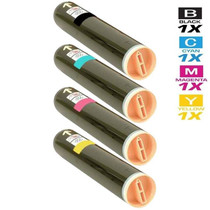
At $321.67, this set puts the WorkCentre Pro C3545's whole toner stock in one delivery: black 006R01175 rated near 26,000 pages, cyan 006R01176, magenta 006R01177 and yellow 006R01178 near 16,000 pages each. The four will be spent at four different speeds — that is the design, not a defect — and each position can be topped up by its own number when its turn comes.
The WorkCentre Pro C3545 takes the same set as its relatives: CopyCentre C3545, CopyCentre C2128, CopyCentre C2636, WorkCentre 7328, WorkCentre 7335, WorkCentre 7345, WorkCentre 7346, WorkCentre Pro C2128 and WorkCentre Pro C2636 all run on these four cartridges. When only one color is spent, the singles shelf holds the 006R01175 black cartridge, 006R01176 cyan cartridge, 006R01177 magenta cartridge and 006R01178 yellow cartridge.







 See Compatible Printers
 Read more about our ink!