




ML-1510
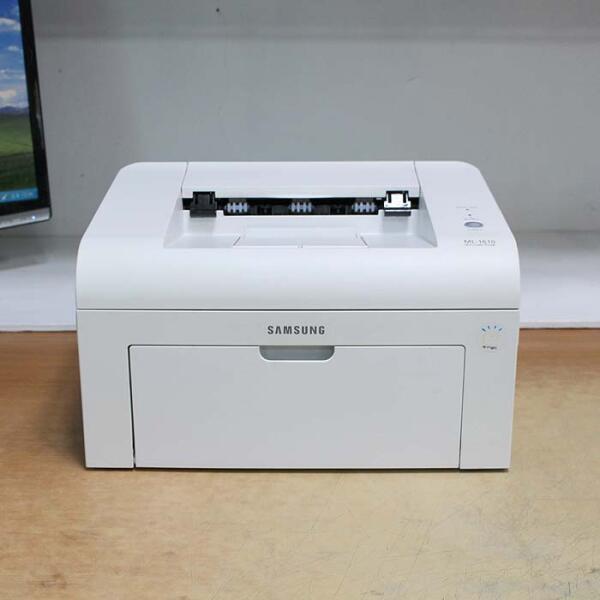
Compact, quiet and affordable, the Samsung ML-1510 became a go-to home laser of its era. This single-function mono printer was aimed squarely at families and students who wanted crisp black text without inkjet fuss, and its cartridge is the ML-1710D3 — the two-pack listing leads this page. Samsung also listed the ML-1520D3 code for the model; compatible and genuine OEM cartridges for the ML-1510 are stocked here.
The ML-1510 earned its place by being unobtrusive: small on the desk, quiet in a shared room, and ready when a school report or a boarding pass could not wait. Feeding it is equally plain. One black cartridge does everything this printer does, levels drop slowly in home use, and a single sealed spare in a drawer is all the inventory management the machine asks for.
Toner Cartridges for ML-1510
| Cartridge | Color / Type | Page Yield |
|---|---|---|
| ML-1710D3 black toner, 2 pack | Black | See product page |
| ML-1510 black toner cartridge | Black | See product page |
| ML-1510 black cartridge (ML-1710D3) | Black | See product page |
| ML-1710D3 black toner, single | Black | See product page |
| ML-1710D3 black toner, 3 pack | Black | See product page |
| ML-1510 black toner cartridges, 5 pack | Black — 5 pack | See product page |
| ML-1710D3 premium quality black toner, 5 pack | Black — premium, 5 pack | See product page |
Which cartridge should you buy?
Households printing a few dozen pages a week do fine with the single ML-1710D3 or the ML-1510 model-named listing. If the printer serves several students or a home office, step up to the 2 pack or 3 pack so a change never waits on a delivery, and consider the premium quality 5 pack if you want the top compatible grade bought in bulk. All of them are the same cartridge fit — quantity is the only real decision.
Chip, toner and everyday use
Seat the cartridge fully so its chip meets the printer's contacts; a half-seated unit is the commonest cause of a recognition complaint on an older machine. Rock the cartridge gently before installing to level the toner. For the crispest text, run the driver in normal or high quality with toner-save off — washed-out text is more often a settings issue than a cartridge issue. Keep spares sealed against moisture and light. Coverage here: a 1-year warranty and 1-year returns on compatible cartridges.
Frequently Asked Questions
How many spare cartridges should I keep for the ML-1510?
One sealed spare is plenty for most homes. Keep it in its bag until the printer actually needs it — the sealed packaging protects the toner from moisture and the drum from light — and once a cartridge is opened, install it promptly rather than shelving it, since an unsealed unit slowly absorbs humidity.
How do I figure out which part of the ML-1510 is causing print defects?
Start with the cartridge. Bands across the page typically indicate uneven toner distribution or a worn roller surface: remove the ML-1510 cartridge and rock it gently side to side to redistribute the toner. If bands persist with a brand-new cartridge installed, the drum assembly is the next suspect.
How do the normal and high quality modes on the ML-1510 compare?
Higher quality settings lay down toner for sharper, darker text — the right choice for final copies and anything leaving the house. For drafts and internal pages, a standard setting with toner-save enabled stretches the same cartridge noticeably further.
Does the ML-1510 share its cartridge with other Samsung models?
Yes — the ML-1710D3 fits a wide family of Samsung ML, SCX and SF machines from the same years, listed at the bottom of this page. A spare bought for this printer is not wasted if another of those models lives in the house.
More printers that use the same cartridges
All of these Samsung models run on the same black cartridge family as the ML-1510: ML-1410, ML-1500, ML-1510B, ML-1520, ML-1710, ML-1710B, ML-1710D, ML-1710P, ML-1740, ML-1750, ML-1755, SCX-4016, SCX-4100, SCX-4116, SCX-4216, SCX-4216F, SF-560, SF-565, SF-565P, SF-565PR, SF-750, SF-755P, Samsung-ML1710D3.