





 See Compatible Printers
 Read more about our ink!
Samsung
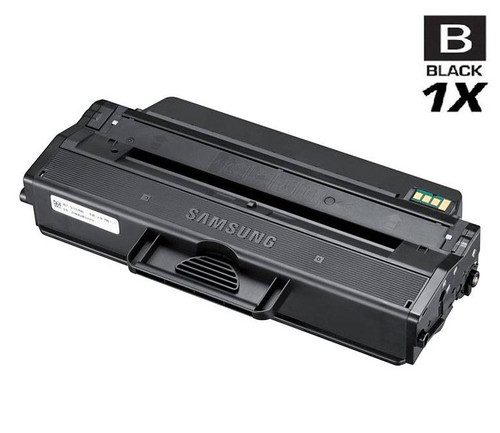
Compatible Samsung SCX-4729FW High Yield Laser Toner Cartridge Black

Amazon Price:

- Page Yield:
- 2,500 Pages
- Availability:
- In Stock
- Shipping:
- Calculated at Checkout
- Compatible Printers
- ML-2950ND
- ML-2955DW
- ML-2955ND
- SCX-4729FD
- SCX-4729FWi>
- Specifications
- SKU:
- SCX-4729FW
- Printer Brand:
- Samsung
- OEM Number:
- MLT-D103L
- Ink Color:
- High Yield Black
- Page Yield:
- 2,500 Pages
- Printer Type:
- Laser Cartridge
- Condition:
- New Compatible
- Description
- Yields up to 2500 pages
- Ink/Toner Color: Black
- Ink/Toner Pack Size: 1/Pack
- Supply Type: Toner
- Cartridge Yield Type: High Yield
- Compatible with: Samsung ML 2950 ML 2951 ML 2955 SCX 4701 SCX 4727 SCX 4729 etc. series laser printers
- Ink/Toner Cartridge Type: Compatible
- Reviews

/> 

Compatible Samsung SCX-4729FW High Yield Laser Toner Cartridge Black is easy to install delivers great print quality and professional results for both text and images
Samsung Black toner cartridge is designed specifically to work with Samsung printers for exceptional reliability and performance. Cartridge offers vibrant print quality and features a 2500-pages standard yield for long-lasting use.
Features:
Frequently Asked Questions
What signs tell me the cartridge in our SCX-4729FW is reaching its end?
Pages come out faded and washed-looking, often after the low-toner warning has been showing for a while. A gentle rock of the cartridge from side to side spreads the last of the toner and can bring density back for a few more pages. When the fade returns straight away, the fill is finished and this MLT-D103L is the one to fit.
How long does one cartridge serve an SCX-4729FW at a family pace?
The rating is 2,500 pages. A household printing a few hundred pages a month — homework, tickets, forms, the odd contract — can see the better part of a year from one cartridge. At $35.06, that works out at roughly 1.4 cents of toner for each page the family prints.
Does the copying we do at home draw on the same cartridge?
It does — copying puts toner on paper just as printing does, so the SCX-4729FW takes it from this same cartridge. Scanning a page to save it digitally, by contrast, puts nothing on paper and uses no toner at all. That is why a home that scans more than it copies can stretch one cartridge surprisingly far.
The warning light is on but prints still look fine — swap now or wait?
Wait, if the output still looks good. The warning is set with a reserve in hand — typically a few hundred pages — precisely so a replacement can be ordered in good time. Swap when the pages themselves fade. Ordering when the warning appears, though, is exactly the right habit.
A defect repeats down every page — will this cartridge cure it?
Probably not. Even fading is the toner cartridge's territory; a flaw that repeats at the same interval belongs to the MLT-R103 imaging unit, rated at about 10,000 pages. If the mark keeps the same rhythm after a cartridge change, the imaging unit is the component to look at next.
What cover comes with this cartridge?
A one-year warranty, and free returns for a full year if the unit leaks, streaks or fails early. Full terms are on the shipping and returns page. We dispatch from our warehouses in IL, PA, GA and CA, and support is available Monday to Friday, 9 AM to 5 PM CST.
Is it worth keeping a spare cartridge at home for this machine?
For most households, yes. The SCX-4729FW tends to be needed most at the worst moments — a form before a deadline, tickets before a trip — and a sealed MLT-D103L in a drawer turns a faded page from a shopping trip into a two-minute swap. Kept sealed, cool and dry, a spare loses nothing by waiting months for its turn.
Does printing on both sides of the page use the cartridge up faster?
Per sheet, yes; per document, no differently than printing the same pages single-sided. The 2,500-page rating counts printed sides, so a ten-page report printed double-sided still spends ten pages of toner — it simply uses five sheets of paper to do it. Duplex saves paper, not toner, and the cartridge's life should be judged on sides printed.
How do I make sure I reorder the right cartridge next time?
Read the code off the cartridge you take out rather than ordering by the printer's name alone. If the spent unit says MLT-D103L, that high-yield code is what to buy again — the same code covers the SCX-4729FD and the ML-2950 and ML-2955 printers listed for this cartridge, which is why the code, not any one machine name, is the reliable check.
What do I do with the old cartridge once the new one is in?
Slip it back into the new cartridge's bag and box so no residual toner escapes, and set it aside for a cartridge recycling drop-off rather than the household trash. Before you let it go, keep it a day or two: if the new MLT-D103L shows any problem, having the old unit to refit briefly is the quickest way to tell whether the fault sits in the cartridge or the machine.
About This Cartridge for the Samsung SCX-4729FW
For the Samsung SCX-4729FW, the full high-yield choice: an MLT-D103L cartridge with 2,500 rated pages at $35.06, near 1.4 cents a page. It comes from our compatible Samsung range for these home-and-office multifunctions. A one-year warranty and a year of free returns stand behind it, and it leaves from the nearest of our warehouses in IL, PA, GA and CA.
Alongside it we stock the SCX-4729FW 5 pack and the MLT-D103L high-yield black cartridge. The cartridge is shared by SCX-4729FD, ML-2950ND, ML-2955DW, and ML-2955ND.
Related Items
Samsung
Compatible Samsung SCX-4729FW High Yield Laser Toner Cartridge Black 5 Pack
/>


Samsung
Compatible Samsung SCX-5637FN High Yield Laser Toner Cartridge Black
/>

Samsung
Compatible Samsung SCX-4727FD High Yield Laser Toner Cartridge Black
/>

Samsung
Compatible Samsung SCX-D6555A High Yield Laser Toner Cartridge Black
/>