




MX510de
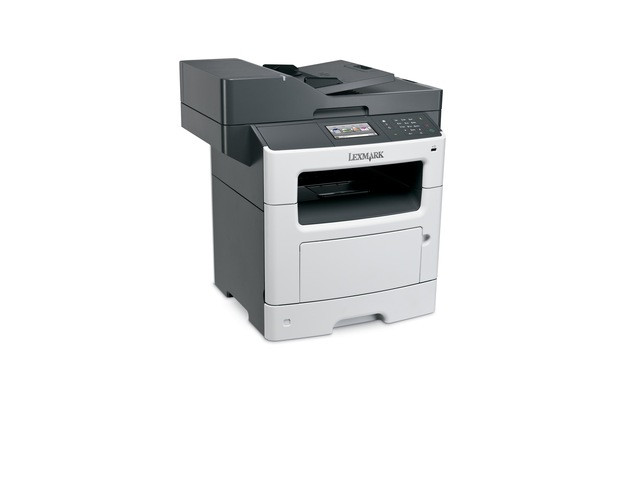
Busy departments judge a multifunction by one test: does the queue in front of it ever get shorter? The Lexmark MX510de is built to pass — networked monochrome printing, copying and scanning in a single workgroup unit, with automatic duplex to hold paper use down across large shared queues. Its toner shelf offers a genuine choice of stamina: the 601H (60F1H00) high-yield cartridge at roughly 10,000 pages, or the 601X (60F1X00) extra-high-yield cartridge at roughly 20,000 pages for departments that print even harder.
A floor-shared MFP lives a different life from a desk printer. Dozens of users send it work all day, walk-up copying adds more, and nobody considers themselves its owner. That environment rewards two things: a machine sturdy enough to absorb the load, and supplies boring enough to manage themselves. The MX510de's cartridge family is exactly that — one black cartridge design in two capacities, so the supply decision reduces to a single question about how much your department prints, answered once and then forgotten.
Toner Cartridges for MX510de
| Cartridge | Color | Page Yield |
|---|---|---|
| Compatible Lexmark 601H (60F1H00) Toner Cartridge Black 2 Pack | Black | ~10,000 pages |
| Compatible Lexmark 601H (60F1H00) Toner Cartridge Black 4 Pack | Black | ~10,000 pages |
| Compatible Lexmark 601H (60F1H00) Toner Cartridge Black | Black | ~10,000 pages |
| Compatible Lexmark 601X (60F1X00) Toner Cartridge Black 2 Pack | Black | ~20,000 pages |
| Compatible Lexmark 601X (60F1X00) Toner Cartridge Black 4 Pack | Black | ~20,000 pages |
| Compatible Lexmark 601X (60F1X00) Toner Cartridge Black | Black | ~20,000 pages |
Which cartridge should you buy?
The smaller standard-yield 601 (60F1000), rated around 2,500 pages, exists in Lexmark's range but rarely earns a place on a workgroup machine. Of the two sizes stocked here, the 601H is the department standard: 10,000 pages keeps changes infrequent, and the cost per page is comfortably low. Graduate to the 601X when the queue statistics tell you to — a floor that empties a 601H too quickly will feel the difference immediately, since the X cartridge doubles the interval to about 20,000 pages. Heavy departments often pair the bigger cartridge with a 2-pack buying habit, so a change never waits on purchasing. Pick by measured volume, not habit: one month of the machine's own page counter settles the question.
Chip, toner and everyday use
The compatible cartridges here carry chips the MX510de reads properly, so toner-level reporting and low-toner warnings behave the way the department expects — no guessing from faded output. Time your swaps with the queue: changing a cartridge between jobs takes a couple of minutes, and a worn cartridge removed mid-afternoon can be rocked gently to redistribute its remaining toner if one last job has to go out. Yields are quoted at 5% coverage under ISO/IEC 19752; departments printing dense reports should expect real-world intervals somewhat shorter than the headline numbers, on any brand of cartridge.
Frequently Asked Questions
Which toner does the Lexmark MX510de use?
This page stocks two sizes for it: the high-yield 601H (60F1H00) at about 10,000 pages and the extra-high-yield 601X (60F1X00) at about 20,000 pages. Both are black, both fit the same slot, and both are listed above.
601H or 601X — how does a department decide?
By volume. If the MX510de serves a moderate team, the 601H's 10,000 pages give long, economical intervals. If the machine is the floor's default printer and copier, the 601X halves the number of changes across the year, which busy departments feel as pure convenience.
Will the compatible cartridge report toner levels correctly?
Yes. The cartridges are chipped for this printer family, so level reporting, low-toner alerts and the machine's other functions — duplex included — work as they do with the original cartridge.
What happens if the toner runs out in the middle of a shared queue?
Printing pauses until the cartridge is changed, which is why a spare kept at the machine matters more on a workgroup unit than anywhere else. Order when the low-toner alert first appears and the pause never has to happen.
More printers that use the same cartridges
One cartridge family serves the whole MX workgroup line, including every model below:
MX310dn, MX410de, MX511de, MX511dhe, MX511dte, MX610de, MX611de, MX611dfe, MX611dhe, MX611dte