






 See Compatible Printers
 Read more about our ink!
Lexmark
Compatible Lexmark 601H (60F1H00) Toner Cartridge Black
- Page Yield:
- Black: 10000
- Availability:
- In Stock
- Shipping:
- Free Shipping

Amazon Price:

- Page Yield:
- Black: 10000
- Availability:
- In Stock
- Shipping:
- Free Shipping
- Compatible Printers
- Specifications
- SKU:
- CS-LEX-601H-BK
- Printer Brand:
- Lexmark
- OEM Number:
- 60F1H00
- Ink Color:
- Black
- Page Yield:
- Black: 10000
- Printer Type:
- Laser Cartridge
- Condition:
- New Compatible
- Description
- Reviews



Clever Supplies brand products are made with high quality components. Why pay more for cheaper product with a high defective rate? You will end up having to send it back to the manufacturer. Your time is valuable. Get a quality product that you KNOW will work. Purchase the Clever Supplies Compatible for Lexmark 601H (60F1H00 ) Black and experience the difference! All Clever Supplies brand products are backed by '100% Quality Satisfaction' 1 year warranty against defects in materials and workmanship for all toner products. Free tech support for a Clever Supplies problems for all Clever Supplies brand products. The use of Clever Supplies brand replacement laser toner cartridges and supplies does not void printer warranty. Premium Quality Replacement Toner Cartridge is made by ISO9001 Certified Factory to Meet or Exceed OEM Standards. These units are manufactured 100% brand new with all new parts including OPC drums, wiper blades, a smart chip and other internal parts, they are an economical alternative to expensive OEM 60F1H00 Compatible Toner Cartridges. This is a Compatible for Lexmark toner cartridges Black guaranteed to perform with Lexmark Laser Printers. It replaces the original Lexmark 601H toner cartridge Black. The compatible replacement for 60F1H00. We offer a 100% Quality Satisfaction Guarantee on our Compatible for 60F1H00 laser toner cartridges and supplies. For use in the following printers: MX Series MX310dn, MX410de, MX510de, MX511de, MX511dhe, MX511dte, MX610de, MX611de, MX611dfe, MX611dhe, MX611dte
Frequently Asked Questions
How long will a 10,000-page rating really last in my office?
The 10,000-page figure is measured at 5% page coverage, which is ordinary text: letters, invoices and reports. On an MX310, MX410 or MX510 printing a few hundred pages a week, expect this cartridge to run for months rather than weeks; dense graphics and full-page forms shorten that, plain text stretches it.
My machine is a multifunction — do copies use this cartridge too?
Yes. Every printed page and every photocopy comes out of this single black cartridge; scanning itself uses no toner until you print the result. That is why an MFP in a busy corner can work through a cartridge faster than the print counter alone suggests.
Which printers does the 601H fit?
This is the standard black cartridge for the whole platform: MX410de, MX510de, MX511de, MX511dhe, MX511dte, MX610de, MX611de, MX611dfe, MX611dhe and MX611dte. This listing is the platform-wide 601H listing rather than one written for a single model, and the cartridge is identical whichever of those machines you own. For the whole 601 shelf priced side by side — both tiers, the nine-model boundary and every pack size — see our Best Lexmark 601H & 601X Toner Cartridges buying guide.
Should I step up to the 601X instead?
If your MFP prints heavily every day, the 601X's 20,000-page rating brings the cost per page down from about 0.81 cents to about 0.52 cents. If your machine handles moderate, everyday volume, the 601H's lower shelf price is the sensible buy — you are not paying for capacity you would take a year to use.
The display says toner is low — do I have to swap the cartridge the same day?
Not usually. The low-toner warning appears while there is still a usable reserve left, so treat it as a prompt to order rather than an emergency; order when you see it and the replacement typically arrives before quality fades. When pages genuinely start coming out light, that is the cartridge running dry.
What protection comes with this cartridge?
Every Clever Supplies compatible cartridge is covered by a one-year warranty and one-year free returns, with the full terms on our shipping and returns page. If anything is wrong with the cartridge, our support team is available Monday through Friday, 9 AM to 5 PM CST to make it right.
How do I fit this cartridge, and what should I check on the first pages afterwards?
The swap is tool-free: open the machine, slide the old cartridge out, unpack the 601H (60F1H00), slide it in until it seats, and close up. Then print a few ordinary pages — a letter or an invoice is ideal — and look for text that is solid and even from top to bottom of the page. Clean, consistent output on those first sheets tells you the cartridge is seated properly and printing as it should.
Why do some documents print darker than others on the same cartridge?
Usually it is the paper and the settings, not the toner. Heavier or coated paper, and driver options such as toner-save or reduced density, all change how dark text looks on the page. If a run looks pale, test the same document on plain paper at standard settings before blaming the cartridge — in most offices that is where the difference turns out to live.
We occasionally print full-page forms — what does that do to the 10,000-page rating?
It shortens it, predictably. The 10,000-page rating for the 601H is measured at 5% coverage, which is ordinary text; a full-page form covers far more of the sheet, so every one of those pages uses considerably more toner. A cartridge that lasts months of letters can end noticeably sooner in a form-heavy month, so if a big forms run is coming, it is worth having the next cartridge on order before it starts.
What do I do with the old cartridge when I take it out?
Keep it to one side until the new cartridge has printed cleanly for a few days — that way, if anything looks off, you still have the old unit for comparison. Once you are satisfied, the empty goes to a toner recycling or collection point rather than into general waste. A cartridge that failed rather than emptied is a different case: hold on to it and talk to support, since it is covered for a year.
About This Lexmark 601H (60F1H00) Black Toner Cartridge
The Lexmark 601H (60F1H00) is the standard-yield black cartridge for the MX310, MX410 and MX510 multifunction family, rated at 10,000 pages and priced at $81.31 — about 0.81 cents per page. It is the straightforward choice for moderate everyday printing, and it ships from the nearest of our Illinois, Pennsylvania, Georgia and California warehouses. See the rest of the range on our Lexmark toner page.
Related Items


Lexmark
Compatible Lexmark 601H (60F1H00) Toner Cartridge Black 4 Pack

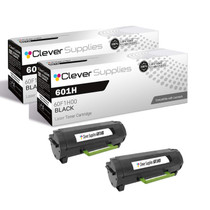
Lexmark
Compatible Lexmark 601H (60F1H00) Toner Cartridge Black 2 Pack

Lexmark
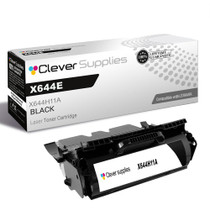
Compatible Lexmark X644E (X644H11A) Toner Cartridge Black

Lexmark
Compatible Lexmark X642E (X644H11A) Toner Cartridge Black