




MX310dn
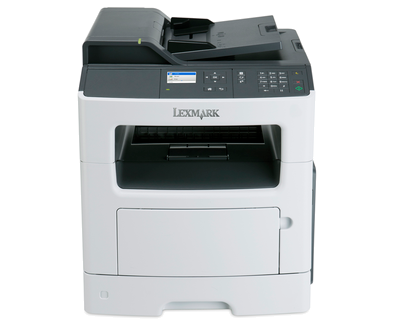
Not every office needs a fleet flagship; some need one compact machine that prints, copies and scans without taking over the desk. That is the Lexmark MX310dn — a monochrome multifunction with network connectivity and automatic two-sided printing, sized for small teams. Its supply shelf is equally simple: this page stocks the 601H (60F1H00) high-yield black cartridge, rated at about 10,000 pages, which suits a small office's pace so well that cartridge changes become a rare event rather than a recurring chore.
The appeal of this machine is consolidation at a human scale. One device on the network handles the day's letters, the occasional copy run and the scanning that feeds email and archives, while one cartridge number covers every one of those jobs that puts toner on paper. For a small office there is real value in that shortness of list: whoever orders supplies only ever has to remember a single part number, and the cartridge that arrives is never the wrong one.
Toner Cartridges for MX310dn
| Cartridge | Color | Page Yield |
|---|---|---|
| Compatible Lexmark 601H (60F1H00) Toner Cartridge Black 2 Pack | Black | ~10,000 pages |
| Compatible Lexmark 601H (60F1H00) Toner Cartridge Black 4 Pack | Black | ~10,000 pages |
| Compatible Lexmark 601H (60F1H00) Toner Cartridge Black | Black | ~10,000 pages |
Which cartridge should you buy?
Lexmark's line for this printer also includes a standard-yield 601 (60F1000) cartridge rated around 2,500 pages, but the arithmetic quietly argues against it: the high-yield 601H delivers roughly four times the pages, so its cost per page lands far lower, and a small office changes cartridges a quarter as often. That is why this page stocks the 601H as the MX310dn's cartridge. Between the single and the multipacks, let your storage and your ordering habits decide — a single suits offices that print in bursts, while a 2-pack means the replacement is already in the cupboard on the day the old cartridge fades, which is exactly the day nobody wants to wait for a delivery.
Chip, toner and everyday use
One cartridge serves every toner job this machine does: printing and copying both draw from it, while scanning uses no toner at all. The chip on the cartridge reports the remaining level to the printer, so the low-toner notice gives fair warning rather than a surprise stop. When that notice appears, a gentle rock of the cartridge from side to side settles the remaining toner and usually coaxes out a good number of additional pages — enough time to order calmly. Keep the spare sealed in its bag until the day it is needed; stored cool and dry, a compatible cartridge waits patiently without degrading.
Frequently Asked Questions
Which toner fits the Lexmark MX310dn?
Order the 601H, part number 60F1H00 — the high-yield black cartridge rated at about 10,000 pages. It is the cartridge this page stocks for the MX310dn, in a single and in multipacks.
Does copying use the same cartridge as printing?
Yes. Copies come off the same print engine, so they draw on the same 601H cartridge. Scanning, by contrast, puts nothing on paper and consumes no toner, which is why scan-heavy offices often find a cartridge lasts longer than expected.
How far does 10,000 pages go in a small office?
Yield ratings assume about 5% page coverage, typical of letters and documents. An office printing a few hundred pages a week can expect one 601H to cover months of work; heavier coverage shortens the run, but the interval stays far longer than a standard-yield cartridge would give.
Are the cartridges on this page original Lexmark products?
They are premium compatibles built for this printer, not original Lexmark stock. They install the same way, print to the same standard, and carry a 1-year warranty with 1-year returns.
More printers that use the same cartridges
The 601H cartridge is shared across the wider MX family, so the same box also fits these models:
MX410de, MX510de, MX511de, MX511dhe, MX511dte, MX610de, MX611de, MX611dfe, MX611dhe, MX611dte