




Laserjet 1320N
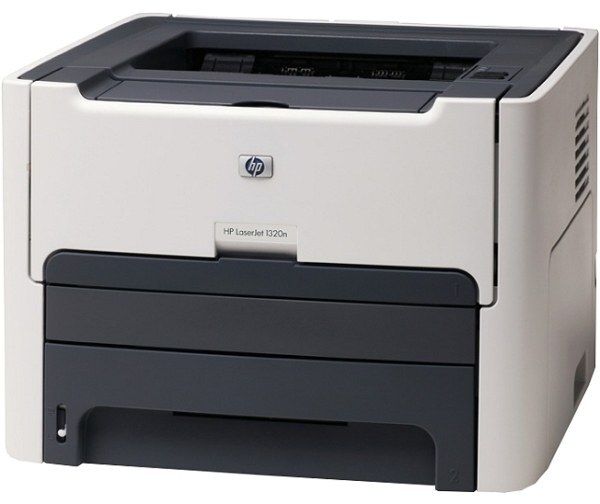
The LaserJet 1320N is the networked member of HP's 1320 line, a monochrome laser printer from 2005 that small offices adopted as their shared workhorse and, in many cases, never replaced. Everything it prints runs through one of two black cartridges: the standard HP 49A (Q5949A) or the high-yield HP 49X, which you will also see under its full part number, Q5949X. Both yields, both pack sizes and both MICR variants are stocked on this page.
Adding Ethernet to the 1320 changed who the printer belonged to. Instead of sitting beside one desk, the 1320N took a network address and served a whole corner of the office, which is why its toner buying pattern differs from a personal printer's: cartridges are consumed by a group, print volume arrives in bursts from several people at once, and running dry mid-morning means a queue of colleagues rather than one annoyed user. That shared duty is the lens for every choice on this page.
Toner Cartridges for Laserjet 1320N
| Cartridge | Color | Page Yield |
|---|---|---|
| Q5949A | Black | See product page |
| Q5949A | Black | See product page |
| Q5949A | Black | See product page |
| Q5949A | Black | See product page |
| Q5949A | Black | See product page |
| Q5949A | Black | See product page |
| Q5949A | Black | See product page |
| Q5949A | Black | See product page |
| Q5949A MICR | Black | See product page |
| Q5949X | Black | See product page |
| Q5949X | Black | See product page |
| Q5949X | Black | See product page |
| Q5949X | Black | See product page |
| Q5949X | Black | See product page |
| Q5949X MICR | Black | See product page |
| Model listing | Black | See product page |
The note after each code says how that listing is packaged; the model listing at the end is the same standard cartridge carried under the printer's own name.
Which cartridge should you buy?
On a shared printer, the honest dividing line is how many pages the group gets through between orders. The standard Q5949A suits a small team that prints modestly and orders often; its per-cartridge price is lower and a spare takes little shelf room. Busier workgroups should default to the Q5949X: the high-yield cartridge stretches the interval between swaps, which matters when the person who notices the low-toner warning is rarely the person who orders. Multipacks earn their place here too — a networked printer that several people depend on justifies a boxed spare in the supply cabinet, and the larger 5 and 10 packs suit offices that standardize on this printer across desks. Choose the MICR versions only if this machine prints checks; for ordinary documents they offer nothing extra.
Chip, toner and everyday use
These cartridges carry a chip the printer reads to confirm the cartridge and track toner level, so seat the new cartridge firmly until it clicks and let the printer finish its short calibration before judging the first pages. On a networked machine, agree on one simple habit: whoever sees the low-toner message tells whoever orders supplies the same day, because a shared printer gives no single owner that job. If output turns light before the cartridge is truly empty, remove it and rock it gently side to side to redistribute the toner, then print on. Store spares flat, in their bags, away from sunlight, and rotate stock so the oldest cartridge goes in first. Page yields are estimates at 5% coverage, so dense shared documents will finish a cartridge sooner than the rating suggests.
Frequently Asked Questions
Which toner cartridge does the LaserJet 1320N take?
Two: the standard Q5949A and the high-yield Q5949X. They are the same cartridge design in two capacities, and every listing on this page — singles, multipacks and MICR versions — is one of those two.
Is the 49X worth it for a printer the whole team uses?
Usually, yes. On shared machines the saving is measured in interruptions as much as in cost per page: the Q5949X runs longer between changes, so the printer is less likely to run dry in the middle of a group's morning. Light-use teams can stay with the standard cartridge and lose nothing.
Does the 1320N need a separate drum unit?
No. On this printer the drum is built into the toner cartridge itself, so every cartridge change also renews the drum. There is no separate drum to order, track or replace on the 1320N.
What are the MICR listings for?
MICR cartridges use magnetic toner that bank scanners can read, which is what check printing requires. This page stocks a MICR version of the standard cartridge and a MICR high-yield version; pick one only if this printer produces checks, and keep it separate from your everyday cartridges so the two never get mixed up.
More printers that use the same cartridges
The 1320N draws on the same two cartridges as the rest of its family, so the models below share this exact shelf logic: HP Q5949A, LaserJet 1160, LaserJet 3390, LaserJet 3392, Laserjet 1160, Laserjet 1160LE, Laserjet 1320, Laserjet 1320NW, Laserjet 1320T, Laserjet 1320TN.