




Color Pro MFP M283fdw
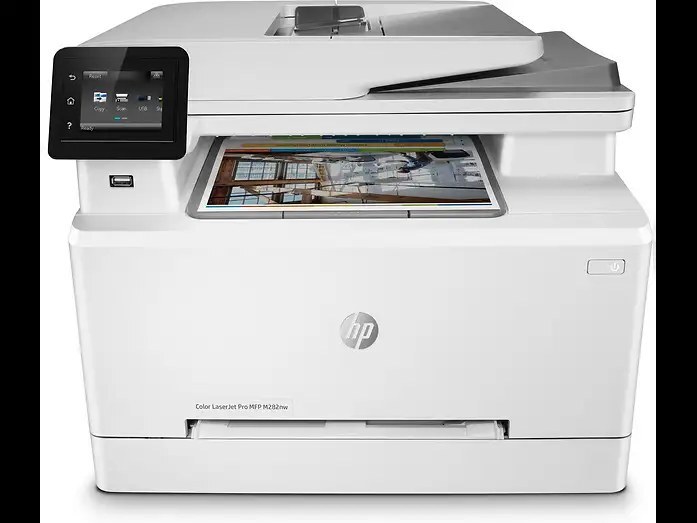
One machine that prints, scans and copies in color is the Color Pro MFP M283fdw's reason to exist; HP slotted it into the 2020 lineup as the all-in-one for hybrid offices. Its toner is the HP 206A (W2110A) line — that black cartridge in standard yield, joined by W2111A cyan, W2113A magenta and W2112A yellow — and the family's high-yield shelf, led by 206X (W2110X) black with W2111X cyan, W2113X magenta and W2112X yellow alongside. The listings below are compatible cartridges throughout, stocked under this model's name and under its siblings' names as well, because the hardware inside is identical.
An all-in-one concentrates a small office's paperwork in one place, which also means its toner works harder than a print-only machine's: the same cartridges feed the printouts, the copies and the scan-to-file jobs people reprint when a signature lands in the wrong place. In practice the black empties first and the colors trail behind at different speeds, so owners tend to keep a black spare permanently and let each color announce itself. The M283fdw reports levels per cartridge, which makes that relaxed approach safe. Compatible cartridges on this page are covered by a 1-year warranty and 1-year returns.
Toner Cartridges for Color Pro MFP M283fdw
| Cartridge | Color | Page Yield |
|---|---|---|
| W2110A, W2111A, W2113A, W2112A 4 Color Set | Black, Cyan, Magenta, Yellow | See product page |
| W2110X, W2111X, W2113X, W2112X 4 Color Set | Black, Cyan, Magenta, Yellow | See product page |
| W2110A, W2111A, W2113A, W2112A 4 Color Set | Black, Cyan, Magenta, Yellow | See product page |
| W2110A Black, 2 pack | Black | See product page |
| W2110A Black | Black | See product page |
| W2111A Cyan | Cyan | See product page |
| W2113A Magenta | Magenta | See product page |
| W2112A Yellow | Yellow | See product page |
| W2110X Black, 2 pack | Black | See product page |
| W2110X Black | Black | See product page |
| W2111X Cyan | Cyan | See product page |
| W2113X Magenta | Magenta | See product page |
| W2112X Yellow | Yellow | See product page |
| W2110A Black, 2 pack | Black | See product page |
| W2110A Black | Black | See product page |
| W2111A Cyan | Cyan | See product page |
| W2113A Magenta | Magenta | See product page |
| W2112A Yellow | Yellow | See product page |
The same cartridges under M255nw labels: W2110A Black, 2 pack, W2110A, W2111A, W2113A, W2112A 4 Color Set, W2110A Black, W2111A Cyan, W2113A Magenta, W2112A Yellow.
The same cartridges under M255dw labels: W2110A Black, 2 pack, W2110A, W2111A, W2113A, W2112A 4 Color Set, W2110A Black, W2111A Cyan, W2113A Magenta, W2112A Yellow.
The same cartridges under M282nw labels: W2110A Black, 2 pack, W2110A, W2111A, W2113A, W2112A 4 Color Set, W2110A Black, W2111A Cyan, W2113A Magenta, W2112A Yellow.
The same cartridges under M283cdw labels: W2110A Black, 2 pack, W2110A, W2111A, W2113A, W2112A 4 Color Set, W2110A Black, W2111A Cyan, W2113A Magenta, W2112A Yellow.
The same cartridges under M283fdn labels: W2110A Black, 2 pack, W2110A, W2111A, W2113A, W2112A 4 Color Set, W2110A Black, W2111A Cyan, W2113A Magenta, W2112A Yellow.
Which cartridge should you buy?
For an all-in-one, plan around the black cartridge first. If the machine prints and copies daily, the high-yield X black pays for itself in fewer interruptions, and the 2 pack format keeps the next one already in the building. Colors can stay standard yield unless the office produces color documents constantly; when it does, the X colors stretch the same way. There is no need to change colors as a group — each slot is independent — so the four-color set is a convenience for a full refresh, not a requirement. Mixed shelves are normal here: choose per slot, by how fast that color actually drains in your office, and the cost per page settles at its lowest without any single big order.
Chip, toner and everyday use
The M283fdw reads a fresh cartridge's chip when the access door closes after a swap. Give it a moment; if an old supply message refuses to clear, one restart refreshes the reading. Before installing, draw the sealing strip fully out and keep fingers off the chip and the green drum. A cartridge that prints pale before its time often just has settled toner — remove it, rock it slowly from side to side five or six times, and it will usually finish its rated life evenly. Store waiting cartridges in their sealed boxes, upright and away from radiators; a cool supply shelf is all the care they need.
Frequently Asked Questions
Which toner cartridges work with the Color Pro MFP M283fdw?
It uses W2110A black, W2111A cyan, W2112A yellow and W2113A magenta in the standard-yield 206A line, or the high-yield 206X versions coded W2110X, W2111X, W2112X and W2113X. Any slot accepts either tier, so the code family on your old cartridge is what has to match.
How should I store a spare W2110A for the M283fdw?
Keep it in its original sealed packaging, standing upright in a cool, dry spot out of direct sunlight. Do not open the seal until the day you install it; a cartridge stored that way waits patiently for a long time without losing print quality.
Does copying or scanning use toner differently on the M283fdw?
Scanning itself uses no toner at all. Copying prints, so it draws on the same four cartridges as ordinary printing, at the same rate per page. Heavy copying habits simply mean the black cartridge reaches empty sooner, which the per-cartridge level display will show you.
Where do I get drivers for the M283fdw?
From HP's support website: search the full model name and choose the package for your operating system. A current driver clears most setup and connectivity complaints; the toner side needs nothing installed, since the cartridges are read by the printer itself.
More printers that use the same cartridges
The M283fdw is one of six machines on the shared 206 shelf; the others take the identical cartridges.
Color Pro MFP M2255nw, Color Pro MFP M282nw, Color Pro MFP M283cdw, Color Pro MFP M283fdn, Color Pro M255dw.