







 See Compatible Printers
 Read more about our ink!
Hewlett Packard
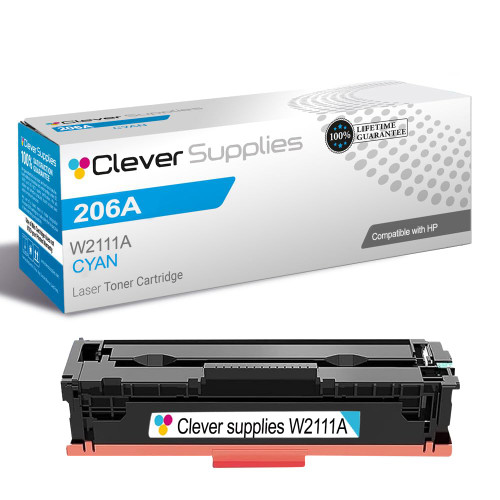
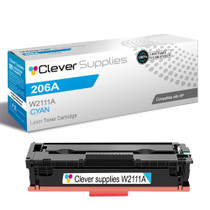
Compatible HP M283fdn (W2111A) Toner Cartridge Cyan
- Page Yield:
- Color: 1250
- Availability:
- In Stock
- Shipping:
- Free Shipping

Amazon Price:

- Page Yield:
- Color: 1250
- Availability:
- In Stock
- Shipping:
- Free Shipping
- Compatible Printers
- Specifications
- SKU:
- CS-HP-M283fdn-C
- Printer Brand:
- Hewlett Packard
- OEM Number:
- W2111A
- Ink Color:
- Cyan
- Page Yield:
- Color: 1250
- Printer Type:
- Laser Cartridge
- Condition:
- New Compatible
- Description
- Reviews



Elevate your printing experience with the HP 206A, featuring the W2110A Black, W2111A Cyan, W2113A Magenta, and W2112A Yellow toner cartridges. These cartridges deliver sharp text, vibrant colors, and reliable performance, making them ideal for both home offices and professional workspaces. Crafted for reliability, the HP 206A toner cartridge and HP 206A toner cartridge are engineered to provide consistent, high-quality output from start to finish. Whether you're printing detailed graphics or important documents, these cartridges ensure every page looks polished and professional. Compatible with multiple HP printers, including the Color Pro MFP M283cdw, M282nw, M2255nw, and M283fdn, these cartridges are easy to install and designed to work seamlessly with your device. Expect smooth operation and outstanding results with every print job. Optimized for everyday performance, the W2110A Black, W2111A Cyan, W2113A Magenta, and W2112A Yellow cartridges are perfect for users who demand quality without compromise. Enjoy efficient, worry-free printing that keeps up with your workflow.
Cross-reference: HP W2111A, the 206A cyan toner cartridge (1,250 pages), is the same cartridge Canon sells as Canon Cartridge 054 (black 1,500 pages, colors 1,200 pages each) and Cartridge 054H high capacity (black 3,100 pages, colors 2,300 pages each) for the Canon Color imageCLASS MF641Cdw, MF642Cdw and MF644Cdw and the Color imageCLASS LBP622Cdw and LBP623Cdw printers (ISO/IEC standard yields).
Frequently Asked Questions
Which cartridge gives the M283fdn its blues?
Cyan — the W2111A, rated 1,250 pages. In the Color Pro MFP M283fdn it carries charts in printed reports, the blue in logos and letterheads, and the sky-and-water tones in color copies. When it thins out, those blues go gray-green long before black shows any sign of trouble, which is why cyan is so often the surprise on the supplies screen.
Color copies look washed out but prints look fine. Same cartridge?
Copies and prints draw on the same cyan, but copies of photographs and artwork are far heavier work, so a fading channel shows there first, weeks before ordinary prints suffer. Print the diagnostics page: if the cyan block is pale there too, the cartridge — not the scanner — is what needs replacing.
What does this cyan cost and include?
As a compatible Clever Supplies cartridge it is $69.51, with a 1-year warranty and 1-year free returns included. Stock ships from Illinois, Pennsylvania, Georgia and California, and support is available Monday through Friday, 9 AM to 5 PM CST.
Can cyan be replaced without touching the fax side of the machine?
Completely. Faxing is a black-only job and never notices a color swap. Open the front, exchange the W2111A, and the HP MFP carries on receiving while you print a test page to admire the blues.
How long should 1,250 pages of cyan last?
That rating assumes standard coverage. A practice printing color charts and headed paper daily will move through it steadily; one printing mostly faxes and letters may take a year. The supplies percentage trend is the only honest forecast.
What if a fresh cyan still leaves colors dull?
Run the diagnostics page again and look at magenta and yellow — dullness can be a partnership of two fading channels. If the new cartridge itself misbehaves, the shipping and returns page explains the free returns route.
Per page, what does this cyan cost?
The W2111A lists at $69.51 and is rated at 1,250 pages, so cyan runs to roughly five and a half cents a page at standard coverage. Color copies of photographs and artwork spend it faster than the rating assumes, which is worth remembering when the channel seems to fall quickly — on a machine that copies color all day, the honest cost per finished copy is simply higher.
Why does cyan age on a different clock from black in this machine?
Because the two channels answer to different masters. Black is spent around the clock by the fax line, whenever senders choose; cyan is spent only during office hours, when someone prints or copies something in color. So the M283fdn's black rhythm tells you nothing about its cyan life — plan the color spare by watching the color workload itself, not by the fax-driven swap cycle.
How do I turn the cyan percentage into a useful forecast?
Apply the supplies percentage to the 1,250-page rating: half a gauge is roughly 625 pages, a quarter about 310. Then weigh it against what is coming — a week of chart-heavy reports or color handouts will spend those pages far faster than a week of letters. That small calculation, done when cyan crosses halfway, is what keeps a color deadline from meeting an empty channel.
How long should I keep the old cyan after fitting the new one?
Until the replacement has proved itself on the work that exposed the problem — one familiar chart printed clean, one color copy matching its original. The old W2111A and its palest output are your before-and-after evidence during that window, and they stand behind any question raised under the 1-year warranty and 1-year free returns. After that, mark it spent and clear it out.
About This M283fdn Cyan Cartridge
W2111A cyan at $69.51 keeps the M283fdn's color work honest: 1,250 rated pages of charts, logos and copies. Fit it on its own in a couple of minutes, print one familiar chart to confirm, and the machine's color output is back to matching what the screen promised.
Completing the row are the black W2110A, the yellow W2112A and the magenta W2113A. There is also the high-yield W2111X for heavier-duty use, or the 206A four-color set when every channel falls due together.
More machines use it than the name on the box suggests — Color Pro MFP M283fdw, Color Pro MFP M283cdw, Color Pro MFP M282nw, Color Pro MFP M2255nw, Color Pro MFP M283fdn and Color Pro M255dw are all built around the same slot.
Related Items

Hewlett Packard
Compatible HP M283cdw (W2111A) Toner Cartridge Cyan

Hewlett Packard
Compatible HP M255dw (W2111A) Toner Cartridge Cyan
Hewlett Packard
Compatible HP M282nw (W2111A) Toner Cartridge Cyan

Hewlett Packard
Compatible HP M255nw (W2111A) Toner Cartridge Cyan