




Color LaserJet MFP M775
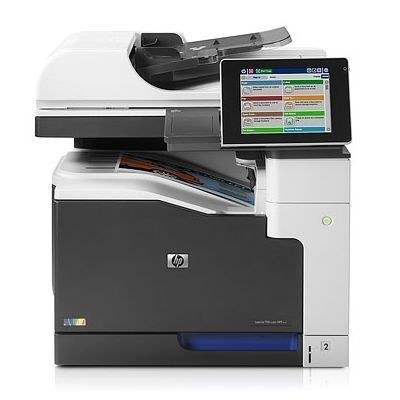
The HP Color LaserJet MFP M775 brought wide-format multifunction color to offices without the full Enterprise management stack — A3 print, copy and scan for productive departments. HP 651A cartridges power it: CE340A black with CE341A cyan, CE342A yellow and CE343A magenta, four separate cartridges that each run down on their own clock.
An A3 multifunction machine sits at the center of a department's paper life: drawings and spreadsheets at full size, copies off the glass, scans into shared folders. That centrality means its toner is consumed by many hands, and nobody in the department feels personally responsible for the level gauge — until the day a big run fades. The practical answer is a standing spare set and a habit of checking levels when a large job is queued, because a machine this size is never printing for just one person.
Toner Cartridges for Color LaserJet MFP M775
| Cartridge | Color | Page Yield |
|---|---|---|
| CE340A | Black | See product page |
| CE341A | Cyan | See product page |
| CE342A | Yellow | See product page |
| CE343A | Magenta | See product page |
| HP 651A 4-color set | Black, cyan, yellow, magenta | See product page |
| MFP M775 4-color set | Black, cyan, yellow, magenta | See product page |
| CE343A magenta — alternate single | Magenta | See product page |
One more black listing sits on this shelf under the CE390X code — a high-yield black carried under the Enterprise 700 name. The cartridges this machine is documented for are the 651A set above, so treat that listing as an extra stocked option and order against the code on the cartridge you remove. Also stocked, under the M775 variant names:
- 651A 3-color set listing — named with CE261A, CE262A and CE263A codes (as labeled)
- LaserJet E 700 MFP M775 (CE390X) black
- LaserJet E 700 MFP M775 (CE340A) listing — labeled Cyan in the catalog (as labeled)
- Color LaserJet M775z+ (CE340A) black
- Color LaserJet M775 (CE340A) black 2-pack
- Color LaserJet M775z+ (CE343A) magenta
- Color LaserJet M775z+ (CE342A) yellow
- MFP M775Z+ (CE341A) cyan
- CLR L E 700 (CE340A) black 2-pack
- Color LaserJet MFP M775 (CE340A) black
- Color LaserJet M775 (CE340A) black 2-pack — second listing
- Color LaserJet M775 (CE340A) black 2-pack — third listing
- Color LaserJet M775 (CE340A) black
- 651A 4-color set — alternate listing
- 651A 4-color set — duplicate listing
- 651A 8-color set
- Color LaserJet MFP M775Z 4-color set
Which cartridge should you buy?
Department machines reward a stocking system over single emergency orders. The pattern that works: one full 4-color set in the cabinet as the reserve, singles ordered as individual colors report low, and black treated as its own faster cycle — the 2-black listings exist because black rarely waits for the colors. When a cartridge is swapped, note which color it was; two swaps of the same color in a quarter is the machine telling you that color deserves its own standing spare. All four codes stay within the 651A family — anything else, whatever the listing name suggests, is not for this MFP. These compatible cartridges are covered by a 1-year warranty and 1-year returns.
Chip, toner and everyday use
Each 651A cartridge carries a chip the M775 reads for type and level, so the control panel's supply gauges stay trustworthy across a shared department. Install with the seal fully removed and the cartridge seated until it stops, then let calibration finish before the big job goes through. For paper jams, the discipline that protects the machine is simple: turn it off, open the covers, and pull the sheet gently in the direction it feeds — never sideways — and check behind the cartridges, where a sheet can lodge. Yield ratings assume standard coverage; an A3 page of dense color uses far more toner than the letter page the estimate is based on, so big-format color work will always look thirstier.
Frequently Asked Questions
What toner cartridges does the Color LaserJet MFP M775 use?
Four separate cartridges from the HP 651A family: CE340A, CE341A, CE342A and CE343A. Match these exact codes when buying replacements — the machine checks each cartridge's chip against the family it expects.
Can the MFP M775 scan and copy documents?
Yes — it is a multifunction unit, so it prints, copies and scans in one machine. Use the scanner glass for single pages and the automatic document feeder for stacks, straight from the control panel. Copying uses toner like printing does; scanning to a file uses none.
How do I clear a paper jam in the MFP M775?
Turn the machine off, open the covers, and gently pull the jammed sheet in the direction it feeds — never yank it sideways, which tears paper and leaves scraps behind. Also check the cartridge area, since a sheet can lodge behind one of the toner cartridges.
My department keeps running out of black first. What should we stock?
That is the normal pattern for document-heavy departments. Keep one of the CE340A 2-black listings as the standing spare and let the colors ride on the full set — black is swapped on its own cycle and rarely in step with the rest.
More printers that use the same cartridges
The 651A family covers the whole M775 bench, under both its naming styles:
Color LaserJet Enterprise 700, Color LaserJet Enterprise 700 MFP M775, Color LaserJet Enterprise 700 MFP M775D, Color LaserJet Enterprise 700 MFP M775F, Color LaserJet Enterprise 700 MFP M775Z, Color LaserJet MFP M775D, Color LaserJet MFP M775F, Color LaserJet MFP M775Z, HP 651A, LJ Enterprise 700 Color MFP M775, LJ Enterprise 700 Color MFP M775D, LJ Enterprise 700 Color MFP M775DN, LJ Enterprise 700 Color MFP M775Z, LJ Enterprise 700 Color MFP M775Z+, LJ Enterprise 700 Color MFP M775f