




Color LaserJet Enterprise 700 MFP M775Z
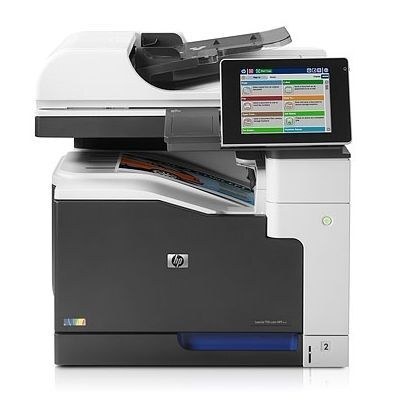
The top configuration of the flagship line: the Color LaserJet Enterprise 700 MFP M775Z packed every wide-format MFP feature HP offered into one machine, aimed at demanding departments that wanted a single device to standardize on. It runs HP 651A toner — black CE340A plus cyan CE341A, yellow CE342A and magenta CE343A — and it needs all four cartridges installed before it will work, even for black-only jobs.
Standardizing on one fully loaded model simplifies everything downstream of the purchase, toner included: one cartridge family for the whole fleet, one shelf layout, one ordering habit. The Z configuration's buyers were typically consolidating — retiring a mix of aging A3 devices and desktop color printers in favor of a managed unit per department — and the supplies routine consolidates with it. What remains is volume: a machine specified for maximum capability tends to be given maximum work.
Toner Cartridges for Color LaserJet Enterprise 700 MFP M775Z
| Cartridge | Color | Page Yield |
|---|---|---|
| CE340A | Black | See product page |
| CE341A | Cyan | See product page |
| CE342A | Yellow | See product page |
| CE343A | Magenta | See product page |
| CE340A (M775z+ listing) | Black | See product page |
| CE341A (M775Z+ listing) | Cyan | See product page |
| CE342A (M775z+ listing) | Yellow | See product page |
| CE343A (M775z+ listing) | Magenta | See product page |
| CE343A (651A listing) | Magenta | See product page |
Boxed sets on this shelf:
- 651A four-color set, CS listing
- Enterprise 700 MFP M775z four-color set
- 651A four-color set, alternate listing
- COLOR LASERJET MFP M775Z four-color set
- 651A eight-color set
And one listing to treat with suspicion: a three-color set wearing a 651A name but built on the CE261A, CE262A and CE263A codes of an earlier family. Those are not this machine's colors, whatever the box calls itself.
Which cartridge should you buy?
A flagship that everything routes through justifies a deeper shelf than a satellite printer: two blacks in reserve is a reasonable posture, because black empties first and an idle Z-configuration idles a whole department's document work with it. Colors can be stocked one deep and replaced as singles, since their burn rate is slower and less predictable. Full sets fit the rhythm of a quarterly supplies order, and the eight-color set suits a storeroom feeding several of these machines. Whatever the pattern, buy by the four codes in the table — listings named for sibling variants use the same cartridges, but the code, not the model word in a listing title, is the deciding fact.
Chip, toner and everyday use
When this MFP flags a cartridge as low, the oldest trick in the building still works: remove the cartridge, rock it gently side to side to redistribute the remaining toner, and reinstall — the shake commonly buys a useful run of extra prints. Treat it as a bridge, not a cure; if quality stays faded, the cartridge is done and should be replaced promptly. Note the machine cannot be coaxed into printing with a slot empty, so a department that shakes a cartridge on Friday should have its replacement ordered the same day. Install with the power on so the replacement's chip is read immediately.
Frequently Asked Questions
What toner does the M775Z take?
All four of the HP 651A cartridges: CE340A, CE341A, CE342A and CE343A. Any set marketed against those exact codes fits; cartridges coded for other families do not.
Can the M775Z scan and copy, or is it print-only?
It is a full multifunction machine — print, copy and scan in one unit, from the flatbed glass or the automatic document feeder, all driven from the control panel. That breadth is the definition of the Z configuration.
Can I shake a toner cartridge to extend its life in the M775Z?
Yes, briefly. Rocking a low cartridge redistributes the toner that remains and can restore even output for a while. Once fading returns despite the shake, replace the cartridge — the trick spends the last of the powder more evenly, it does not create more.
What happens if I load a cartridge with the wrong code?
At best the machine refuses to recognize it; at worst a forced fit damages the slot. The four codes for this MFP are printed in the table above — if a listing's codes do not match them, it belongs to a different printer, regardless of how the listing is titled.
More printers that use the same cartridges
The core of the family:
Color LaserJet Enterprise 700, Color LaserJet Enterprise 700 MFP M775, Color LaserJet Enterprise 700 MFP M775D, Color LaserJet Enterprise 700 MFP M775F, Color LaserJet MFP M775, Color LaserJet MFP M775D, Color LaserJet MFP M775F, Color LaserJet MFP M775Z
The remaining configurations and code pages:
HP 651A, LJ Enterprise 700 Color MFP M775, LJ Enterprise 700 Color MFP M775D, LJ Enterprise 700 Color MFP M775DN, LJ Enterprise 700 Color MFP M775Z, LJ Enterprise 700 Color MFP M775Z+, LJ Enterprise 700 Color MFP M775f