




Color LaserJet Enterprise 700 MFP M775
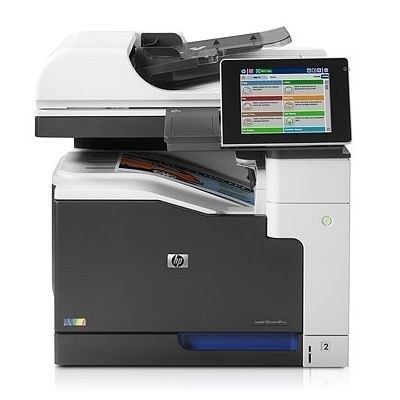
A3 printing, copying and scanning in one managed machine — the Color LaserJet Enterprise 700 MFP M775 is the wide-format flagship for large departments, and everything happens on one capable box. It runs the HP 651A family: CE340A black with CE341A cyan, CE342A yellow and CE343A magenta. All four cartridges must be installed for the machine to work, each is replaced on its own schedule, and every product on this page is a compatible replacement for one of those codes or a set built from them. A high-yield CE390X black from the broader 700 range is also stocked on this shelf under its own listing; it is a different code from CE340A, so the label on your installed cartridge is the one to trust.
Departments buy for a machine like this on a plan, not on a whim. The M775 sits at the center of a floor's document work, its supply status is checked like any other shared resource, and a toner outage is a team problem rather than a personal one. Standardizing on the single 651A family keeps that planning simple: one black, three colors, and consumption patterns that repeat month after month.
Toner Cartridges for Color LaserJet Enterprise 700 MFP M775
| Cartridge | Color / Type | Page Yield |
|---|---|---|
| CE340A | Black cartridge | See product page |
| CE340A (MFP M775 listing) | Black — alternate listing | See product page |
| CE340A (M775 listing) | Black — alternate listing | See product page |
| CE341A | Cyan cartridge | See product page |
| CE342A | Yellow cartridge | See product page |
| CE343A | Magenta cartridge | See product page |
| CE343A (651A listing) | Magenta — alternate listing | See product page |
| 700 MFP M775 4 Color Set | Full set — black, cyan, yellow, magenta | See product page |
Further listings stocked for this machine: 651A Toner Cartridge 4 Color Set (CE340A/ CE341A/ CE343A/ CE342A), 651A (CE261A CE262A CE263A) Toner Cartridge 3 Color Set, LASERJET E 700 MFP M775 (CE390X) Toner Cartridge Black, LASERJET E 700 MFP M775 (CE340A) Toner Cartridge Cyan, Color Laserjet M775 (CE340A) Toner Cartridge 2 Black, Color LaserJet M775 (CE340A) Toner Cartridge 2 Black, Color LaserJet M775 (CE340A) Toner Cartridge 2 Black, 651A (CE340A CE341A CE342A CE343A) Toner Cartridge 4 Color Set, 651A (CE340A CE341A CE342A CE343A) Toner Cartridge 4 Color Set, 651A (CE341A CE342A CE343A) Toner Cartridge 8 Color Set.
Which cartridge should you buy?
Let the supplies menu decide. It reports each of the four cartridges separately, so order the code it flags and leave healthy cartridges in place. When a department refreshes the whole machine — after a big project, say, when several levels are low together — the four-color sets restock everything in one pass. Black deserves its own buffer: on a document-heavy A3 MFP it empties well ahead of the colors, and the multi-black listings on this shelf exist for exactly that rhythm. Match the full code every time; near-miss codes from other HP families will not seat.
Chip, toner and everyday use
Each cartridge carries a chip the M775 reads for its level gauge, and a compatible cartridge should be recognized as soon as it locks into its slot. Fit the unit, close the door and let the machine complete its start-up before printing a test page. If a cartridge fades near empty, removing it and rocking it gently from side to side levels the remaining toner for a few more jobs. Keep reserve sets sealed, flat and away from heat, and rotate stock so the oldest set is fitted first.
Frequently Asked Questions
What toner does the Color LaserJet Enterprise 700 MFP M775 take?
Four HP 651A cartridges: CE340A black, CE341A cyan, CE342A yellow and CE343A magenta, all installed at the same time. Any listing on this page carrying one of those exact codes is the right type for this machine.
Can the M775 scan and copy without a computer?
Yes — it is a multifunction unit, so it prints, copies and scans from the one machine. Use the scanner glass or the automatic document feeder straight from the control panel for walk-up work.
How do I check toner levels on the M775?
Open the supplies or consumables menu on the control panel to see the remaining level of each of the four cartridges, or print a supplies-status page from the device menus for a quick snapshot to take back to the supply cabinet.
Does an empty color cartridge stop black printing?
The machine needs its full set installed to run, so a spent cartridge should be replaced promptly rather than worked around. The good news is that only the flagged cartridge needs changing — the other three keep their remaining life.
More printers that use the same cartridges
These sibling models run the same 651A family:
Color LaserJet Enterprise 700, Color LaserJet Enterprise 700 MFP M775D, Color LaserJet Enterprise 700 MFP M775F, Color LaserJet Enterprise 700 MFP M775Z, Color LaserJet MFP M775, Color LaserJet MFP M775D, Color LaserJet MFP M775F, Color LaserJet MFP M775Z, HP 651A, LJ Enterprise 700 Color MFP M775, LJ Enterprise 700 Color MFP M775D, LJ Enterprise 700 Color MFP M775DN, LJ Enterprise 700 Color MFP M775f, LJ Enterprise 700 Color MFP M775Z, LJ Enterprise 700 Color MFP M775Z+.