




Color LaserJet 4500HDN
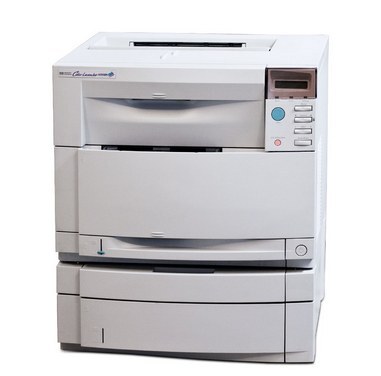
Built for the heaviest workloads in its line, the Color LaserJet 4500HDN was the high-duty configuration of the 4500 series — the version departments chose when color printing never really stopped. Its black cartridge is the C4191A (640A), the black member of its HP family, alongside C4192A cyan, C4193A magenta and C4194A yellow. This page stocks the black cartridge; the three color singles are not part of this page's shelf, and the text below says so plainly rather than dressing the shelf up as something bigger.
There is an honesty to a page with one product on it. The 4500HDN is a veteran machine now, kept running by offices that value its staying power, and what most of those offices need, most of the time, is the black cartridge — text, forms and everyday documents drain C4191A long before the colors move. If your machine's color levels are the problem, the sibling model pages in the family list below carry their own shelves; this page is the black-toner stop for the HDN configuration.
Toner Cartridges for Color LaserJet 4500HDN
| Cartridge | Color | Page Yield |
|---|---|---|
| C4191A / 640A | Black | See product page |
Which cartridge should you buy?
With a single listing, the buying question becomes a stocking question. One C4191A on the shelf is the minimum for a machine that still earns its floor space; two is the right number if the printer supports a workflow that cannot pause — a shipping desk, a front office, a records room. The cartridge is the standard black for the whole 640A family, so a spare bought for this machine also fits the other 4500 and 4550 models in the family list. When a color does finally empty, order by the exact code — C4192A, C4193A or C4194A — and be wary of any listing that will not state its code outright.
Chip, toner and everyday use
Legacy color lasers reward unhurried cartridge changes. Let the machine idle cool for a few minutes before opening it up, slide the old cartridge out level so loose toner does not spill into the bay, and keep the new one's drum shutter closed until it is fully home. A gentle rock end to end wakes up toner that has settled in storage. If the first pages after a swap look streaky, print a handful of ordinary pages before judging — transfer components on a high-duty veteran often need a short run to settle back in.
Frequently Asked Questions
Which black cartridge does the Color LaserJet 4500HDN use?
The C4191A, the black member of the HP 640A family. It is the cartridge listed above, and it is the only toner product stocked on this page.
Where are the color cartridges for this machine?
Not on this page's shelf. The 4500HDN takes C4192A cyan, C4193A magenta and C4194A yellow alongside the black; those codes are named here so you can order them accurately, but this page sells the black only — check the sibling model pages below for their shelves.
My 4500HDN prints black fine but one color has faded — is it the black cartridge?
No. Each color lives in its own cartridge, and a faded color points at that color's cartridge or its slot. The black C4191A cannot cause a color-specific problem.
How long can I store a spare C4191A?
Kept sealed, flat and in a cool dry room, a compatible cartridge stores well for an extended period. Rotate stock so the oldest spare goes in first, and rock the cartridge gently before installing one that has sat for a long stretch.
More printers that use the same cartridges
The 640A family also covers the rest of the 4500 line and the 4550 series — the complete list of sibling machines is here.
Color LaserJet 4500, Color LaserJet 4500D, Color LaserJet 4500DN, Color LaserJet 4500N, Color LaserJet 4550, Color LaserJet 4550DN, Color LaserJet 4550HDN, Color LaserJet 4550N, HP 640A.