




Color LaserJet 4500D
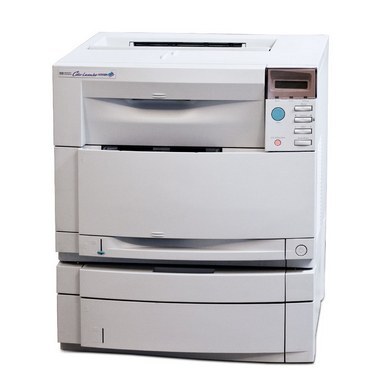
Duplex printing was a premium feature when the Color LaserJet 4500D offered it, and two-sided color output saved real paper in an era when every color page cost money. The machine runs the HP 640A cartridge family: black is the C4191A stocked here, joined in the machine by C4192A cyan, C4193A magenta and C4194A yellow.
A duplex machine changes how toner gets spent. Reports and drafts come out on both sides of the sheet, so a cartridge covers more finished documents than the same cartridge in a single-sided printer — one reason these early color lasers stayed economical long after their purchase price was forgotten. The 4500D's owners tend to be keepers: the printer still does its one job, and the cartridge it asks for has not changed in decades.
Toner Cartridges for Color LaserJet 4500D
| Cartridge | Color | Page Yield |
|---|---|---|
| C4191A | Black | See product page |
The listing stocked on this page for the Color LaserJet 4500D is the black cartridge, the C4191A from HP's 640A family. The machine's color companions from that same family — C4192A cyan, C4193A magenta and C4194A yellow — are named here so you can match them against the code printed on a cartridge you already hold.
Which cartridge should you buy?
On a machine of this age the buying rule is simple: match the code. The black slot takes the cartridge listed above and nothing else, so read the code off the cartridge you pull out before ordering. Black is also the cartridge this printer leans on hardest — duplex drafts, memos and everyday documents are mostly black work — which makes it the one to keep a spare of. The three colors deplete slowly by comparison and are replaced individually as each one finishes. Our compatible black carries a 1-year warranty and 1-year returns, the practical cover for keeping a veteran machine in service.
Chip, toner and everyday use
Toner in a 4500D lives a long time between swaps, and the machine tells you plainly when a cartridge is low rather than stopping without warning. When output fades before the warning, lift the cartridge out and rock it gently side to side — the toner inside redistributes and often prints cleanly again for a while. Keep the spare sealed in its bag in a cool drawer; opened cartridges and heat are what shorten a cartridge's useful life, not the calendar.
Frequently Asked Questions
Which cartridges fit the Color LaserJet 4500D?
The full 640A set: C4191A black with C4192A, C4193A and C4194A for color. This page stocks the black; the surest check before any order is the code printed on the cartridge currently in the machine.
Will a compatible cartridge work in a printer this old?
Yes — a compatible cartridge built to the 640A specification seats and prints the same way the original does. Age is actually an argument for compatibles here: they keep a sound machine running at a sensible cost per page.
How do I get the 4500D working with a newer computer?
Install the full driver package for the model rather than a generic driver, and the printer's duplex and color options stay available. The toner side needs no setup at all — the cartridge is recognized as soon as it clicks in.
More printers that use the same cartridges
The rest of the 4500/4550 line runs on the same 640A shelf:
Color LaserJet 4500, Color LaserJet 4500DN, Color LaserJet 4500HDN, Color LaserJet 4500N, Color LaserJet 4550, Color LaserJet 4550DN, Color LaserJet 4550HDN, Color LaserJet 4550N, HP 640A