




Color LaserJet 4500
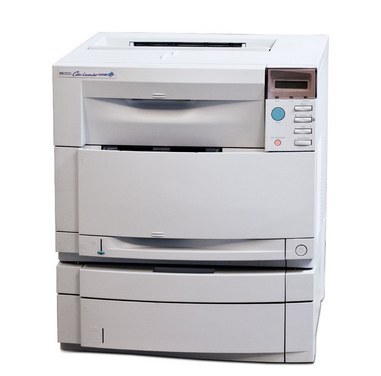
The Color LaserJet 4500 dates to the turn of the millennium, when color lasers were graduating from exotic to essential, and it brought departmental color printing to offices ready to leave the copy shop behind. It works with a four-cartridge color family. The cartridge stocked on this page is the black: the C4191A (640A). The family's other members — cyan C4192A, magenta C4193A and yellow C4194A — are documented for this printer in its original materials but are not stocked here, so this page is a black-only listing.
Surviving 4500s tend to live quiet, specific lives: a forms desk, a back office, a department that prints the same documents it printed a decade ago and sees no reason to change the machine that handles them. That kind of duty is almost entirely black text, which is exactly the cartridge this page covers. If your 4500 is one of those, a spare black on the shelf is the whole supplies strategy.
Toner Cartridges for Color LaserJet 4500
| C4191A | Black | See product page |
No color cartridges are listed for this model on this page. If your machine asks for a cyan, magenta or yellow cartridge, note the code on the cartridge itself — C4192A, C4193A or C4194A respectively — as those are not sold here.
Which cartridge should you buy?
There is one decision here and it is simple: the C4191A black cartridge is the stocked supply for this printer, and for the text-heavy work most surviving 4500s do, it is the cartridge that matters. Buy one for the machine and, if the printer supports a desk that cannot wait, a second as the shelf spare — an unopened cartridge keeps well and an empty one stops the queue cold. Before ordering, confirm the code on the cartridge you are removing reads C4191A; the 640A family numbers are close neighbors, and the code is the one detail that decides whether a cartridge seats.
Chip, toner and everyday use
On a printer of this age, gentle handling pays: slide the cartridge in straight, do not force it, and let the machine take its time recognizing the new supply. Streaks and banding on the 4500 are most often a low or dirty cartridge rather than a printer failure — remove the cartridge, rock it side to side to redistribute the toner, and if the banding stays, that cartridge is telling you it is done. Keep the paper path clean and the paper dry; a machine this seasoned rewards steady, ordinary care far more than any intervention. Store the spare sealed and flat, away from light.
Frequently Asked Questions
Which toner cartridges are compatible with the Color LaserJet 4500?
The HP 640A family: C4191A black, with C4192A cyan, C4193A magenta and C4194A yellow in the original lineup. Only the black is stocked on this page; the color codes are given so you can identify a cartridge, not as items sold here.
Why is only the black cartridge listed?
Because that is the stock held for this model. Most 4500s still in service print monochrome work, and this page reflects that — it lists the black cartridge honestly rather than dressing the page up with colors that are not available.
How do I fix streaks and banding on the 4500?
Start with the cartridge: shake it gently side to side to level the toner, and if the banding persists, replace it. On this machine a single tired cartridge explains streaks far more often than the printer hardware does.
Will a compatible cartridge void the 4500 warranty?
No — using a compatible cartridge does not void the printer's hardware warranty on its own. Clever Supplies compatible cartridges additionally carry a 1-year warranty and 1-year returns of their own.
More printers that use the same cartridges
The 4500 and 4550 lines share this cartridge family: Color LaserJet 4500D, Color LaserJet 4500DN, Color LaserJet 4500HDN, Color LaserJet 4500N, Color LaserJet 4550, Color LaserJet 4550DN, Color LaserJet 4550HDN, Color LaserJet 4550N, HP 640A