




Color Laser C1660
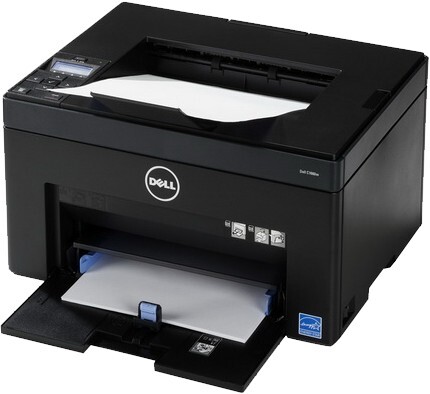
The Dell C1660 is the small end of Dell's color laser range: an entry-level machine for home offices and very small businesses that want proper laser color — crisp text, clean charts, the occasional flyer — without a workgroup printer's size or price. It keeps things simple with four individual cartridges: black 332-0399, cyan 332-0400, magenta 332-0401 and yellow 332-0402, so a light user only ever replaces the one color that has actually run out.
That one-at-a-time design suits how a small office really prints. Weeks of letters and invoices draw almost entirely on the black cartridge, then a single color-heavy job — a presentation, a set of charts for a client — leans on the colors. With the C1660 there is no penalty for that pattern: each slot is watched separately, and restocking means one modest cartridge rather than a forced full set.
Toner Cartridges for Dell C1660
| Cartridge | Color | Page Yield |
|---|---|---|
| 332-0399 | Black | See product page |
| 332-0400 | Cyan | See product page |
| 332-0401 | Magenta | See product page |
| 332-0402 | Yellow | See product page |
| 332-0401 | Magenta | See product page |
| 332-0402 | Yellow | See product page |
| 332-0400 | Cyan | See product page |
| 332-0399 | Black | See product page |
| 332-0402 | Yellow | See product page |
| 332-0399 — Black 3 Pack | Black | See product page |
| 332-0399 — Black 5 Pack | Black | See product page |
| 332-0399 — Black 2 Pack | Black | See product page |
| 332-0399 — Black 3 Pack | Black | See product page |
| 332-0399 — Black 5 Pack | Black | See product page |
| 332-0399 / 332-0400 / 332-0401 / 332-0402 — 4 Color Set | Black / Cyan / Magenta / Yellow | See product page |
| C1660 4 Color Set | Black / Cyan / Magenta / Yellow | See product page |
| C1660 Premium Quality 4 Color Set | Black / Cyan / Magenta / Yellow | See product page |
| 332-0399 / 332-0400 / 332-0401 / 332-0402 — 4 Color Set | Black / Cyan / Magenta / Yellow | See product page |
| 332-0399 / 332-0400 / 332-0401 / 332-0402 — 5 Color Set | Black / Cyan / Magenta / Yellow | See product page |
| 332-0399 / 332-0400 / 332-0401 / 332-0402 — 8 Color Set | Black / Cyan / Magenta / Yellow | See product page |
| 332-0400 / 332-0401 / 332-0402 — 6 Color Set | Cyan / Magenta / Yellow | See product page |
| 332-0400 / 332-0401 / 332-0402 — 3 Color Set | Cyan / Magenta / Yellow | See product page |
Which cartridge should you buy?
For most C1660 owners, single cartridges are the whole answer. The machine's light-duty role means any one color can last a long time, and buying singly keeps cash out of the supply drawer. Black is the exception worth planning around, since everyday documents consume it fastest; the black multi-packs listed here trim the per-cartridge cost for the slot you will change most often. A four-color set earns its place in two situations — setting up a new printer whose starter cartridges are finishing together, or the rare moment several colors flag low at once. The expanded set formats suit households or micro-offices that would rather stock once and forget about toner for a long stretch. Every compatible cartridge is backed by a 1-year warranty and 1-year returns, which makes trying one in place of the Dell original a low-risk experiment.
Chip, toner and everyday use
The C1660 reads a chip on each cartridge to confirm it has the right part and to estimate what is left, so push replacements in until they seat with a positive click and let the printer finish waking up before printing a test page. Light use has one quirk: toner sits undisturbed for weeks, settles, and can print faintly on the first pages after a quiet spell — removing the cartridge and rocking it gently side to side levels the powder again. Keep unopened spares in a drawer away from radiators and sunny windowsills, and write the purchase date on the box if you stock ahead, so the oldest cartridge is always the next one fitted.
Frequently Asked Questions
What toner does the Dell C1660 use?
Four separate cartridges: 332-0399 black, 332-0400 cyan, 332-0401 magenta and 332-0402 yellow. Each fits only its own slot, and the number is printed on the cartridge label, which is the fastest way to confirm you are ordering the right color.
How long does C1660 toner last in a home office?
It depends almost entirely on what you print. Text pages sip toner, while full-page color documents drink it several times faster, so a home office printing mostly letters can go many months between changes. The printer's own level readings are the guide that matters for your workload.
Can I print in black if a color cartridge is empty?
The four slots are monitored independently, and the machine is built around replacing colors individually as they finish. Fitting the empty color promptly is the simplest course — single cartridges are inexpensive for this model and the swap takes a moment.
Where do jams usually happen in the C1660?
Most jams trace back to paper rather than toner: overfilled trays, mixed paper stocks, or a torn fragment left from an earlier jam. Clear any jam fully, close every cover firmly, and load fresh, fanned paper before blaming a cartridge.
More printers that use the same cartridges
The C1660 shares its four cartridges with its wireless sibling, so the same toner shelf serves both versions of this compact color laser: Color Laser C1660W, Dell (332-0399, 332-0400, 332-0401, 332-0402).