






 See Compatible Printers
 Read more about our ink!
Dell
Compatible Dell 332-0400 Toner Cartridge Cyan
- Page Yield:
- 1,000 Pages
- Availability:
- In Stock
- Shipping:
- Calculated at Checkout

Amazon Price:

- Page Yield:
- 1,000 Pages
- Availability:
- In Stock
- Shipping:
- Calculated at Checkout
- Compatible Printers
- Color Laser C1660wi>
- Color Laser C1660
- Color Laser C1660W
- Dell (332-0399, 332-0400, 332-0401, 332-0402)
- Specifications
- SKU:
- Dell-332-0400
- Printer Brand:
- Dell
- OEM Number:
- 332-0400
- Ink Color:
- Cyan
- Page Yield:
- 1,000 Pages
- Printer Type:
- Laser Cartridge
- Condition:
- New Compatible
- Description
- Yields up to 1000 pages
- Compatible Dell 332-0400 Toner Cartridge Cyan produces high-resolution printouts for enhanced graphics and sharp text
- Unlike bargain brand inks Compatible Dell 332-0400 Toner Cartridge Cyan is designed to work exclusively with Dell printers to deliver the highest quality and performance
- Compatible with: Dell C1660 C1660w laser printer
- Replaces the Following Manufacturer Numbers: 332-0400 5R6J0 DWGCP
- Reviews

/> 

Compatible Dell 332-0400 Toner Cartridge Cyan delivers consistent quality with high-resolution printouts sharper images and text.
Dell Toner cartridge in cyan color provides excellent high-resolution print quality for your important documents projects and presentations. Toner cartridge offers rich dark text and image with high productivity.
Features:
Frequently Asked Questions
Why is this cyan cartridge sold under the number 332-0400 instead of a printer name?
Because Dell assigns one part number to each color position, and 332-0400 is the number for the cyan cartridge in the C1660 and C1760 series. The number is the safest way to order: printer names get shared across several models, but 332-0400 identifies exactly one cartridge — cyan, standard capacity, for this printer family. If your empty cartridge or your printer's supply screen shows 332-0400, this is the matching replacement.
What does one printed page actually cost with the 332-0400?
At $25.55 for a rated 1,000 pages, the cyan cost works out to roughly 2.6 cents per page at the standard 5% coverage the rating assumes. That is honest math, not a bargain claim: this is a small, standard-capacity cartridge for compact printers, and small cartridges always cost more per page than large high-yield ones. Color-heavy pages — photos, charts, full-bleed flyers — use far more than 5% coverage and will pull the real cost per page higher.
Is 1,000 pages a small yield, or is that normal for this printer class?
It is normal for the class, and it is worth saying plainly: 1,000 pages is a short rating. The Dell C1660 and C1760 are compact desktop color lasers built for light duty, and their color cartridges are physically small, so cyan, magenta (332-0401) and yellow (332-0402) are each rated at 1,000 pages while the black (332-0399) carries a little more. If you print color every day in volume, this printer family will always mean frequent cartridge changes — no cartridge brand changes that.
How can I tell the cyan is the cartridge that ran out?
When cyan empties first, prints shift in a recognizable way: skies and blue logos wash out toward green or gray, and teal and green tones take over images because there is no blue left to balance them. The printer's supply gauge will also show the cyan bar at or near empty. Swapping only the 332-0400 restores the blues without touching the other three cartridges, which keep printing until their own turn comes.
Is this a genuine Dell cartridge?
No — this is a compatible replacement built to the 332-0400 specification and sold under our own label, which is why it costs less than Dell's own box. It is made to fit the same slot, deliver the same rated 1,000 pages and produce the same cyan output in the C1660 and C1760. Every cartridge we sell is covered by a one-year warranty and one-year free returns, so if it underperforms you are not stuck with it.
How fast will my order ship, and who do I call if something is off?
Orders leave from whichever of our four warehouses — Illinois, Pennsylvania, Georgia or California — is closest to you, which keeps most deliveries short. If a cartridge arrives damaged or prints poorly, our support team is available Monday through Friday, 9 AM to 5 PM CST, and the full returns process is spelled out on our shipping and returns page. You can browse the rest of the range for this printer family on our Dell toner page.
Can I keep printing black-and-white documents while the cyan sits empty?
Yes. Black text is printed by the separate black cartridge, so letters, invoices and reports come out normally while the cyan slot waits for its replacement. What you cannot do is print honest color: anything needing blue will come out shifted until the 332-0400 is fitted. The practical routine is to let monochrome work carry on uninterrupted, hold the color jobs, and swap the cyan when the cartridge arrives — the printer does not need the whole set changed to recover.
Our printing is heavy on blue logos and charts — which color should we keep a spare of?
Cyan, in your case. Blue-dominant documents draw on the 332-0400 harder than on its partners, so in a logo- and chart-heavy office cyan is usually the first of the three colors to empty — the washed-out skies and gray-blue graphics are the tell. One sealed spare on the shelf turns that from a stalled job into a two-minute swap. Offices whose color work is mostly warm tones can take the opposite hint and watch magenta and yellow instead.
Where on the printer do I confirm that 332-0400 is the cartridge to order?
In two places, and they should agree. The printer's supply screen lists each color position by its part number, so the cyan line reads 332-0400; the label on the cartridge you pull out of the cyan slot carries the same number. Checking either one beats ordering from memory or from a previous order for a different machine — the number on the screen or the old unit is the authority, and it takes seconds to read.
How do I check the new cyan has actually fixed the problem?
Print something with real blue in it — a page carrying a sky photograph, a blue chart or your company's logo. With a fresh 332-0400 in place, blues should come back full and even, and the green-gray cast that took over your images should be gone. Compare that page with the last one the old cartridge produced; the difference is unmistakable when cyan was the culprit. If the test page still looks washed out, the low cartridge was not the whole story.
About This 332-0400 Cyan Cartridge
This is the cyan position cartridge for Dell's compact C1660 and C1760 color laser printers, sold under its Dell part number 332-0400. It is a standard-capacity compatible cartridge rated at 1,000 pages for $25.55 — about 2.6 cents per page — and we would rather state that plainly than dress it up: small desktop printers carry small cartridges, and this one is sized for the light, occasional color printing those machines were built for. Order it when your supply screen names 332-0400 or your blues start fading, replace only the cyan slot, and rely on the one-year warranty and one-year free returns standing behind it if anything disappoints.
Related Items

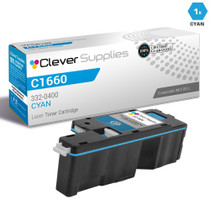
Dell
Compatible Dell C1660 Toner Cartridge Cyan (332-0400)
/>

Dell
Compatible Dell C5765DN Toner Cartridge Cyan (332-2118)
/>

Dell
Compatible Dell 332-0399/ 332-0400/ 332-0401/ 332-0402 Toner Cartridge 4 Color Set
/>
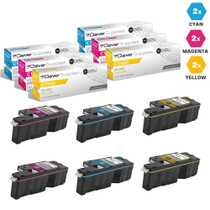

Dell
Compatible Dell C1660 Toner Cartridges 6 Color Set (332-0400, 332-0401, 332-0402)
/>