






 See Compatible Printers
 Read more about our ink!
Dell
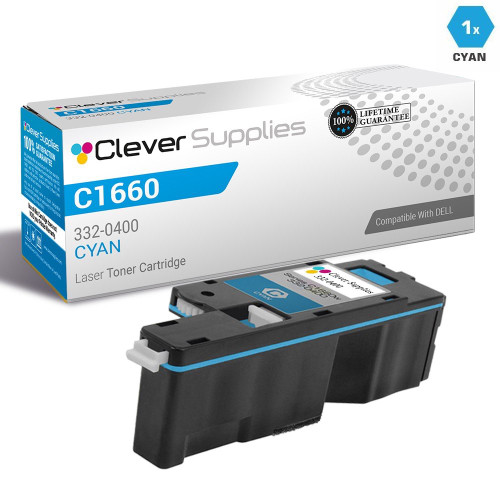
Compatible Dell C1660 Toner Cartridge Cyan (332-0400)
- Page Yield:
- Color: 1000
- Availability:
- In Stock
- Shipping:
- Calculated at Checkout

Amazon Price:

- Page Yield:
- Color: 1000
- Availability:
- In Stock
- Shipping:
- Calculated at Checkout
- Compatible Printers
- Color Laser C1660wi>
- Color Laser C1660
- Color Laser C1660W
- Dell (332-0399, 332-0400, 332-0401, 332-0402)
- Specifications
- SKU:
- CS-Dell-C1660-C
- Printer Brand:
- Dell
- OEM Number:
- 332-0400
- Ink Color:
- Cyan
- Page Yield:
- Color: 1000
- Printer Type:
- Laser Cartridge
- Description
- Reviews

/> 

Clever Supplies brand products are made in the USA! Why pay more for cheaper product with a high defective rate? You will end up having to send it back to the manufacturer. Get a quality product that you KNOW will work. Purchase the Clever Supplies Products Compatible for Dell C1660 (332-0400) Cyan and experience the difference! All Clever Supplies brand products are backed by '100% Quality Satisfaction' 1 year warranty against defects in materials and workmanship for all toner products. Free tech support for a Clever Supplies problems for all Clever Supplies brand products. The use of Clever Supplies brand replacement laser toner cartridges and supplies does not void printer warranty. Premium Quality Replacement Toner Cartridge is made by ISO9001 Certified Factory to Meet or Exceed OEM Standards. These units are manufactured 100% brand new with all new parts including OPC drums, wiper blades, a smart chip and other internal parts, they are an economical alternative to expensive OEM 332-0400 Compatible Toner Cartridges. This is a Compatible for Delltoner cartridges Cyan guaranteed to perform with Dell Laser Printers. It replaces the original Dell C1660 toner cartridge cyan (Cyan) . The compatible replacement for 332-0400. We offer a 100% Quality Satisfaction Guarantee on our Compatible for 332-0400 laser toner cartridges and supplies. For use in the following printers: Color Laser C1660w, Color Laser C1660
Frequently Asked Questions
Our C1660's blues look pale and the greens have gone muddy — is the cyan cartridge the cause?
Very likely, yes. Cyan is the blue half of every sky, logo and photograph your C1660 prints; as the 332-0400 runs dry, blues fade first and greens turn muddy because yellow is left mixing without enough blue. Check the supply gauge on the printer — if the cyan bar is the lowest of the four, replacing this one cartridge is the fix, and the black, magenta and yellow can stay right where they are.
Which cartridge number does the C1660 actually ask for in the cyan slot?
The cyan position takes Dell part number 332-0400, which is the cartridge on this page. The other positions have their own numbers — black is 332-0399, magenta is 332-0401 and yellow is 332-0402 — so matching the number on the empty cartridge (or on the printer's supply screen) to the number here is the surest way to order the right color the first time.
How long does 1,000 pages of cyan realistically last in a C1660?
It depends entirely on how much color you print. At roughly 100 color pages a month — invoices with a color logo, the odd handout — a 332-0400 lasts on the order of ten months. At 250 color pages a month it is closer to four months. And one full-page photo can use as much cyan as dozens of mostly-text pages, because the 1,000-page rating assumes only 5% of the page is covered. Photo-heavy use shortens any color cartridge's life dramatically.
Why does this cartridge cost about 2.6 cents per page?
Because the capacity is small: $25.55 spread over a rated 1,000 pages is simply the arithmetic of a compact standard-yield cartridge, and we will not pretend otherwise. The C1660 was designed as an inexpensive desktop printer with small cartridges, so its cost per page is higher than a big workgroup machine's. What this compatible 332-0400 does is keep that per-page cost well below what the same slot costs with Dell's own branded box.
Do I have to replace all four colors when only cyan is empty?
No. Each cartridge in the C1660 is independent and reports its own level, and colors rarely run out together — cyan often goes first in offices that print a lot of blue-branded documents. Replace the 332-0400 on its own, keep printing on the remaining magenta, yellow and black, and only order the others as their gauges approach empty. There is no benefit to swapping a cartridge that still has toner in it.
What protection do I have if this compatible cartridge disappoints?
Every cartridge we ship carries a one-year warranty and one-year free returns — if this 332-0400 leaks, prints streaky or falls well short of its rating, you send it back on us within that year. Our support team answers Monday through Friday, 9 AM to 5 PM CST, and orders ship from our warehouses in Illinois, Pennsylvania, Georgia and California. The details are on our shipping and returns page, and the wider range for these printers is on our Dell toner page.
We like to keep a spare cyan on hand — how should it be stored until the day it is needed?
Keep the 332-0400 sealed in its bag, standing upright in a cool, dry cupboard away from sunlight and heating vents. Toner is a dry powder and does not dry out the way ink does, so a sealed cartridge simply waits until its turn comes. Write the arrival date on the box, open the cartridge only when the installed cyan's gauge reaches empty, and if you ever hold two spares, fit the older one first.
Our cyan is fading but a print run has to finish today — is there a way to stretch the cartridge?
Usually, yes. Take the 332-0400 out and rock it gently from side to side a few times, then reseat it. That redistributes the toner still inside and evens the coverage out for a while — it is a redistribution, not a refill, so treat whatever pages it buys as borrowed time. Order the replacement the same day, and if the fading returns within a few pages, the cartridge is genuinely empty rather than merely settled.
What should the first pages look like after we fit a new 332-0400?
Print something with sky, a logo or a photograph — the work cyan carries. The blue should come back even and solid across the whole page, and greens should lose the muddy cast they had before the swap. Give it two or three pages before judging, because a fresh cartridge settles in as it starts to feed. If one edge stays pale, pull the cartridge out, rock it once more and reseat it firmly.
What do we do with the old cyan cartridge once it comes out?
Slip it straight into the bag the new 332-0400 arrived in and seal it, so any loose toner stays contained instead of dusting the desk. Keep it for a few days until the replacement has proven itself, then send it out through a local office-supply or municipal electronics recycling route. A spent cartridge stored sealed does no harm in the meantime, and holding it briefly means it is still on hand if support ever asks about it.
About This C1660 Cyan Cartridge (332-0400)
This page is the C1660 listing of Dell's cyan cartridge 332-0400, which also serves the C1760 series. It is a compatible, standard-capacity cartridge rated at 1,000 pages and priced at $25.55 — roughly 2.6 cents per page at standard coverage, a figure we state openly because compact-printer cartridges are never the cheapest way to print a page. Buy it when your blues fade or the supply screen names the number, change only the cyan slot, and let the one-year warranty and one-year free returns cover you if the cartridge ever falls short.
Related Items

Dell
Compatible Dell 332-0400 Toner Cartridge Cyan
/>


Dell
Compatible Dell C1660 Toner Cartridges 6 Color Set (332-0400, 332-0401, 332-0402)
/>


Dell
Compatible Dell C1660 Toner Cartridges 3 Color Set (332-0400, 332-0401, 332-0402)
/>


Dell
Compatible Dell C1660 (332-0402) Toner Cartridge Yellow