






 See Compatible Printers
 Read more about our ink!
Dell
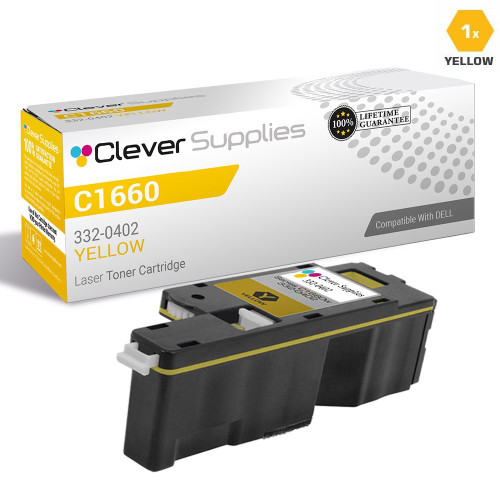
Compatible Dell C1660 Toner Cartridge Yellow (332-0402)
- Page Yield:
- Color: 1000
- Availability:
- In Stock
- Shipping:
- Calculated at Checkout

Amazon Price:

- Page Yield:
- Color: 1000
- Availability:
- In Stock
- Shipping:
- Calculated at Checkout
- Compatible Printers
- Color Laser C1660wi>
- Color Laser C1660
- Color Laser C1660W
- Dell (332-0399, 332-0400, 332-0401, 332-0402)
- Specifications
- SKU:
- CS-Dell-C1660-Y
- Printer Brand:
- Dell
- OEM Number:
- 332-0402
- Ink Color:
- Yellow
- Page Yield:
- Color: 1000
- Printer Type:
- Laser Cartridge
- Description
- Reviews

/> 

Clever Supplies brand products are made in the USA! Why pay more for cheaper product with a high defective rate? You will end up having to send it back to the manufacturer. Get a quality product that you KNOW will work. Purchase the Clever Supplies Products Compatible for Dell C1660 (332-0402) Yellow and experience the difference! All Clever Supplies brand products are backed by '100% Quality Satisfaction' 1 year warranty against defects in materials and workmanship for all toner products. Free tech support for a Clever Supplies problems for all Clever Supplies brand products. The use of Clever Supplies brand replacement laser toner cartridges and supplies does not void printer warranty. Premium Quality Replacement Toner Cartridge is made by ISO9001 Certified Factory to Meet or Exceed OEM Standards. These units are manufactured 100% brand new with all new parts including OPC drums, wiper blades, a smart chip and other internal parts, they are an economical alternative to expensive OEM 332-0402 Compatible Toner Cartridges. This is a Compatible for Delltoner cartridges Yellow guaranteed to perform with Dell Laser Printers. It replaces the original Dell C1660 toner cartridge yellow (Yellow) . The compatible replacement for 332-0402. We offer a 100% Quality Satisfaction Guarantee on our Compatible for 332-0402 laser toner cartridges and supplies. For use in the following printers: Color Laser C1660w, Color Laser C1660
Frequently Asked Questions
Our C1660's prints have turned cold and blue — is the yellow cartridge empty?
Very likely, yes. Yellow is the warm primary: when the 332-0402 in a Dell C1660 runs dry, reds collapse toward magenta, greens go cold and teal, and yellows and golds wash out or vanish. The tell-tale sign is that black text stays sharp while every color looks like it was printed through blue glass. Before replacing anything else, check the yellow slot — on this machine the cartridge behind that symptom is the 332-0402, and no adjustment to the other colors can substitute for it.
Why does the C1660 go through yellow faster than we expect?
Two reasons, both ordinary. First, the 332-0402 is a small cartridge — 1,000 pages at the standard 5% coverage — and everyday office color uses yellow constantly: it sits inside greens, warm greys, skin tones and most chart colors, not just in things that look yellow. Second, real pages rarely match the 5% test page; a logo on every letterhead and a highlighted table in every report push coverage well past it. The cartridge is not leaking or faulty — the C1660's color work simply draws on yellow in almost every print.
How should we plan around a 1,000-page yellow cartridge?
Count in reams: 1,000 rated pages is two reams of paper. A C1660 printing around 100 color pages a month gets roughly ten months from a 332-0402; a busier desk at 250 color pages a month gets about four. When the low-toner warning appears, that is the moment to order — the remaining toner is a short runway, not another month of printing. Households and very light users can safely wait for the warning; a desk that prints color daily should keep one spare sealed in the cupboard.
What does yellow cost per page in this printer?
On this listing's numbers, $24.85 for 1,000 rated pages works out to about 2.48 cents per page for the yellow component. We state that plainly because it is the real cost of running a compact color laser: the C1660 was built small and inexpensive, and its 1,000-page cartridges are priced accordingly. There is no multipack trick available on this listing to soften it — the 332-0402 is sold singly, and the honest comparison is against the Dell original for the same slot, not against workgroup toner economics.
Does the C1660 take the same yellow as the C1760nw?
Yes — both machines draw from the same supply family, and the yellow for each is the 332-0402. The set that serves them is 332-0399 black, 332-0400 cyan, 332-0401 magenta and this 332-0402 yellow. If you run one of each printer, a single spare yellow covers both, which is one of the few stocking conveniences these desktop models offer. Match the number on the cartridge you remove; if it reads 332-0402, this listing replaces it directly.
What happens if this compatible cartridge does not perform?
It is covered the same way everything we sell is covered: a 1-year warranty and 1-year free returns, with the steps laid out on our shipping and returns page. The 332-0402 on this listing is a compatible cartridge built to Dell's specification for the C1660 and C1760nw yellow slot — not a Dell-branded box — and support is available Monday to Friday, 9 AM to 5 PM CST if you want to talk a color problem through before ordering. Orders ship from the nearest of our Illinois, Pennsylvania, Georgia or California warehouses; the wider range is on our Dell toner page.
How is the yellow cartridge changed, and what should the first page afterwards show?
Open the cover, pull the finished 332-0402 straight out, slide the new one in until it seats, and close up — minutes, no tools, and the other three cartridges stay exactly where they were. Then print something with reds and greens on it: both should come back warm and full immediately. If they do, the change is proved; the C1660 needs no recalibration to accept the new yellow.
We run a C1660 and a C1760nw — how does one spare yellow serve both machines?
Because both machines take the same cartridge: the 332-0402 is the yellow for the whole family. One sealed spare on the shelf therefore covers whichever printer fades first, instead of each machine needing its own reserve. The only discipline it asks is the usual one — match the number on the cartridge coming out; if it reads 332-0402, the spare on the shelf is its replacement.
How long can a sealed spare yellow sit before it is needed?
As long as it takes. The 1,000-page rating of the 332-0402 is spent by pages printed, not by time on a shelf, so a spare bought today is worth exactly the same when its turn comes months from now. Kept sealed, indoors and away from heat and sunlight, it simply waits — which is what makes holding one spare for two machines a sensible arrangement rather than a gamble.
Should the old yellow be thrown away the moment it comes out?
Not quite yet. Keep the removed 332-0402 in its box for a few days while the replacement proves itself. If the cold, blue cast disappears, the old cartridge was simply empty and can go with the next batch of empties. If the same cast persists with a fresh cartridge fitted, the comparison has told you something valuable: the problem was never the yellow, and the old cartridge is the evidence.
About This C1660 Yellow Cartridge (332-0402)
A single compatible 332-0402 yellow cartridge for the Dell Color Laser C1660 and C1760nw family, rated at 1,000 pages and priced at $24.85 — roughly 2.48 cents per rated page, stated plainly because compact-printer toner is what it is. It ships from our Illinois, Pennsylvania, Georgia or California warehouse and carries a 1-year warranty with 1-year free returns.
Related Items


Dell
Compatible Dell C1660 (332-0402) Toner Cartridge Yellow

Dell
Compatible Dell 332-0402 Toner Cartridge Yellow
/>

Dell
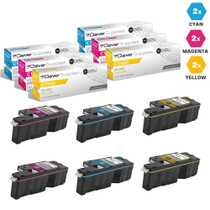
Compatible Dell C1660 Toner Cartridges 6 Color Set (332-0400, 332-0401, 332-0402)
/>


Dell
Compatible Dell C1660 Toner Cartridges 3 Color Set (332-0400, 332-0401, 332-0402)
/>