




Color Laser 3115CN
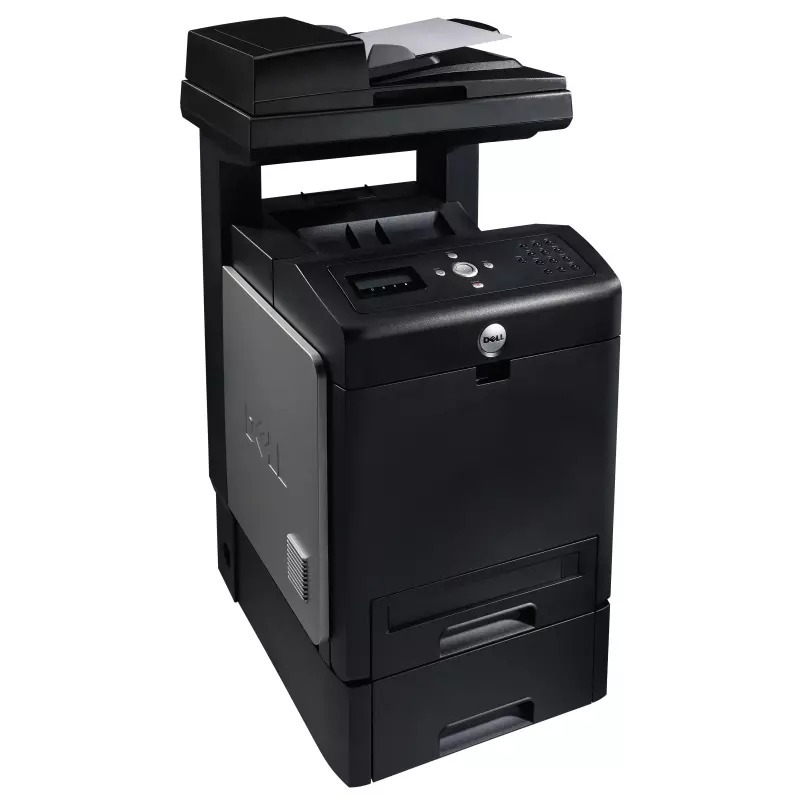
The Dell 3115CN bolts full multifunction hardware — print, scan, copy and fax — onto a workgroup color laser engine, and feeds it with four separate high-yield cartridges: 310-8092 in black, 310-8094 in cyan, 310-8096 in magenta and 310-8098 in yellow, each rated for about 8,000 pages. One networked box handles the whole document flow of an office, and each color is replaced on its own schedule.
That independence matters in practice. A shared color machine almost never empties evenly: black drains on everyday documents while the colors ebb at different speeds depending on what the office prints. Because the 3115CN takes four individual cartridges, a low yellow never forces you to discard healthy cyan and magenta — you change the one that is spent and keep printing. For a device serving a whole department, that is where the real saving sits.
Toner Cartridges for Dell 3115CN
| Cartridge | Color | Page Yield |
|---|---|---|
| 310-8092 | Black | High Yield — about 8,000 pages |
| 310-8094 | Cyan | High Yield — about 8,000 pages |
| 310-8096 | Magenta | High Yield — about 8,000 pages |
| 310-8098 | Yellow | High Yield — about 8,000 pages |
| Dell 3115 Cyan (310-8094) | Cyan | See product page |
| Dell 3115 Yellow (310-8098) | Yellow | See product page |
| Dell 3110 Black (310-8092) | Black | See product page |
| Dell 3110 Cyan (310-8094) | Cyan | See product page |
| Dell 3110 Magenta (310-8096) | Magenta | See product page |
| Dell 3110 Yellow (310-8098) | Yellow | See product page |
| 310-8092 / 310-8094 / 310-8096 / 310-8098 — 4 Color Set | Black, Cyan, Magenta, Yellow | High Yield — about 8,000 pages per cartridge |
| Dell 3115CN — 4 Color Set | Black, Cyan, Magenta, Yellow | High Yield |
| Dell 3115CN Premium — 4 Color Set | Black, Cyan, Magenta, Yellow | High Yield |
| Dell 3110 — 4 Color Set | Black, Cyan, Magenta, Yellow | See product page |
| Dell 3110 Black — 2 Pack (310-8092) | Black | See product page |
| Dell 3110 Black — 3 Pack (310-8092) | Black | See product page |
| Dell 3110 Black — 5 Pack (310-8092) | Black | See product page |
| Dell 3110 — 3 Color Set | Cyan, Magenta, Yellow | See product page |
| Dell 3110 — 5 Color Set | Black, Cyan, Magenta, Yellow | See product page |
| Dell 3110 — 6 Color Set | Cyan, Magenta, Yellow | See product page |
| Dell 3110 — 8 Color Set | Black, Cyan, Magenta, Yellow | See product page |
Which cartridge should you buy?
For a workgroup machine, the high-yield numbers are the default choice: each of the four cartridges listed first above runs to roughly 8,000 pages, so a busy shared printer is opened up far less often than with the standard sizes Dell also lists for this family. Day to day, replace colors one at a time as the supplies screen flags them — that is the cheapest way to run this printer. A four-color set earns its place when several cartridges are nearing empty together, or when you want a complete matched set on the shelf before a heavy print period; the larger five-, six- and eight-color bundles suit offices that would rather stock deep once than reorder monthly. Singles named for the 3110 and 3115 carry the same four codes and fit the same slots. All of these compatible cartridges carry a 1-year warranty with 1-year returns.
Chip, toner and everyday use
Each cartridge reports its own level, and the control panel's supplies screen — or the printer's web interface, since the 3115CN is networked — shows all four side by side, which takes the guesswork out of knowing which color to order. When you install a fresh cartridge, remove every piece of sealing tape and packaging first; a partly attached seal is a common reason a new unit reads as empty. Store unopened spares upright in a cool spot away from sunlight, and when one color starts to streak, take that cartridge out and rock it gently end to end to level the toner before condemning it.
Frequently Asked Questions
What cartridges fit the Dell 3115CN?
Four high-yield cartridges: black 310-8092, cyan 310-8094, magenta 310-8096 and yellow 310-8098, each good for about 8,000 pages. If a code looks unfamiliar, compare it with the number on the cartridge you remove.
Only one color has run out — do I need a whole set?
No. The four cartridges are independent, so replace just the empty color and leave the others in place. A set only makes sense when several colors are low at once or you are stocking a shelf.
How do I tell which color is running low?
Open the supplies screen on the control panel, or the printer's web interface from any computer on the network. It lists each cartridge separately, so you can see exactly which of the four needs attention.
Can the 3115CN print envelopes and labels without jamming?
Yes — feed them through the multipurpose tray one at a time, keep the stack small with the guides snug, and select the matching media type in the driver so the fuser runs at the right temperature for the heavier stock.
More printers that use the same cartridges
These Dell models draw on the same four-cartridge family, which is handy if your office runs more than one of them: Color Laser 3110, Color Laser 3110CN, Color Laser 3115, Color Laser 3115 MFP, DELL (310-8092, 310-8094, 310-8096, 310-8098), Multifunction 3115cn.