






 See Compatible Printers
 Read more about our ink!
Xerox
Compatible Xerox WorkCentre 6605N Toner Cartridges 4 Color Set (106R02228, 106R02225, 106R02226, 106R02227)

Amazon Price:

- Page Yield:
- Black: 8000, Color: 6000
- Availability:
- In Stock
- Shipping:
- Free Shipping
- Compatible Printers
- Specifications
- SKU:
- CS-Xerox-6605N-4Set
- Printer Brand:
- Xerox
- OEM Number:
- 106R02228, 106R02225, 106R02226, 106R02227
- Ink Color:
- Black, Cyan, Magenta, Yellow
- Page Yield:
- Black: 8000, Color: 6000
- Printer Type:
- Laser Cartridge
- Condition:
- New Compatible
- Description
- Reviews

/> 

Clever Supplies brand products are made in the USA! Why pay more for cheaper product with a high defective rate? Your time is valuable. Get a quality product that you KNOW will work. Purchase the Clever Supplies Compatible for Xerox WorkCentre 6605N (106R02228, 106R02225, 106R02226, 106R02227) 4 Color Toner Cartridge Set and experience the difference! All Clever Supplies brand products are backed by '100% Quality Satisfaction' 1 year warranty against defects in materials and workmanship for all toner products. Free tech support for any problems for all Clever Supplies brand products. The use of Clever Supplies brand replacement laser toner cartridges and supplies does not void printer warranty. Premium Quality Replacement Toner Cartridge is made by ISO9001 Certified Factory to Meet or Exceed OEM Standards. These units are manufactured 100% brand new with all new parts including OPC drums, wiper blades, a smart chip and other internal parts, they are an economical alternative to expensive OEM 106R02228, 106R02225, 106R02226, 106R02227 Compatible Toner Cartridges. The Compatible Toner Cartridges will produce the same amount of page yield as an OEM cartridge would. This is a Compatible for Xerox WorkCentre 6605N 4 Color Toner Cartridge Set Black, Cyan, Magenta, Yellow guaranteed to perform with Xerox Laser Printers. It replaces the original Xerox WorkCentre 6605N 4 Color Toner Cartridge Set Black, Cyan, Magenta, Yellow. The compatible replacement for 106R02228, 106R02225, 106R02226, 106R02227. The use of compatible replacement Cartridges and supplies does not void Printer Warranty. Our Xerox Compatible Cartridge is a replacement for OEM Xerox. We offer a 100% Quality Satisfaction Guarantee on our Compatible for 106R02228, 106R02225, 106R02226, 106R02227 Laser Toner Cartridges and supplies. For use in the following printers: Phaser 6600, Phaser 6600N, WorkCentre 6605, WorkCentre 6605N, Phaser 6600DN, Phaser 6600YDN, WorkCentre 6605DN
Frequently Asked Questions
How can I check toner levels on the WorkCentre 6605N without walking to the machine?
The 6605N is the networked version of the multifunction, and its status can be read remotely through the machine's embedded web interface as well as at the control panel. Each cartridge reports its own remaining level, so you can see which of the four positions is getting low and plan the swap before the machine stops a job over it.
What cartridges does the set include?
Four high-yield units, one for each toner position: 106R02228 in black, 106R02225 in cyan, 106R02226 in magenta and 106R02227 in yellow. Between them they are the complete cartridge family for this machine, so the set is a full restock rather than a partial top-up.
How long should the ratings last in a small office?
Black is rated at up to 8,000 pages; each color at up to 6,000 pages, measured at 5% coverage. An office printing a few hundred pages a week, mostly documents, will measure cartridge life in many months; one producing color material daily will cycle the colors faster. The honest way to use the numbers is as relative capacity — black holds roughly a third more than each color — and to let the machine's own level reports time your replacements.
Does the N version take a different cartridge from the standard 6605?
It does not. The N marks the networked configuration, and the toner bay is identical across the family. The same set serves the WorkCentre 6605 and WorkCentre 6605DN multifunctions alongside the Phaser 6600, Phaser 6600N, Phaser 6600DN and Phaser 6600YDN printers.
Is it better to order when the low warning appears, or ahead of it?
Ahead of it, if the machine is business-critical. A low warning still leaves printing capacity, but a networked multifunction serving several people can work through that remainder quickly. Holding the set on site means the changeover takes minutes whenever the empty message lands, and the sealed cartridges store flat in a cupboard until then.
What cover comes with the set?
It carries a 1-year warranty and 1-year free returns as standard; the full policy sits on our shipping and returns page. Deliveries are sent from our IL, PA, GA and CA warehouses, and support answers Monday to Friday, 9 AM to 5 PM CST.
On a shared networked machine, who should watch the toner levels, and how often?
Give the job to one named person. The 6605N reports every cartridge's level through its embedded web interface, so a weekly glance from that person's desk — two minutes, no trip to the machine — catches a falling position while there is still time to act. Without an owner, everyone assumes someone else has seen the warning, and the first person to learn about an empty cartridge is the one whose job just stopped.
What should we check when the set first arrives?
Count the boxes against the positions: there should be four, carrying the codes 106R02228 for black, 106R02225 for cyan, 106R02226 for magenta and 106R02227 for yellow. If all four codes are present, the restock is complete. Then unseal only the cartridge you are about to fit; the other three go into the cupboard still sealed, where they keep in good condition until their own positions run down.
Why do the four cartridges run down at such different rates on a shared machine?
Because a shared 6605N prints everybody's mix, not one person's. Correspondence and invoices spend almost entirely black — the 106R02228, which is also the largest cartridge at up to 8,000 pages — while presentations, charts and color copies draw on the 6,000-page color positions according to whatever hues dominate them. A blue-heavy house style empties cyan first; warm branding leans on magenta and yellow. Uneven levels are the normal signature of varied work, not a fault.
How should the spent cartridges from a set be handled?
As each position empties, drop the old unit into the box its replacement arrived in and store the boxes together in one corner of the supply cupboard. When the set has cycled through, you have a tidy batch of four empties to hand to a toner recycling program or e-waste collection in a single trip — instead of loose cartridges migrating around the office, which is how spent toner usually ends up in the general trash by mistake.
About This 4 Color Set for the WorkCentre 6605N
At $107.39, this is the high-yield four-cartridge group presented for the WorkCentre 6605N: 106R02228 black rated up to 8,000 pages and 106R02225 cyan, 106R02226 magenta and 106R02227 yellow rated up to 6,000 pages each. It is aimed at small offices running the networked multifunction as their single print, copy and scan hub. You can see the rest of the brand's lineup on our Xerox toner page.
Related Items


Xerox
Compatible Xerox WorkCentre 6605DN Toner Cartridges 4 Color Set (106R02228, 106R02225, 106R02226, 106R02227)
/>



Xerox
Compatible Xerox WorkCentre 6605 Toner Cartridges 4 Color Set (106R02228, 106R02225, 106R02226, 106R02227)
/>


Xerox
Compatible Xerox 6600 Toner Cartridges 4 Color Set (106R02228, 106R02225, 106R02226, 106R02227)
/>

Xerox
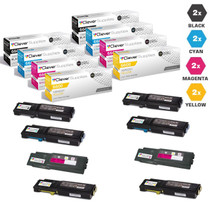
Compatible Xerox 6600 Toner Cartridges 8 Color set (106R02228, 106R02225, 106R02226, 106R02227)
/>