







 See Compatible Printers
 Read more about our ink!
Hewlett Packard
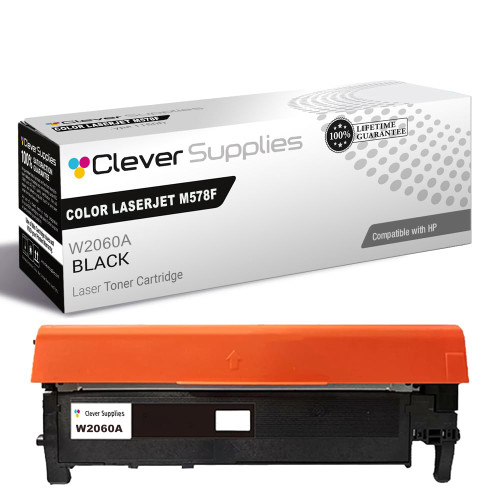
Compatible HP COLOR LASERJET M578F (W2120A) Toner Cartridge Black

Amazon Price:

- Page Yield:
- Black: 5500
- Availability:
- In Stock
- Shipping:
- Free Shipping
- Compatible Printers
- Specifications
- SKU:
- CS-HP-212A-CLJ-M578F-BK
- Printer Brand:
- Hewlett Packard
- OEM Number:
- W2120A
- Ink Color:
- Black
- Page Yield:
- Black: 5500
- Printer Type:
- Laser Cartridge
- Condition:
- New Compatible
- Description
- Reviews



Get vibrant, professional-quality prints with the HP 212A toner cartridge series, which includes HP 212A W2120A Black, W2121A Cyan, W2123A Magenta, and W2122A Yellow. These cartridges are designed to deliver sharp text and brilliant colors, making them ideal for high-impact business documents. Built for consistent performance, the HP 212A toner cartridge ensures every page meets high standards of clarity and detail. Whether you're printing presentations or detailed graphics, you can rely on these cartridges for outstanding color accuracy and smooth operation. Compatible with a wide range of HP printers, including COLOR LASERJET M554DN, COLOR LASERJET M555DN, COLOR LASERJET M555X, COLOR LASERJET M578C, COLOR LASERJET M578DN, COLOR LASERJET M578F, and COLOR LASERJET M578Z, the HP 212A series ensures seamless installation and optimal performance in each supported device. Rely on HP 212A toner cartridge technology to support high-volume printing needs with minimal interruptions. Designed for efficiency, these cartridges help reduce downtime and keep your office running smoothly, page after page.
Frequently Asked Questions
How do I confirm this is the black my department needs?
Read the code on the cartridge you are replacing. If it says W2120A, this is its match — the black member of the HP 212A family for this Enterprise color platform. The family name 212A covers four colors; only this code feeds the black station.
Statements have pale account numbers — is that a toner symptom?
Yes, and an early one. Numerals and small print lose contrast before headlines do, so statements that patients squint at mean the black is nearly spent. The supplies page will confirm a low reading; a fresh cartridge restores the crispness billing paper demands.
How many pages should billing plan on?
The rating stands at 5,500 pages under the standard test. Statement runs mix dense tables with light letters, so a department's true figure floats around the rating; the gauge percentage, checked before a big mailing, is the number to schedule by.
Does the black cartridge influence scanned-page quality?
Copies and scans print through the same black channel, so a fading cartridge grays the copies too. Staff often blame the scanner glass; if prints and copies fade together, the cartridge is the shared cause.
What assurance comes with the $81.71 unit?
It is covered by a 1-year warranty, and 1-year free returns protect you if the unit arrives defective. We fulfil from warehouses in Illinois, Pennsylvania, Georgia and California, and the support desk is staffed Monday through Friday, 9 AM to 5 PM CST. The shipping and returns page gives the delivery and returns detail in full.
Any quick check before the monthly statement run?
Print one dense test page the day before. If it comes out even and dark, run the batch; if it grays at the foot, swap first — reprinting five hundred statements costs more than the minute the swap takes.
What does one statement page actually cost in toner?
The arithmetic is simple: $81.71 spread over the W2120A's 5,500 rated pages works out at roughly a cent and a half per page. Statement runs mix dense account tables with light letters, so the true figure drifts a little around that mark, but for budgeting a mailing cycle it is a dependable number — and it explains why a pale batch reprinted costs more than the cartridge ever did.
Why should billing keep a spare black on the shelf?
Because the warning rarely lands on a quiet day. A monthly statement cycle concentrates printing into a few days, and a cartridge that fades mid-run turns a routine mailing into a reprint. With a spare W2120A in the cupboard, the swap takes about a minute and the run continues; without one, the department waits on a delivery while statements sit unfinished.
Do the department's other printers take the same black?
Yes — the black slot is common across the platform. The M554dn, M555dn, M555x and the M578 models all feed from the W2120A, so one shelf code serves every machine the department runs. There is no per-model stock to keep apart, and a cartridge ordered for one printer can rescue another whose gauge complains first.
When does stepping up to the high-yield black make sense?
When volume stops being steady. The W2120A suits a department whose statement runs arrive on a predictable monthly rhythm; for heavier stretches — year-end mailings, enrollment surges — the high-yield W2120X fits the same slot and stretches the interval between swaps. The printer needs no adjustment either way; the choice is purely about how often someone opens the toner door.
About This W2120A Black Cartridge
Billing departments measure a cartridge in statements mailed on time. The W2120A serves the black station of printers like the Color LaserJet Enterprise M554dn, sized for departmental volume and honest about its level on the supplies page. When account numbers start to fade, the code on this box is the one that brings them back to black. From one end of the range to the other the slot is common: COLOR LASERJET M555DN and COLOR LASERJET M555X, and COLOR LASERJET M578C, COLOR LASERJET M578DN, COLOR LASERJET M578F and COLOR LASERJET M578Z as well. Should the other channels follow, they are listed as the cyan W2121A, the yellow W2122A and the magenta W2123A; this slot's own upgrade is the high-yield W2120X — the 212X black, and the 212A four-color set sweeps the full set in one order.
Related Items

Hewlett Packard
Compatible HP COLOR LASERJET M578F (W2120A) Toner Cartridge 2 Black


Hewlett Packard
Compatible HP COLOR LASERJET M578F (W2120X) Toner Cartridge Black


Hewlett Packard
Compatible HP COLOR LASERJET M554DN (W2120A) Toner Cartridge Black


Hewlett Packard
Compatible HP COLOR LASERJET M578F (W2120A, W2121A, W2123A, W2122A) Toner Cartridge 4 Color Set