







 See Compatible Printers
 Read more about our ink!
Hewlett Packard
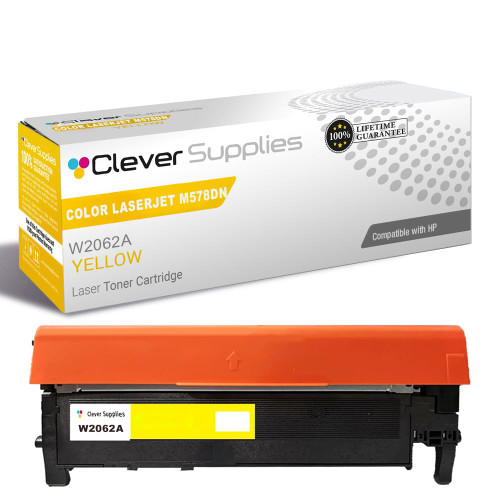
Compatible HP COLOR LASERJET M578DN (W2122A) Toner Cartridge Yellow

Amazon Price:

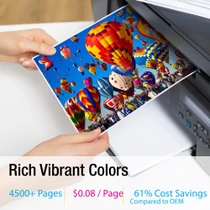
- Page Yield:
- Color: 4500
- Availability:
- In Stock
- Shipping:
- Free Shipping
- Compatible Printers
- Specifications
- SKU:
- CS-HP-212A-CLJ-M578DN-Y
- Printer Brand:
- Hewlett Packard
- OEM Number:
- W2122A
- Ink Color:
- Yellow
- Page Yield:
- Color: 4500
- Printer Type:
- Laser Cartridge
- Condition:
- New Compatible
- Description
- Reviews



Get vibrant, professional-quality prints with the HP 212A toner cartridge series, which includes HP 212A W2120A Black, W2121A Cyan, W2123A Magenta, and W2122A Yellow. These cartridges are designed to deliver sharp text and brilliant colors, making them ideal for high-impact business documents. Built for consistent performance, the HP 212A toner cartridge ensures every page meets high standards of clarity and detail. Whether you're printing presentations or detailed graphics, you can rely on these cartridges for outstanding color accuracy and smooth operation. Compatible with a wide range of HP printers, including COLOR LASERJET M554DN, COLOR LASERJET M555DN, COLOR LASERJET M555X, COLOR LASERJET M578C, COLOR LASERJET M578DN, COLOR LASERJET M578F, and COLOR LASERJET M578Z, the HP 212A series ensures seamless installation and optimal performance in each supported device. Rely on HP 212A toner cartridge technology to support high-volume printing needs with minimal interruptions. Designed for efficiency, these cartridges help reduce downtime and keep your office running smoothly, page after page.
Frequently Asked Questions
What does W2122A designate?
The yellow cartridge in the HP 212A line-up — one channel, one code. This platform's four stations are individually coded, and the yellow position accepts only W2122A, so the stamp settles the question before any money moves.
Proofs keep coming out blue-heavy and clients notice. Is yellow to blame?
Very likely. Yellow quietly underpins greens, golds and skin tones, and as it dies the whole palette cools: grass goes teal, brass goes green and faces lose warmth. A supplies-page glance showing yellow near empty is nearly a confession.
How is yellow's life rated?
4,500 pages at standard coverage. Proofing and short-run color work lay down much heavier coverage than the test standard assumes, so plan on the gauge, not the rating, when a client deadline sets the schedule.
Can I swap yellow without disturbing a calibrated workflow?
Yes. It is a standalone sealed unit; change it, let the printer run its calibration, and proof again. The fresh channel typically restores the warmth that had been drifting out of client work for days.
What does the $81.71 buy beyond the cartridge?
Cover, mainly: a 1-year warranty on the unit and 1-year free returns if it arrives defective. Dispatch is from our Illinois, Pennsylvania, Georgia and California warehouses, and the support desk is open Monday through Friday, 9 AM to 5 PM CST. The shipping and returns page has the shipping and returns wording.
How do I keep a spare yellow proof-ready?
Sealed, flat and out of the light well. Toner waits indefinitely in its bag; it is opening early and standing the unit on end near a heater that shortens a spare's useful temper.
How does yellow fit into a proofing routine that already checks everything else?
Add the four supply percentages to the same pre-job check that covers paper and settings. Yellow drifts silently — proofs cool by degrees while every mechanical setting reads correct — so the gauge is the only instrument that names it early. Reading the W2122A level before a client run turns a creeping palette fault into a one-minute swap between jobs.
Why do proofing weeks shorten the gap between yellow swaps?
Proof pages are printed precisely because they are dense: full-color imagery, solid panels and skin tones across the whole sheet, at coverage the 4,500-page office rating never assumed. A proofing week can therefore spend in days what an office spends in a month, and the swap rhythm should be planned around client deadlines — change between jobs, never in the middle of a proof set.
What does one rated page from this cartridge cost?
The $81.71 price over the 4,500-page rating works out near one point eight cents of toner per page at standard coverage. A dense proof page carries several times the standard coverage, so its true toner cost is a multiple of that figure — worth knowing when a studio prices short proof runs and wonders which line item keeps moving.
Do yellow spares need sorting by printer model in the studio?
No, and that is a quiet convenience of this platform: there are no per-model variants of the yellow bay. One W2122A serves the M554dn, the M555dn and M555x and the M578c, M578dn, M578f and M578z alike, so the shelf holds a single spare and reordering is a matter of one code. In a calibrated workflow, one less variable to sort is one less error to make.
About This W2122A Yellow Cartridge
In a proofing workflow, yellow is the channel nobody watches until a client does. The W2122A brings the warm foundation back to machines on the Color LaserJet Enterprise M554dn platform — one code, one station, rated for production-length runs. Watch its gauge alongside the others, proof by proof, and the palette stops drifting quietly in the middle of a client's job. In a shop that proofs all day, that habit of watching the yellow gauge alongside the others is worth more than any single rating figure printed on a box. The cartridge's working life is not confined to one badge — COLOR LASERJET M555DN and COLOR LASERJET M555X rely on it, and COLOR LASERJET M578C, COLOR LASERJET M578DN, COLOR LASERJET M578F and COLOR LASERJET M578Z rely on it equally. The neighbouring bays are covered by the black W2120A, the cyan W2121A and the magenta W2123A; where this slot works hardest, the high-yield W2122X — the 212X yellow is the longer-interval option, and the 212A four-color set renews every channel in a single box.
Related Items

Hewlett Packard
Compatible HP COLOR LASERJET M578DN (W2122X) Toner Cartridge Yellow


Hewlett Packard
Compatible HP COLOR LASERJET M578F (W2122A) Toner Cartridge Yellow

Hewlett Packard
Compatible HP COLOR LASERJET M578C (W2122A) Toner Cartridge Yellow


Hewlett Packard
Compatible HP COLOR LASERJET M555DN (W2122A) Toner Cartridge Yellow