





 See Compatible Printers
 Read more about our ink!
Epson
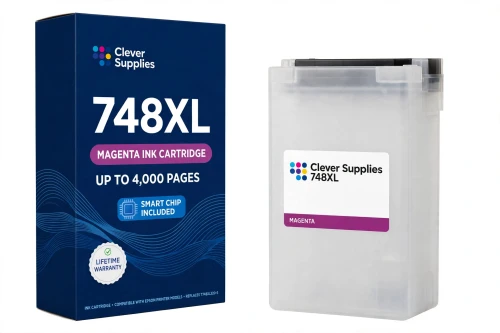
Compatible Epson 748XL T748XL320 Magenta Ink Cartridge
- Page Yield:
- Up to 4,000 pages (ISO/IEC 24711)
- Shipping:
- Calculated at Checkout

Amazon Price:

- Page Yield:
- Up to 4,000 pages (ISO/IEC 24711)
- Shipping:
- Calculated at Checkout
- Compatible Printers
- Specifications
- SKU:
- CS-EP-748-MXL
- Condition:
- New Compatible
- OEM Part #:
- T748XL320
- Color:
- Magenta
- Ink Type:
- Pigment
- Page Yield:
- Up to 4,000 pages (ISO/IEC 24711)
- Chip:
- New compatible chip
- Warranty:
- Lifetime Warranty
- Returns:
- 1-Year Free Returns
- Description
- Reviews
Color work on a WorkForce Pro runs on packs like this one: our compatible T748XL320 carries DURABrite Pro pigment magenta ink rated up to 4,000 pages (ISO/IEC 24711), against 1,500 pages for the standard color pack in this family. The 748 products are large ink packs, not small home cartridges: the PrecisionCore print head stays in the printer, and the pack supplies ink plus its green IC chip, so replacing magenta means replacing only the color that is spent.



Our shelf for this family is deliberately narrow, and this page states it plainly: we stock the XL tier as individual packs — this T748XL320, alongside T748XL120 black (up to 5,000 pages), T748XL220 cyan (up to 4,000 pages), T748XL420 yellow (up to 4,000 pages). Epson's catalogue also lists a standard tier and an XXL tier (black up to 10,000 pages, colors up to 7,000 each), but there is no compatible ladder for those tiers in our range and no 748 set is sold here, so each color is ordered on its own when the printer calls for it. This cartridge carries a new compatible chip. If your printer's firmware has been updated, recognition issues can occasionally occur — reseat the pack firmly and restart the printer before assuming the pack is at fault, and consider pausing automatic firmware updates before a big print run.
It fits all five verified 748-family models — WF-6090, WF-6530, WF-6590, WF-8090 and WF-8590 — in the XL position. One tier warning belongs on every 748 page: the WF-6530 takes standard and XL packs only, so XXL packs are not for that model; the other four models accept XXL in Epson's catalogue, but that does not change what this XL pack is. Nothing here fits a different Epson family. Covered by our lifetime warranty, with free returns for the first year.
Shop the Epson 748 family: T748XL120 Black Ink Cartridge · T748XL220 Cyan Ink Cartridge · T748XL420 Yellow Ink Cartridge
Browse by series: WorkForce
Frequently Asked Questions
Which WorkForce Pro models use the T748XL320?
Five models are verified for the 748 family — WF-6090, WF-6530, WF-6590, WF-8090 and WF-8590 — and every one of them accepts the XL tier across all four colors, magenta included.
How many pages should I expect from this magenta pack?
Up to 4,000 pages. That is Epson's published rating for the genuine pack under the ISO/IEC 24711 pattern, and your real total will move with coverage, paper and cleaning cycles: coverage-heavy color work comes in below the rating, lighter documents nearer to it.
Why does magenta sometimes empty ahead of the other two colors?
Presentations, marketing material and photographs lean heavily on warm tones, and magenta carries much of that load. Its rating matches the other colors in this tier — up to 4,000 pages — but actual consumption is set by what you print, not by the rating table.
What happens if a firmware update changes how the printer reads chips?
This pack uses a new compatible chip, and recognition trouble after a firmware update is possible on occasion. If a warning appears following an update, power the printer down, reseat the pack so it sits firmly, and restart before concluding the pack is at fault. We cannot promise recognition under every future firmware release; where a recognition fault cannot be cleared, our lifetime warranty covers the pack.
The printer refuses to accept the new magenta pack. What should I check?
Start with the basics: switch off, take the pack out, and inspect the green chip contacts — clean, dry, and not touched by hand. Refit the pack and power back on. If a firmware update came immediately before the message, treat the update as the likely trigger and contact us; we will work through the problem with you under the lifetime warranty.
Is the ink in this pack pigment-based or dye-based?
Pigment-based: DURABrite Pro, the ink Epson specifies for the entire 748 family in all four colors. It is the pigment formulation that gives these workgroup printers output resistant to smudging, water and fading.
Who manufactures the T748XL320 sold here?
Clever Supplies. This is a compatible ink pack built to the T748XL320 specification, labeled compatible on its box and on this page. It is not a genuine Epson product and Epson does not make it.
Can this pack share the printer with standard or XXL packs?
Yes, so long as your model accepts the tiers involved. Positions are independent, so an XL magenta can sit alongside a standard or XXL black. The one family exception is the WF-6530, which accepts standard and XL only — never fit XXL packs to that model.
Why doesn't this page state the ink volume in millilitres?
Epson's official US sources state no millilitre volume for the 748 packs, so there is no verified figure to print. We leave the Volume field blank instead of filling it with a reseller's claim; the ISO page yield is the comparison that can be checked for this family.
How do I change the magenta pack?
Remove the spent pack from the magenta position, unwrap its replacement only when you are ready, and — without touching the green chip — insert the new pack until it seats firmly. Let the ink charge fully before you print, and swap promptly after removal so the print head does not dry out.
How should an unopened spare magenta pack be kept?
Keep it in its sealed packaging, standing upright, somewhere at room temperature away from direct sunlight, and do not open it before installation day. No specific shelf-life figure is published for this product, so none is printed in its specifications.
Can I order all four 748 colors together as a set?
Not from us: our range has no compatible 748 set, so the four XL colors are ordered pack by pack. That way you only ever buy the color the printer is actually asking for. Each pack carries the lifetime warranty, and returns are free for the first year.
Related Items
Epson
Compatible Epson 748XL T748XL220 Cyan Ink Cartridge
Color work on a WorkForce Pro runs on packs like this one: our compatible T748XL220 carries DURABrite Pro pigment cyan ink rated up to 4,000 pages (ISO/IEC 24711), against 1,500 pages for the...


Epson
Compatible Epson 748XL T748XL120 Black Ink Cartridge
This is the high-capacity black ink pack the 748 family does its heavy lifting with — our compatible T748XL120 carries DURABrite Pro pigment ink rated up to 5,000 pages (ISO/IEC 24711), twice the...
Epson
Compatible Epson 748XL T748XL420 Yellow Ink Cartridge
Color work on a WorkForce Pro runs on packs like this one: our compatible T748XL420 carries DURABrite Pro pigment yellow ink rated up to 4,000 pages (ISO/IEC 24711), against 1,500 pages for the...
Epson
Compatible Epson 924XL T924XL320 Magenta Ink Cartridge
Magenta carries the warm half of everything a small office prints in color — the red end of charts, photos in reports, the logo on the letterhead. Our compatible T924XL320 carries DURABrite Ultra...