






 See Compatible Printers
 Read more about our ink!
Brother
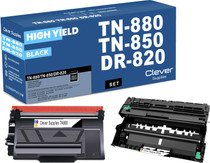
Compatible Brother TN880-DR820 Black Drum and Toner Set
- Page Yield:
- Toner:12,000 pages, Drum:30,000 pages
- Availability:
- In Stock
- Shipping:
- Calculated at Checkout

Amazon Price:

- Page Yield:
- Toner:12,000 pages, Drum:30,000 pages
- Availability:
- In Stock
- Shipping:
- Calculated at Checkout
- Compatible Printers
- HL-L6200
- HL-L6250
- HL-L6300
- HL-L6400
- HL-L6200DW
- HL-L6200DWT
- HL-L6250DW
- HL-L6300DW
- HL-L6400DW
- HL-L6400DWT
- MFC-L6700
- MFC-L6750
- MFC-L6800
- MFC-L6900
- MFC-L6700DW
- MFC-L6750DW
- MFC-L6800DW
- MFC-L6900DW
- Brother-TN570
- Brother-TN820
- Brother-TN850
- Brother-TN880
- DCP-8040
- DCP-8040D
- DCP-8045
- DCP-8045D
- DCP-8045DN
- DCP-L5500
- DCP-L5500DN
- DCP-L5600
- DCP-L5600DN
- DCP-L5650
- DCP-L5650DN
- DCP-L6600
- HL-5100
- HL-5130
- HL-5140
- HL-5140LT
- HL-5150
- HL-5150D
- HL-5150DLT
- HL-5170
- HL-5170D
- HL-5170DLT
- HL-5170DN
- HL-5170DNLT
- HL-5170N
- HL-L5000
- HL-L5000D
- HL-L5100
- HL-L5100DN
- HL-L5200
- HL-L5200DW
- HL-L5200DWT
- HL-L6250 DN
- HL-L6300 T
- HL-L6400DWG
- HL-L6400DWX
- MFC-8120
- MFC-8120NCH
- MFC-8220
- MFC-8220N
- MFC-8440
- MFC-8440D
- MFC-8440DN
- MFC-8640
- MFC-8640D
- MFC-8840
- MFC-8840D
- MFC-8840DN
- MFC-8840DTN
- MFC-L5700
- MFC-L5700DN
- MFC-L5700DW
- MFC-L5750DW
- MFC-L5800
- MFC-L5800DW
- MFC-L5850
- MFC-L5850DW
- MFC-L5900
- MFC-L5900DW
- MFC-L6900DWG
- MFC-L6900DWX
- Specifications
- SKU:
- CS-Bro-TN880-DR820-Set-N
- Printer Brand:
- Brother
- OEM Number:
- TN880-DR820
- Ink Color:
- Black
- Page Yield:
- Toner:12,000 pages, Drum:30,000 pages
- Printer Type:
- Laser Cartridge
- Condition:
- New Compatible
- Description
- Reviews

/> 

For optimal printing performance in a variety of Brother printers and multifunction devices, look no further than the Brother TN880 TN850 toner cartridge and DR820 drum unit. Compatible with models such as HL-L6200, MFC-L6750, and more, these consumables ensure reliable and consistent results. The TN880 toner cartridge delivers exceptional print quality, producing sharp and clear black prints suitable for a range of printing tasks. Whether it's the HL-L6300 or the MFC-L6900DW, this cartridge consistently meets high standards of performance. Meanwhile, the DR820 drum unit is essential for maintaining the printing process, ensuring precise transfer of toner onto paper for accurate reproduction of images and text. Compatible with printers like the HL-L6400DW and MFC-L6800, this drum unit ensures smooth printing operations. With features like high page yield and easy installation, the TN880 TN850 toner cartridge and DR820 drum unit combo provide cost-effective printing solutions, minimizing interruptions and maximizing productivity. Whether you're printing documents for business or personal use, these consumables offer reliable performance across the entire Brother printer lineup. From the HL-L6200DW to the MFC-L6900, users can trust the Brother TN880 TN850 toner cartridge and DR820 drum unit to deliver consistent and high-quality prints.
Frequently Asked Questions
My prints have both faded text and background streaks — can one order fix both problems?
Yes, and that combination of symptoms is exactly why this pairing exists. Fading usually points to a toner at the end of its life, while streaks and background shading usually point to a tired drum. Changing both together — one TN880 toner and one DR820 drum for $49.48 — resets print quality in a single swap instead of fixing one fault and discovering the other a week later.
What should output look like right after the swap?
Expect the factory-style result the pair is designed to restore: solid blacks from the fresh 12,000-page TN880 cartridge and a clean background from the new DR820 drum, which is rated at 30,000 pages. If a first test page carries a faint line, run the printer's drum cleaning routine once and print again.
How much cheaper is the joint fix than replacing the parts one at a time?
The separate route costs $34.33 for the TN880 plus $34.55 for the DR820 — $68.88 in total. Doing it as this single set costs $49.48, so the joint reset saves $19.40 as well as a second delivery wait. For the full platform compared — all four toner steps (TN820, TN850, TN880 and TN890) with their pack prices and cost per page, plus which machines take the DR820 drum and which five need the DR890 instead — see our Best Brother TN850 Toner Cartridges guide. The Best Brother DR820 Drum Unit guide covers all four set shapes this family sells, and the five models a TN880-and-drum bundle genuinely serves — fewer than its listing names.
Does changing both at once make troubleshooting harder later?
Actually it makes it easier. With both components starting at zero pages on the same day, any future fault is simpler to read: toner issues will track with the 12,000-page cartridge life, drum issues with the 30,000-page drum life, and you know the exact date both clocks started.
Which printers can get this full quality reset?
The reset applies to the Brother models built for the TN880 toner and DR820 drum combination, listed here: HL-L6200, HL-L6250, HL-L6300, HL-L6400, HL-L6200DW, HL-L6200DWT, HL-L6250DW, HL-L6300DW, HL-L6400DW, HL-L6400DWT, MFC-L6700, MFC-L6750, MFC-L6800, MFC-L6900, MFC-L6700DW, MFC-L6750DW, MFC-L6800DW and MFC-L6900DW
If the new pair does not restore my print quality, what then?
Start with us: support is available 9 AM–5 PM CST and can walk through cleaning and seating checks. Both items are Clever Supplies compatibles covered for a full year — 1-year warranty and 1-year free returns, detailed on our Shipping & Returns page — and orders leave from warehouses in IL, PA, GA and CA.
What is the fairest test of the new pair once fitted?
Reprint the exact document that showed the fading and streaks before the swap, on the same paper with the same settings. Judged against its own earlier output, the fresh TN880 and DR820 either have or have not cleared both faults — no guesswork from a generic test page. Keep the old print beside the new one until you are satisfied the faults have gone.
We mostly copy on our MFC — does that change what this set does for us?
No. Copies on the MFC-L6700 and MFC-L6800 series machines image through the same TN880 cartridge and the same DR820 drum as prints, so the faded-text and streak faults this set exists to fix appear in copying for the same reason and clear in the same swap. The drum's 30,000 pages and the cartridge's 12,000 are spent by copies and prints alike.
Should the old drum and cartridge go straight into recycling?
Not on the same day. Keep the removed pair for a few days while the new TN880 and DR820 prove themselves on real work. If a fault reappears, the old parts let you swap one component back and isolate whether the cartridge or the drum is responsible — a test that becomes impossible the moment the old pair has left the building.
The platform takes more than one cartridge size — which one is in this set?
The largest: the TN880, rated at 12,000 pages. This family runs three cartridge sizes under the same DR820 drum, and the sizes differ in how much toner they hold rather than in how they fit. Checking the TN880 code on the cartridge label before fitting confirms you are installing the long-life size this set promises, not a shorter-life cartridge taken from the same shelf.
About This TN880 and DR820 Print-Quality Reset Set
When faded text and streaky backgrounds show up together, this 1 drum + 1 toner set is the one-order answer: a TN880 toner rated at 12,000 pages seated in a fresh DR820 drum rated at 30,000 pages, for $49.48 instead of $68.88 separately ($19.40 saved). Replacing the imaging pair together returns output to a clean baseline and restarts both service clocks on the same day. Related supplies sit on our Brother page.
Printer showing "Replace Toner" or "No Toner" after a cartridge change? Our TN820, TN850 and TN880 troubleshooting guide walks through the reset-gear check, the counter reset and the three-size rule for this family.
Related Items

Brother
Compatible Brother TN880-DR820 Black Drum and 2 Toner Set
/>


Brother
Compatible Brother TN880-DR820 Black Drum and 3 Toner Set
/>

Brother
Compatible Brother TN880-DR820 Black 2 Drum and 2 Toner Set
/>

Brother
Compatible Brother DR820 Black Drum and Toner Set
/>