




ImageRunner Advance C5051
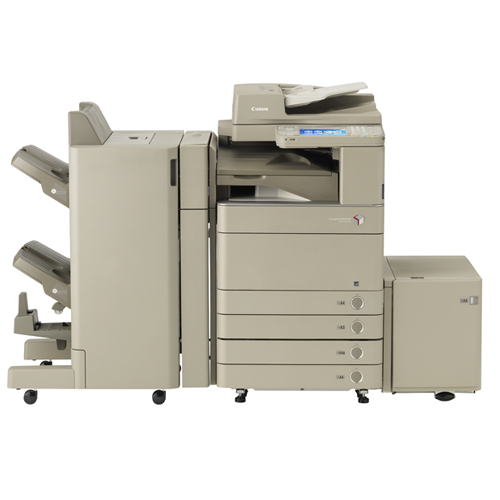
Speed defined this machine: at 51 pages per minute in color and in black-and-white alike, the Canon imageRUNNER ADVANCE C5051 was the quickest model in the first-generation C5000 line, built for departments that push serious volume through one shared device. It prints over the network, duplexes automatically and handles the copy, scan and send work of a full color MFP. All of that output runs on a single toner family, the Canon GPR-30: the black cartridge is rated for up to 44,000 pages, while the cyan, magenta and yellow cartridges each carry a rating of roughly 38,000 pages, so a busy floor can go a long time between swaps.
A machine like this rarely belongs to one person. It sits in a department workroom or a print corner where marketing drafts, contracts, reports and scanned paperwork all land on the same output tray, and where a toner warning at the wrong moment holds up everyone at once. The practical habit for C5051 owners is simple: watch the black cartridge, because monochrome jobs dominate most office queues, and keep one spare on the shelf so a long run never stalls mid-job.
Toner Cartridges for ImageRunner Advance C5051
| Cartridge | Color | Page Yield |
|---|---|---|
| GPR-30 Black | Black | 44,000 pages |
| GPR-30 Cyan | Cyan | 38,000 pages |
| GPR-30 Magenta | Magenta | 38,000 pages |
| GPR-30 Yellow | Yellow | 38,000 pages |
| GPR-30 4 Color Set | Black, Cyan, Magenta, Yellow | 44,000 (black), 38,000 (colors) |
| GPR-30 Premium 4 Color Set | Black, Cyan, Magenta, Yellow | 44,000 (black), 38,000 (colors) |
Which cartridge should you buy?
Start with how your department actually prints. If the queue is mostly black-and-white documents with occasional color, the GPR-30 Black single is the cartridge you will reorder most, and its 44,000-page rating already stretches far between orders. Color cartridges empty one at a time, so replace only the slot the panel calls for instead of changing all three. When several colors are running low together, or the machine is new to you and you want a known starting point, the GPR-30 4 Color Set refreshes every slot in one order; the Premium 4 Color Set is the same four-cartridge lineup in the premium build. Every compatible cartridge here is covered by a 1-year warranty and 1-year returns.
Chip, toner and everyday use
Swaps on this platform are front-cover work: open the door, pull the spent unit straight out, rock the replacement gently from side to side so the toner inside settles evenly, and slide it home until it seats. The machine reads the cartridge chip on its own; if a recognition prompt appears, reseating the unit usually clears it. Yield figures assume about 5% page coverage, so dense graphics and full-bleed color pages will land lower in real life. Store unopened spares upright, indoors and away from heat, and rotate stock so the oldest box is used first.
Frequently Asked Questions
What toner does the imageRUNNER ADVANCE C5051 take?
It takes the Canon GPR-30 family: one black cartridge rated near 44,000 pages and cyan, magenta and yellow cartridges rated around 38,000 pages each. All four singles and two four-color sets are listed in the table above.
My C5051 says only one color is empty. Do I change all three?
No. Each color lives in its own slot and can be replaced on its own, so a low magenta warning only calls for the magenta cartridge. Changing the others early simply throws away the toner still left in them.
How long does a GPR-30 black cartridge realistically last?
The rating is up to 44,000 pages at 5% coverage, which is a light text page. Offices printing dense reports or graphics-heavy pages will see fewer pages, which is normal for any cartridge rated on that standard.
Are these compatible cartridges covered if something goes wrong?
Yes. The compatible GPR-30 cartridges on this page carry a 1-year warranty, and returns are accepted for a full year, so a department can try them without a long-term commitment.
More printers that use the same cartridges
The same GPR-30 family also feeds these related models: ImageRunner Advance C5235A, ImageRunner Advance C5240, ImageRunner Advance C5240A, ImageRunner Advance C5250, ImageRunner Advance C5255, ImageRunner C5030, ImageRunner C5035, ImageRunner C5045, ImageRunner C5051, ImageRunner Advance C5030, ImageRunner Advance C5030I, ImageRunner Advance C5035, ImageRunner Advance C5035I, ImageRunner Advance C5045, ImageRunner Advance C5045I, ImageRunner Advance C5045P, ImageRunner Advance C5051I, ImageRunner Advance C5051P, ImageRunner Advance C5235.