




WorkCentre 7220i
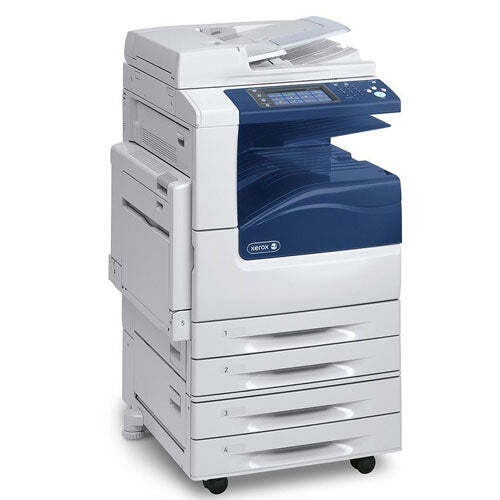
The WorkCentre 7220i is a color laser multifunction built for workgroups that watch running costs, and it draws on the family cartridge system: 006R01457 black — about 22,000 pages to a cartridge — plus 006R01460 cyan, 006R01459 magenta and 006R01458 yellow. On this page those cartridges are sold as multi-packs and sets rather than singles, which suits offices that restock in planned batches instead of one cartridge at a time.
The 7220i earns its keep on balance: color output good enough for client-facing documents, running costs low enough to survive a budget review. Machines like this tend to stay in service for years, passed between teams, and the supply routine that develops around them is batch-based — a box arrives, the shelf is full again, and nobody thinks about toner for months. The pack listings below are built around exactly that habit.
Toner Cartridges for WorkCentre 7220i
| Cartridge | Color | Page Yield |
|---|---|---|
| 006R01457 — Black 2 Pack | Black | 22,000 pages per cartridge |
| 006R01457 / 006R01460 / 006R01459 / 006R01458 — 5 Color Set | Black + all three colors | See product page |
| 006R01460 / 006R01459 / 006R01458 — 3 Color Set | Cyan + magenta + yellow | See product page |
Which cartridge should you buy?
Three listings cover every restock pattern. The 006R01457 Black 2 Pack is the black-only refill: two cartridges, each rated around 22,000 pages, for the slot that empties first and most predictably. The 3 Color Set bundles cyan, magenta and yellow for the day the colors run down together.
The 5 Color Set is the full reset — it is built from the same four cartridge numbers with black doubled, so one box restores every slot and leaves a spare black behind. If your 7220i's colors are healthy and only black is low, skip the sets and take the 2 Pack; buying colors you do not need yet is the one waste this page lets you avoid. All listings carry a 1-year warranty and 1-year returns on the compatible cartridges.
Chip, toner and everyday use
Pack buying rewards a small amount of shelf discipline: note which box went in and when, because the 7220i's level readouts — not the calendar — should drive the next order. Keep unopened packs sealed and stored flat at room temperature. When a cartridge from a set goes in, push it home until it clicks and give the machine a moment to read the chip before queuing a job; a half-seated cartridge is the usual cause of a false "not recognized" message.
Frequently Asked Questions
Why are there no single cartridges on this page?
This model's listings are the family's multi-packs and sets: a black 2 Pack, a 3 Color Set and a 5 Color Set. They contain the same four cartridge numbers the whole family uses — the packaging is what differs.
What is in the 5 Color Set?
It is built around 006R01457 black, 006R01460 cyan, 006R01459 magenta and 006R01458 yellow, with the black cartridge doubled — five cartridges in the box.
Only my black is empty. Which listing do I want?
The 006R01457 Black 2 Pack. It restocks the black slot twice over and leaves your color cartridges — and your budget — untouched.
How long should a black cartridge last in a 7220i?
Around 22,000 pages at the standard 5% coverage measure. A workgroup printing heavy graphics or full-color pages will see shorter real-world runs.
More printers that use the same cartridges
These sibling models run on the same four cartridge numbers: WorkCentre 7120, WorkCentre 7120s, WorkCentre 7120t, WorkCentre 7125, WorkCentre 7125s, WorkCentre 7125t, WorkCentre 7220, WorkCentre 7220t, WorkCentre 7225, WorkCentre 7225i, WorkCentre 7225t, WorkCentre WC7220TI, WorkCentre WC7225TI.