




Versalink C500 DN
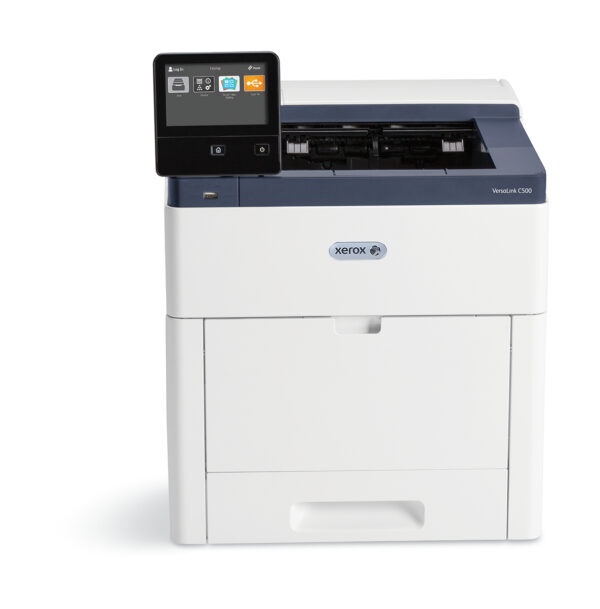
When a whole team shares one printer, the VersaLink C500 DN earns its place: it is a workgroup color laser printer with networking and two-sided printing built in, so reports, handouts and routine documents all come from a single shared machine. Xerox built two cartridge families for it. The standard family pairs black 106R03862, rated around 5,500 pages, with cyan 106R03863, magenta 106R03864 and yellow 106R03865 at roughly 3,000 pages apiece. Every cartridge stocked on this page comes from the high-capacity family instead: black 106R03869 at about 12,100 pages, plus cyan 106R03866, magenta 106R03867 and yellow 106R03868 at roughly 9,000 pages each — the supplies to choose when a shared printer cannot keep pausing for swaps.
A networked printer in the middle of an office lives differently from a desktop unit. Jobs arrive from every desk, two-sided documents are the default rather than the exception, and nobody owns the job of watching toner levels. Running the high-capacity family on the C500 DN matches that reality: the black cartridge covers more than twice the pages of the standard one, and each color stretches about three times as far, so the machine spends its time printing instead of waiting on whoever ordered supplies last.
Toner Cartridges for Versalink C500 DN
| Cartridge | Color | Page Yield |
|---|---|---|
| 106R03869 | Black | About 12,100 pages |
| 106R03866 | Cyan | About 9,000 pages |
| 106R03867 | Magenta | About 9,000 pages |
| 106R03868 | Yellow | About 9,000 pages |
| 106R03869 | Black — 2 Pack | About 12,100 pages each |
| 106R03866, 106R03867, 106R03868 | Cyan, Magenta, Yellow — 3 Color Set | About 9,000 pages each |
| 106R03869, 106R03866, 106R03867, 106R03868 | All four colors — 4 Color Set | Black about 12,100 pages; colors about 9,000 pages |
| 106R03869, 106R03866, 106R03867, 106R03868 | All four colors — 5 Color Set | Black about 12,100 pages; colors about 9,000 pages |
Which cartridge should you buy?
Start with the black cartridge, because shared machines burn through black fastest. The high-capacity black on this page is rated around 12,100 pages against roughly 5,500 for the standard cartridge, so one swap covers the work of more than two. Offices whose queue is mostly text documents can stretch further with the black 2 pack and stop thinking about toner for long stretches. Colors behave differently: cyan, magenta and yellow rarely run dry together, since charts, logos and photos use them unevenly. Replace a single color as it fades, and reach for the 3 color set only when two or three colors are low at once — that pattern keeps fresh cartridges in the slots that need them instead of retiring ones with toner left. The full four- and five-cartridge sets suit a planned refresh of every slot at the same time.
Chip, toner and everyday use
The C500 DN reads a chip on each cartridge to report its level and confirm the right cartridge is in the right slot, so seat a new cartridge firmly until it clicks and let the printer finish recognizing it before sending a long job. Page ratings assume about five percent coverage per page; a week of full-color presentations will drain the colors well ahead of the estimate, while plain memos sip toner. Keep each spare in its sealed bag until the swap, store it flat in a cool cupboard, and give a cartridge that has sat for months a gentle side-to-side rock before installing it.
Frequently Asked Questions
What toner does the VersaLink C500 DN use?
It takes the 106R03862 standard family and the high-capacity family sold on this page. The standard black is rated around 5,500 pages with the three colors near 3,000 pages each, while the high-capacity black reaches about 12,100 pages and the colors about 9,000 pages each.
Why does this page only list high-capacity cartridges?
Shared workgroup machines go through standard cartridges quickly, so this page stocks the family that lasts: every listing here is a high-capacity cartridge, a black 2 pack, or a set built from that family.
One color ran out. Do I have to buy the whole set?
No. Each color sits in its own slot and is sold individually on this page, so order just the cyan, magenta or yellow cartridge the printer is asking for and leave the others in place.
The printer does not recognize the new cartridge. What should I check?
Open the front cover, pull the cartridge out and confirm it matches the color of the slot, then push it back in until it seats with a click. If the message stays, power the printer off and on so it reads the chip again.
More printers that use the same cartridges
If your office also runs one of these models from the same cartridge family, its page carries the same high-capacity supplies: Versalink C500N, Versalink C505 X and Versalink C505S.