






 See Compatible Printers
 Read more about our ink!
Xerox
Compatible Xerox C500 (106R03867) Toner Cartridge Magenta
- Page Yield:
- Color: 9000
- Availability:
- In Stock
- Shipping:
- Calculated at Checkout

Amazon Price:

- Page Yield:
- Color: 9000
- Availability:
- In Stock
- Shipping:
- Calculated at Checkout
- Compatible Printers
- Specifications
- SKU:
- CS-Xerox-C500-M
- Printer Brand:
- Xerox
- OEM Number:
- 106R03867
- Ink Color:
- Magenta
- Page Yield:
- Color: 9000
- Printer Type:
- Laser Cartridge
- Condition:
- New Compatible
- Description
- Reviews

/> 

Clever Supplies Compatible with Xerox Versalink C500 DN C500N C505 X C505S toner cartridge
Frequently Asked Questions
Why does our logo red look muted on paper and our purple look too blue, when both were fine last month?
Brand colors are the least forgiving test a cartridge ever faces. A company red and a company purple are not printed from one cartridge each — they are precise blends, and magenta is the ingredient that gives the red its fire and keeps the purple from sliding toward navy. When the 106R03867 supply weakens, those two signature colors drift first and furthest, long before a general document looks obviously wrong. If the letterhead still seems acceptable but the logo on a brochure proof no longer matches the brand sheet, suspect the magenta cartridge before you blame the file or the paper.
Why do faces in printed headshots and staff photos lose their natural look before text pages show any problem?
Skin is mostly mid-tones, and magenta does much of the quiet work inside them — the warmth in a cheek, the color in lips, the difference between a healthy complexion and a gray, drained one. A photograph exposes a weakening cartridge in a way a page of black text never will, because the eye notices a face that looks slightly sunburned, flat or lifeless even when it cannot name what changed. If your printed portraits have stopped looking like the people in them while reports and invoices still print cleanly, the fading magenta unit is the most likely explanation.
Why did our magenta quality start slipping weeks before the printer reported the cartridge as low?
The level shown on the printer is an estimate, not a promise that output stays perfect until the number reaches zero. In the last stretch of its life a cartridge lays color down less evenly, so rich reds lose depth, berry and wine shades flatten, and large blocks of color can look slightly patchy while the machine still reports toner remaining. Treat your own prints as the earlier warning: once color-critical work starts to shift on the page, the cartridge is effectively finished for that kind of job, whatever the gauge still says. That is the moment to order this 106R03867 replacement, not after the printer stops you mid-run.
Can I start a long brochure run on a magenta cartridge that has begun to fade, or will the finished stack look inconsistent?
It can, and that inconsistency is the real risk. A cartridge in decline does not hold one steady shade — it drifts as the run progresses, so the first fifty brochures off the machine can carry a noticeably different red from the last fifty, and the mismatch shows the moment the copies sit side by side in a pile. For a short internal draft that drift rarely matters, but for handouts, mailers or anything a customer will compare copy to copy, fit the fresh cartridge before the run starts. Beginning the job on a new 106R03867 keeps one consistent magenta strength from the first sheet to the final one.
Which VersaLink machines is this single magenta cartridge built for?
It is built for the Versalink C500 DN and the Versalink C500N printers, and for the multifunction models in the same family, the Versalink C505 X and the Versalink C505S. Matching the badge on your machine against that list, together with the 106R03867 code on the magenta cartridge you are taking out, confirms this is the right single replacement for your printer.
What protection, delivery and support come with this magenta cartridge?
It arrives with a 1-year warranty and 1-year free returns, so if the cartridge itself proves faulty you are covered for a full year rather than left carrying the cost. Orders ship from whichever of our warehouses in IL, PA, GA or CA gets the cartridge to you soonest, and the complete terms are published on our shipping & returns page. If you want help confirming the code before you order, our support team is available Monday to Friday, 9 AM to 5 PM CST, and the full range for these machines is listed in the Xerox section of the store.
How do I prove it is the cartridge and not our logo file before I order?
Find a print of the brand sheet from when output was good — most offices have one in a folder or pinned in a brand pack — and print the same file again now. Lay the two side by side. The file has not changed, so if today's red has lost its fire and the purple has slid toward navy, the change happened inside the machine, and magenta is the one ingredient both of those colors are built from. That comparison isolates the 106R03867 without touching a single setting, and it takes less time than one round of adjusting colors on screen.
Is it worth keeping a sealed spare magenta purely for brand work?
For an office whose proofs and mailers carry the company colors, yes. Magenta quality slips gradually, weeks before the printer reports the level as low, which means the drift is usually discovered at the worst moment — with a brochure deadline already on the machine. A sealed 106R03867 on the shelf, stored flat in a cool, dry cupboard, turns that discovery into a two-minute swap instead of a delivery wait. You are not stocking deep; you are insuring the one color your business is judged by, at the price of one cartridge.
After fitting the new cartridge, how do I sign off that brand color is back?
Print the logo sheet and one headshot page, and compare both against the approved printed sample your office works from — not against the screen, which flatters everything. The red should carry its full depth again, purples should sit on the brand shade rather than leaning blue, and faces should look like their owners. Keep that fresh print with the brand materials as the new reference copy. If the comparison still fails with a new 106R03867 installed, the problem is not the cartridge, and you have a clean test result to take to the next step of fault-finding.
What should happen to the old magenta unit?
Once the replacement has passed the brand-sheet test, the old unit goes into the new cartridge's box, marked spent with the date, and out through your usual recycling route. Do not leave it loose on the supply shelf. A part-drained magenta is the easiest cartridge in this family to refit by accident — it still prints, just badly — and one hurried swap during a busy morning puts the muted reds and blue-shifted purples straight back into circulation. A labeled box on its way out of the building cannot cause that.
About This Xerox VersaLink C500 Magenta Toner Cartridge — 106R03867
This is a single compatible magenta toner cartridge, code 106R03867, for the VersaLink C500 and C505 machines named above, priced at $40.31 and rated at up to 9,000 pages — roughly 0.45 cents per page at the rated yield. It is the replacement to reach for when the color your business is recognized by stops printing true: the red in a logo losing its punch, purples leaning blue, and faces in photographs coming off the page looking wrong. Swapping in this one cartridge restores that single spent color while the units still working stay in place, and the other colors for this platform are listed separately so each can be ordered on its own as it runs down. The cartridge is backed by a 1-year warranty and 1-year free returns.
Related Items


Xerox
Compatible Xerox C500 (106R03866, 106R03867, 106R03868) Toner Cartridge 3 Color Set
/>



Xerox
Compatible Xerox C500 (106R03869, 106R03866, 106R03867, 106R03868) Toner Cartridge 4 Color Set
/>

Xerox
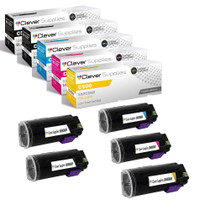
Compatible Xerox C500 (106R03869, 106R03866, 106R03867, 106R03868) Toner Cartridge 5 Color Set
/>

Xerox
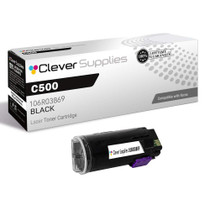
Compatible Xerox C500 (106R03869) Toner Cartridge Black
/>