







 See Compatible Printers
 Read more about our ink!
Xerox
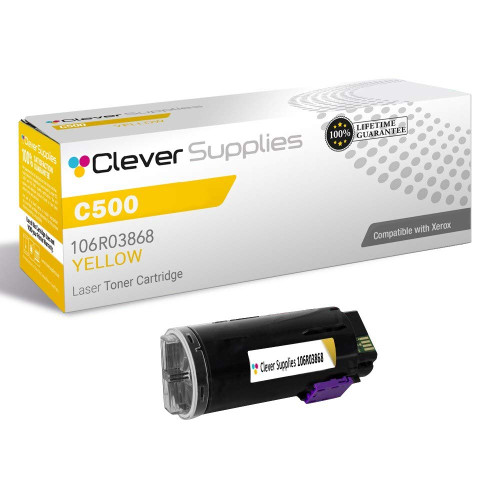
Compatible Xerox C500 (106R03868) Toner Cartridge Yellow
- Page Yield:
- Color: 9000
- Availability:
- In Stock
- Shipping:
- Calculated at Checkout

Amazon Price:

- Page Yield:
- Color: 9000
- Availability:
- In Stock
- Shipping:
- Calculated at Checkout
- Compatible Printers
- Specifications
- SKU:
- CS-Xerox-C500-Y
- Printer Brand:
- Xerox
- OEM Number:
- 106R03868
- Ink Color:
- Yellow
- Page Yield:
- Color: 9000
- Printer Type:
- Laser Cartridge
- Condition:
- New Compatible
- Description
- Reviews

/> 

Clever Supplies Compatible with Xerox Versalink C500 DN C500N C505 X C505S toner cartridge
Frequently Asked Questions
Why are the greens in our leaflets and landscape photos printing blue or teal instead?
Green on this printer is not a color of its own — it is mixed on the page from cyan and yellow in roughly equal parts. Cyan is still laying down at full strength, so when yellow falls away the balance tips and every green leans toward the blue partner in the mix: lawns turn teal, foliage looks like water, and a healthy park scene comes out looking cold and artificial. Nothing is wrong with the cyan cartridge, and the file has not changed. The missing half of the mix is yellow, and fitting this 106R03868 cartridge puts the two halves back in proportion.
Why has the yellow series almost vanished from our charts while the other bars still print boldly?
Yellow is the palest ink on the page, so a chart exposes a weakening cartridge before a paragraph ever does. The blue and red bars hold their edges against white paper, but a yellow bar, line or pie slice that was already light loses contrast first and can drop out so completely that a printed report looks as if one set of figures is missing altogether. Hand that page to someone in a meeting and they will read the data wrong, not just see a faded color. If one series has quietly disappeared from otherwise sharp graphics, the yellow supply — not the spreadsheet — is the place to look.
Our safety notices and warning sheets rely on yellow panels — why are those backgrounds washing out?
Caution panels, hazard bands and highlighted instruction boxes are usually large, flat areas of pure yellow, and flat areas are where a tired cartridge shows its weakness most plainly: the panel prints streaky, patchy or so pale that the warning no longer stands out from the rest of the sheet. That matters beyond appearance, because a notice that does not catch the eye does not do its job on a workshop wall or inside a manual. A fresh 106R03868 restores a solid, even yellow field, so safety wording framed in yellow reads as urgent again instead of blending into the page.
Why have our orange headings and warm autumn tones started coming out pinkish-red?
Orange is the other great mix on the page, built from magenta laid over yellow. Take yellow out of that pairing and magenta takes over, so orange headings slide toward pink, terracotta and rust tones redden, and warm harvest colors in seasonal material lose the golden part that made them feel warm. It is an easy fault to misread as a magenta problem, because magenta is the color you can suddenly see too much of — but magenta has not grown stronger; the yellow that used to balance it has grown weaker. Replacing this single yellow cartridge corrects oranges without touching a magenta unit that is still working properly.
Which VersaLink models does this yellow cartridge fit?
Four machines take it. On the printer side there is the Versalink C500 DN model and its sibling, the Versalink C500N model; on the multifunction side there is the Versalink C505 X version and its sibling, the Versalink C505S version. Confirm the match two ways before ordering: the model badge on your machine, and the code on the yellow cartridge you are removing, which should read 106R03868.
What cover do I get with this cartridge, and where does my order ship from?
Cover runs for a full year in both directions: a 1-year warranty on the cartridge and free returns for 1 year as well, so a faulty unit is our problem to sort out, not yours to absorb. We send orders out from the warehouse — IL, PA, GA or CA — that serves your address best; full details live on our shipping & returns page. For help checking symptoms or the code before you buy, our support team answers Monday to Friday, 9 AM to 5 PM CST. The rest of the range for these machines sits in the Xerox section, where each remaining color has a separate listing of its own.
What single print tells me the yellow is the problem?
Print one page that carries both a green area — a leaflet header, a landscape photo — and a chart with a yellow series in it. Those two features fail together only when yellow does: the green leans blue because its yellow half is missing, and the yellow bars wash out because there is barely any yellow left to print with. Two seemingly separate faults on one sheet, sharing one missing ingredient, is as close to a signed confession as a cartridge gives. If only one of the two looks wrong, keep looking before you spend on a 106R03868.
We print safety notices — should we order yellow at the low warning, or earlier?
Earlier, and this family is the reason why. Yellow rarely announces its own failure directly; it shows up disguised inside other colors and in washed-out caution panels, sometimes well before the machine calls the cartridge low. A warning sheet whose yellow background no longer stands out is not doing its job on a workshop wall, so for safety and instruction work the first visibly pale panel is the order trigger, not the empty message. At that point there is still toner in reserve for ordinary documents while the replacement is on its way.
Should an office that prints warning sheets keep a spare yellow on hand?
It is the one spare that earns its shelf space in that environment. Large flat yellow panels are the most demanding thing this cartridge prints and the least deferrable — a faded batch of notices cannot simply be reprinted next week and hung up in the meantime. One sealed 106R03868, stored flat in a cool, dry place, means the swap happens the same morning a panel washes out. For offices without that safety workload the calculus is softer, but where the yellow itself carries a warning, the spare is part of the notice system, not a luxury.
How do we stop a spent yellow being put back in by mistake?
Mark it the moment it comes out. A drained yellow cartridge looks perfectly respectable — no dramatic symptoms on the unit itself — so write "spent" and the date on its box before it leaves your hand, and keep it boxed until the new cartridge has proved itself on a green and a chart page. After that it leaves through the usual recycling route. The routine takes seconds, and it protects the next person: nobody refits an empty on purpose, but an unmarked 106R03868 on a shelf is an accident waiting for a busy morning.
About This Xerox VersaLink C500 Yellow Toner Cartridge — 106R03868
What you are buying here is one compatible yellow cartridge on its own — code 106R03868, made for the VersaLink C500 series and its C505 multifunction counterparts. It costs $40.31, and its rating is 9,000 pages, which puts the rated cost near 0.45 cents for each page. Yellow rarely announces its own failure directly; instead it betrays itself through the colors it helps to build, turning greens blue, oranges pink and warning panels anaemic, while a yellow chart series can disappear from the page entirely. This cartridge answers that specific pattern: you swap out only the spent yellow unit and leave the colors that are still printing well exactly where they are, buying each remaining color separately when its own turn comes. Cover is a 1-year warranty together with free returns for 1 year.
Related Items


Xerox
Compatible Xerox C500 (106R03866, 106R03867, 106R03868) Toner Cartridge 3 Color Set
/>



Xerox
Compatible Xerox C500 (106R03869, 106R03866, 106R03867, 106R03868) Toner Cartridge 4 Color Set
/>

Xerox
Compatible Xerox C500 (106R03869, 106R03866, 106R03867, 106R03868) Toner Cartridge 5 Color Set
/>

Xerox
Compatible Xerox C500 (106R03869) Toner Cartridge Black
/>