




DocuColor 260
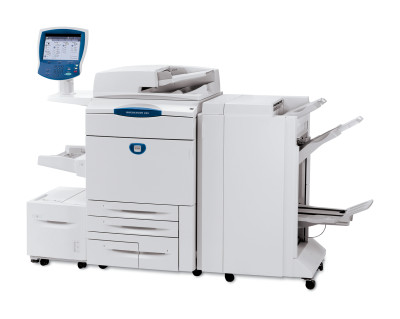
At the top of the family sits the Xerox DocuColor 260, the model shops choose when the heaviest color production workloads are simply the daily norm. Replacement black toner is the 006R01219 cartridge, which we carry in compatible form, and the color side is covered by 006R01222 cyan, 006R01221 magenta and 006R01220 yellow — the same four-cartridge system used across this press line.
Flagship volume reframes every supply decision. A 260 rarely idles, so toner logistics become part of production planning: consumption is forecast from the job queue, spares are staged near the press, and a cartridge change is a scheduled minute rather than an emergency. Buying for this machine is therefore less about any single order and more about building the rotation — working stock, shelf stock, and a reorder point that fires while both still hold.
Toner Cartridges for DocuColor 260
| Cartridge | Color | Page Yield |
|---|---|---|
| 006R01219 | Black | Standard yield |
| 006R01222 | Cyan | Standard yield |
| 006R01221 | Magenta | Standard yield |
| 006R01220 | Yellow | Standard yield |
| DocuColor 260 4 Color Set | Full Set | Standard yield |
| DocuColor 260 Premium Quality 4 Color Set | Full Set | Standard yield |
| 4 Color Set (006R01219 / 006R01222 / 006R01221 / 006R01220) | Full Set | Standard yield |
On the DocuColor 260, imaging does not come from the toner cartridges themselves — it runs through a separate drum that is replaced on its own cycle: the 013R00602 Drum Unit Cartridge (Black).
Which cartridge should you buy?
Run a rotation. Singles are the working tool of a 260 shop: pull from shelf stock, reorder the color you pulled, and let each cartridge's consumption rate set its own par level over a few cycles. Black typically earns the deepest par; colors follow your actual job mix. Bring in a 4 color set — or the premium quality set — when the press is scheduled down for service and a coordinated refresh costs no extra production time. What flagship volume cannot absorb is the zero-stock moment, so set your reorder trigger at the low-toner warning and treat any week you dip into the last spare as a signal to raise that color's par.
Chip, toner and everyday use
At this throughput, small disciplines compound. Stage the next cartridge beside the press before the current one empties so swaps stay under a minute of stopped time; rock the new unit gently before fitting to free settled toner; and confirm the press has read the new cartridge's chip before releasing the next job, since level reporting drives your reorder rhythm. Store the rotation stock in the press room's climate, sealed and flat — cartridges cycled through a hot warehouse age unevenly, and on a flagship press uneven age shows up as uneven density. Keep a simple swap log on the machine: date, color, job. Three columns, and forecasting stops being guesswork.
Frequently Asked Questions
What toner does the DocuColor 260 use?
Four standard-yield cartridges: 006R01219 black, 006R01222 cyan, 006R01221 magenta and 006R01220 yellow. They are sold above as singles and in 4 color sets, including a premium quality set.
Is the drum part of the toner cartridge on the 260?
No. Imaging is handled by the separate 013R00602 drum unit cartridge, replaced on its own longer cycle when print quality indicates wear.
Our 260 shares a press room with WorkCentre machines. Any overlap in supplies?
Yes — several WorkCentre models use this identical toner family; the full list is below, and it makes a shared, shallower spare pool practical.
What if a compatible cartridge underperforms in production?
Compatible cartridges here carry a 1-year warranty and 1-year returns, so a genuinely faulty unit can be exchanged rather than absorbed as a production cost.
More printers that use the same cartridges
One cartridge family stretches across the whole group below, from the DocuColor line into the high-end WorkCentre range: DocuColor 240, DocuColor 242, DocuColor 250, DocuColor 252, WorkCentre 7655, WorkCentre 7665, WorkCentre 7675, WorkCentre 7755, WorkCentre 7765, WorkCentre 7775.