





 See Compatible Printers
 Read more about our ink!
Xerox
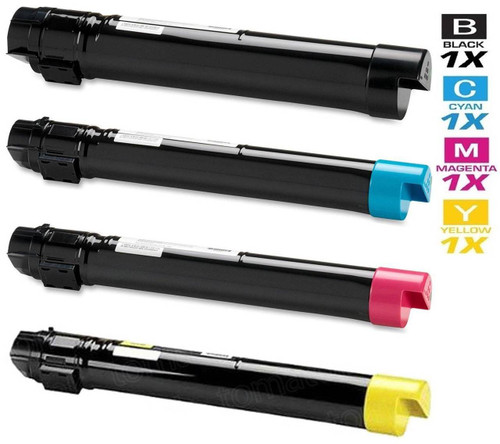
Compatible Xerox Workcentre 7428 RLX Laser Toner Cartridges 4 Color Set
- Page Yield:
- Black: 26,000, Colors: 15,000 each
- Availability:
- In Stock
- Shipping:
- Free Shipping

Amazon Price:

- Page Yield:
- Black: 26,000, Colors: 15,000 each
- Availability:
- In Stock
- Shipping:
- Free Shipping
- Compatible Printers
- WorkCentre 7425
- WorkCentre 7425 FB
- WorkCentre 7425 FBX
- WorkCentre 7425 FL
- WorkCentre 7425 FLX
- WorkCentre 7425 FX
- WorkCentre 7425 R
- WorkCentre 7425 RB
- WorkCentre 7425 RBX
- WorkCentre 7425 RL
- WorkCentre 7425 RLX
- WorkCentre 7425 RX
- WorkCentre 7428
- WorkCentre 7428 FB
- WorkCentre 7428 FBX
- WorkCentre 7428 FLX
- WorkCentre 7428 FX
- WorkCentre 7428 R
- WorkCentre 7428 RB
- WorkCentre 7428 RBX
- WorkCentre 7428 RL
- WorkCentre 7428 RLX
- WorkCentre 7428 RX
- WorkCentre 7435
- WorkCentre 7435 FB
- WorkCentre 7435 FBX
- WorkCentre 7435 FL
- WorkCentre 7435 FLX
- WorkCentre 7435 FX
- WorkCentre 7435 R
- WorkCentre 7435 RB
- WorkCentre 7435 RBX
- WorkCentre 7435 RL
- WorkCentre 7435 RLX
- WorkCentre 7435 RXi>
- WorkCentre 7425FB
- WorkCentre 7425FBX
- WorkCentre 7425FL
- WorkCentre 7425FLX
- WorkCentre 7425FX
- WorkCentre 7425R
- WorkCentre 7425RB
- WorkCentre 7425RBX
- WorkCentre 7425RL
- WorkCentre 7425RLX
- WorkCentre 7425RX
- WorkCentre 7428FB
- WorkCentre 7428FBX
- WorkCentre 7428FLX
- WorkCentre 7428FX
- WorkCentre 7428R
- WorkCentre 7428RB
- WorkCentre 7428RBX
- WorkCentre 7428RL
- WorkCentre 7428RLX
- WorkCentre 7428RX
- WorkCentre 7435 RX
- WorkCentre 7435FB
- WorkCentre 7435FBX
- WorkCentre 7435FL
- WorkCentre 7435FLX
- WorkCentre 7435FX
- WorkCentre 7435R
- WorkCentre 7435RB
- WorkCentre 7435RBX
- WorkCentre 7435RL
- WorkCentre 7435RLX
- Specifications
- SKU:
- Workcentre-7428-RLX
- Printer Brand:
- Xerox
- OEM Number:
- 006R01395, 006R01398, 006R01397, 006R01396
- Ink Color:
- Black, Cyan, Magenta, Yellow
- Page Yield:
- Black: 26,000, Colors: 15,000 each
- Printer Type:
- Laser Cartridge Set
- Condition:
- New Compatible
- Description
- Yields up to: Black: 25000 Colors: 15000 each
- Compatible Xerox Workcentre 7428 RLX Laser Toner Cartridges 4 Color Set can produce renown Xerox quality printing and reliability
- Unlike bargain brand toners compatible Xerox 4 Color Set Toner Cartridges are designed to work specifically in Xerox printers for exceptional reliability that helps reduce maintenance costs and service calls
- Ink/Toner Color: 4 Color Set
- Ink/Toner Pack Size: 4/Set
- Supply Type: Toner
- Compatible with: Xerox WorkCentre: 7425 7425 FB 7425 FL 7428 7428 FB 7428 FX 7435 7435 R 7435 RB series printers
- Cartridge Yield Type: Standard
- Ink/Toner Cartridge Type: Compatible
- Reviews

/> 

Compatible Xerox Workcentre 7428 RLX Laser Toner Cartridges 4 Color Set is designed and tested to ensure optimum performance and outstanding productivity
Xerox 4 color set toner cartridge is designed to deliver the best image quality and reliable printing. Toner cartridge is compatible with Xerox WorkCentre: 7425 7425 FB 7425 FL 7428 7428 FB 7428 FX 7435 7435 R 7435 RB series printers and yields up to Black: 25000 Colors: 15000 each.
Features:
Frequently Asked Questions
Marketing wants photo-heavy flyers from this copier — what should we expect?
Respectable graphics, honestly framed. A laser multifunction prints crisp charts, bold color blocks and perfectly presentable flyers, though it will not rival a dedicated photo printer for subtle skin tones. The bigger practical point is appetite: a full-page photograph is the hungriest page this machine ever prints, laying color toner across nearly every square inch. Treat image runs as a separate budget in your head.
Why did one brochure run pull so much cyan and magenta?
Because photographs and rich illustrations are built from layered color, and skies, shadows and skin tones lean heavily on cyan and magenta. The 15,000-page color ratings assume text documents with modest graphics, so a single afternoon of brochures can consume what weeks of correspondence would not. The set is not underperforming — the job was simply far denser than the rating's reference page.
How do we proof a design without burning through the set?
Soft-proof on screen first, then print exactly one copy and judge that under the room's real lighting before releasing the run. Check especially that dark photographs have not gone muddy and that brand colors sit where you expect. One proof sheet costs pennies of toner; discovering a problem forty copies in costs a visible slice of cyan 006R01398 and magenta 006R01397.
Will repeated image work wear the cartridges or the machine out faster?
It uses toner faster — that is all. The cartridges are consumed by coverage, not damaged by it, and the machine treats a photograph like any other page. When a color does run down, its replacement in this family is black 006R01395, cyan 006R01398, magenta 006R01397 or yellow 006R01396, swapped in a minute with the rest of the set still sealed.
Should we keep plain and glossy media expectations apart?
Yes. Laser toner sits on the surface of the sheet, so glossy laser media gives images a smoother, more photographic finish, while plain paper yields a flatter, more matte look. Whichever you choose, select the matching media type at the panel so the fusing suits the stock — the wrong setting dulls results on any cartridge, this family's included.
What backing does the set carry for a busy creative desk?
A 1-year warranty and 1-year free returns, detailed on our shipping and returns page. Stock is dispatched from warehouses in IL, PA, GA and CA, help is available Monday to Friday, 9 AM to 5 PM CST, and the wider Xerox collection is set out on the brand page.
Between image projects, our machine mostly prints text — which spare matters most?
The black. Text work draws almost entirely on black 006R01395, and its 25,000-page rating is the one your everyday volume is spent against. The colors — cyan 006R01398, magenta 006R01397 and yellow 006R01396 — wait sealed through those stretches and lose nothing by it. When you check levels before a project, read the black first; it is the position most likely to need its replacement fitted before a long run.
Can we change a single color in the middle of a project without disturbing the rest?
Yes — each position is its own sealed unit with its own life. If magenta runs down between proof and print run, fit the fresh magenta 006R01397 and leave black, cyan and yellow exactly where they are. The swap takes a couple of minutes, and because a set keeps every color in the building, a mid-project change is a pause rather than a postponement of the deadline.
How does a set bought for one campaign hold up if the next is months away?
Perfectly well. Kept sealed, flat and dry at room temperature, the cartridges simply wait; powder toner does not dry out or go stale on an office timescale. A department that prints image work in bursts — a campaign this month, quiet correspondence until next quarter — can hold this set across the gap and find every unit at full strength when the next project lands.
How far ahead of a deadline should we look at the color levels?
At the planning stage, not the printing stage. Photographic work spends cyan 006R01398, magenta 006R01397 and yellow 006R01396 far faster than their 15,000-page document ratings suggest, so check the panel percentages when the project is scheduled. If any color is already low, fit its replacement before the run begins — discovering an empty channel the night before a deadline is the one outcome this set exists to prevent.
About This Xerox WorkCentre 7428 RLX 4 Color Set
For a WorkCentre 7428 RLX that mixes daily paperwork with the occasional image-rich project, this set supplies the full palette in one $132.31 box: black 006R01395 rated at 25,000 pages, plus cyan 006R01398, magenta 006R01397 and yellow 006R01396 rated at 15,000 pages each. Ordinary documents sip from those ratings; photographs drink deeply, and the set simply accommodates both.
Every cartridge is sealed separately, so the colors survive long quiet stretches of text work untouched and are ready at full strength the day the next flyer, presentation or display sheet comes along.
Related Items

Xerox
Compatible Xerox Workcentre 7428 RLX Premium Quality Laser Toner Cartridges 4 Color Set
/>


Xerox
Compatible Xerox Workcentre 7428 Laser Toner Cartridges 4 Color Set
/>
Xerox
Compatible Xerox Workcentre 7428 RBX Laser Toner Cartridges 4 Color Set
/>
Xerox
Compatible Xerox Workcentre 7428 R Laser Toner Cartridges 4 Color Set
/>