




ProXpress C3060FW
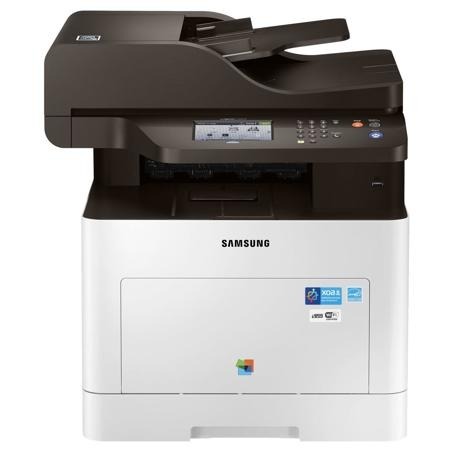
The ProXpress C3060FW joined Samsung's ProXpress stable in the mid-2010s as a business-class color laser multifunction printer — the C3060 variant with fax and wireless networking added, built for workgroups that need reliable A4 color output day after day. Its specified toner is the CLT-503L range: black CLT-K503L alongside cyan CLT-C503L, magenta CLT-M503L and yellow CLT-Y503L, all stocked below.
Wireless is the detail that shapes this printer's toner story. A C3060FW rarely belongs to one person: it sits on the network where a whole workgroup can reach it, printing from several desks, copying at the glass and receiving faxes in between. Nobody sees the full picture of what it prints, so its four levels drift apart in ways a personal printer's never do. The saving grace is that each cartridge is an independent consumable with its own chip and level — the machine always knows which color is actually low, and that is the only one that needs your money.
Toner Cartridges for ProXpress C3060FW
- ProXpress C3060FW 4 Color Set — the full refresh, model-named
- Black — ProXpress C3060FW (CLT-K503L) — model-named black single
- Cyan — ProXpress C3060FW (CLT-C503L) — model-named cyan single
- Magenta — ProXpress C3060FW (CLT-M503L) — model-named magenta single
- Yellow — ProXpress C3060FW (CLT-Y503L) — model-named yellow single
- CLT-503L 4 Color Set — one of each color, code-named
- CLT-503L 8 Color Set — eight-cartridge set
- CLT-503L 5 Color Set — five-cartridge set on the black, cyan and magenta codes
- CLT-503L 6 Color Set — six-cartridge set of the three colors
- CLT-503L 3 Color Set — the three colors without black
- CLT-K503L 5 Black — five black cartridges
- CLT-K503L 3 Black — three black cartridges
- CLT-K503L 2 Black — two black cartridges
- CLT-K503L Black — single black
- CLT-C503L Cyan — single cyan
- CLT-M503L Magenta — single magenta
- CLT-Y503L Yellow — single yellow
Which cartridge should you buy?
On a shared machine, stagger everything. Replace each color as its own warning arrives rather than refreshing all four on someone else's schedule, and let black — the cartridge a workgroup consumes fastest — ride in the two-, three- and five-packs so a spare is always in the cupboard. Samsung's specification also names an S-coded counterpart line for this model (CLT-K503S, CLT-C503S, CLT-M503S, CLT-Y503S); the listings here are the L line, so a ten-second code check against the cartridge in the machine prevents the classic wrong-box return. A full set is the tidy choice when the printer changes offices or several levels bottom out together.
Chip, toner and everyday use
Because the four chips report separately, a shake-and-redistribute on this model is a per-cartridge job: only the low one comes out, gets rocked gently to even its toner, and goes back. Spares deserve a system on a shared printer — sealed in their original packaging, upright, in a cool dry cabinet, ideally the same locked cabinet every time so stock is easy to account for. Fitted correctly, a compatible cartridge from this page is covered by a 1-year warranty and 1-year returns, and level readings behave exactly as they do with the original.
Frequently Asked Questions
Do I have to replace all four cartridges on the C3060FW at once?
No. Each color cartridge is an independent consumable with its own chip and level, so replace only the one the printer flags. Black-only printing for everyday text is the quiet trick that stretches the color cartridges on a shared machine, since routine documents never draw on them.
The printer keeps jamming — is the toner cartridge the cause?
Sometimes, but not usually. A badly seated cartridge can obstruct the path, so reseat any cartridge that was changed just before the jams began. Beyond that, look at the paper: guides set snugly against the stack stop sheets skewing into the path, and pickup rollers that have worn smooth will misfeed no matter which cartridge is fitted.
My spare CLT-K503L sat in the cupboard for a year — is it still good?
Yes. Kept sealed in its original packaging, upright in a cool, dry room, a toner cartridge waits patiently — a year on the shelf costs it nothing. Give it a gentle shake before fitting to redistribute the toner, and it will print like a fresh delivery.
More printers that use the same cartridges
These cartridges also run the rest of the family: ProXpress C3060F, ProXpress C3010ND, ProXpress C3010DW, ProXpress C3010DW.