




T522dn
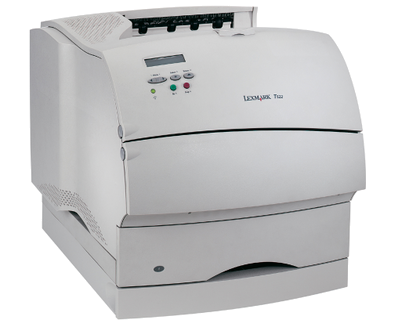
Some printers earn their place by doing three jobs at once, and the Lexmark T522dn is one of them: a monochrome laser that pairs the quicker 522 engine with automatic two-sided printing and built-in network connectivity in a single cabinet. Lexmark built this family around the 12A6835 high-yield black cartridge, rated at roughly 20,000 pages, and the same cartridge family gives the T522dn a second black option, the 12A6735, which is the compatible cartridge stocked on this page in single, 2-pack and 4-pack listings.
That combination suits departments that have standardized on one model across several desks or an entire floor. When every unit on the network shares the same supplies, whoever orders toner stops juggling part numbers, and a spare pulled from the closet always fits the machine that ran dry. Duplex output trims paper spending on long reports, while the shared connection means the printer sits wherever the team needs it rather than next to one person's computer. For offices still running these dependable units, keeping the supply shelf simple is most of the battle.
Toner Cartridges for T522dn
| Cartridge | Color | Page Yield |
|---|---|---|
| Compatible Lexmark T520 (12A6735) Toner Cartridge Black 2 Pack | Black | See product page |
| Compatible Lexmark T520 (12A6735) Toner Cartridge Black 4 Pack | Black | See product page |
| Compatible Lexmark T520 (12A6735) Toner Cartridge Black | Black | See product page |
Which cartridge should you buy?
Start with how much your T522dn actually prints. The 12A6735 single cartridge is the sensible pick for a lone machine with a modest monthly queue, and it keeps the least money sitting on the shelf. If the printer serves a whole workgroup, the 2-pack removes the mid-month scramble that follows an empty unit, because the replacement is already in the building when the warning appears. Busy departments and anyone stocking several T520-family machines at once usually do best with the 4-pack: one order covers multiple printers, and the per-cartridge cost drops compared with buying singles one at a time. Whichever size you choose, the cartridge itself is the same; only the quantity in the box changes.
Chip, toner and everyday use
Each compatible cartridge carries a chip the T522dn reads on installation, so the toner gauge on the panel reflects the new unit instead of carrying over the old count. Seat the cartridge firmly until it clicks, then close the cover and let the printer finish its start-up cycle before sending a test page. Yield figures for this family are estimates worked out at 5% page coverage, which means dense reports and heavy graphics will use toner faster than memos do. If pages ever come out faint near the end of a cartridge's life, take it out and rock it gently from side to side; redistributing the toner inside often restores even coverage for a while longer. Keep spares sealed, flat and away from direct sunlight and heat.
Frequently Asked Questions
Which toner cartridge does the T522dn take?
The printer belongs to the 12A6835 cartridge family, whose high-yield black is rated at about 20,000 pages. On this page you will find the family's second black cartridge, the 12A6735, sold as a compatible in one, two and four cartridge boxes.
Does printing on both sides use more toner?
No. Duplex printing puts the same amount of toner on each printed side; what it saves is paper, because a two-page document fits on one sheet. Toner consumption follows how much text and graphics land on the page, not whether the sheet passes through the printer twice.
Can one cartridge order cover several different printers here?
Yes, within this family. The T522dn shares its black cartridge with the T520 and T522 printers and the X520 and X522 multifunction models listed below, so a 4-pack bought for one machine can rescue another when its toner runs out at an awkward moment.
Will the printer recognize a compatible cartridge right away?
It should. The chip on the cartridge reports its level to the printer as soon as it is installed, and the panel gauge resets for the new unit. If a message lingers after a swap, opening and firmly reseating the cartridge, then restarting the printer, clears it in most cases.
More printers that use the same cartridges
The T522dn shares its black toner with a wide band of T520-generation printers and X-series multifunction models:
Sbe, T520, T520Sbe, T520d, T520dn, T520n, T522, T522n, X520, X520 MFP, X522, X522s, X522s MFP