




LaserJet 5100Le
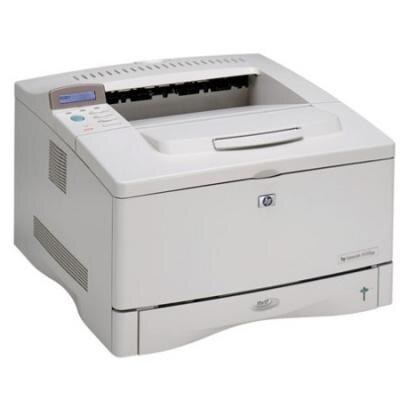
The LaserJet 5100Le was a limited-edition configuration of HP's LaserJet 5100 — the year-2000 wide-format A3 printer, sold through special channels in distinctive packaging. Under the badge is the same tabloid-capable engine the rest of the 5100 line runs on, and it feeds on the same pair of cartridges: HP's standard 29A (C4129A) and the high-yield 29X (C4129X). This page stocks the 29X line — a MICR single and multi-packs of two, three and five.
The 5100 generation took the 5000's wide-format formula and carried it into the 2000s, and the Le is best understood as a sales-channel variation on that dependable base rather than a different machine. That is good news two decades on: nothing about the Le is orphaned. Its cartridge is among the most widely shared in HP's older wide-format range, which is why a special-channel printer from 2000 remains an ordinary one to supply.
Toner Cartridges for LaserJet 5100Le
- C4129X 2 Pack — Black — high yield; page yield: see product page
- C4129X MICR — Black — magnetic toner for checks; page yield: see product page
- C4129X 5 Pack — Black — high yield; page yield: see product page
- C4129X 3 Pack — Black — high yield; page yield: see product page
- C4129X Premium 5 Pack — Black — high yield; page yield: see product page
Which cartridge should you buy?
Volume decides, as it does across this family. The two-pack is the natural stock for a single Le in steady use; the three- and five-packs, premium included, suit the machine that shares a corridor with its sibling models and eats toner accordingly. Handle the MICR cartridge as a separate purchase with a separate purpose — check stock is the only paper it should ever print on. If your Le now prints only occasionally, buy the smallest pack and let freshness win over bulk pricing: a sealed cartridge keeps well, but a decade of spares helps no one.
Chip, toner and everyday use
Before a new cartridge goes in, give it a gentle side-to-side rock — a few easy tilts, never a vigorous shake — so the toner distributes evenly after its time on a shelf. Seat it fully and run a test page. For paper jams, the drill on this generation is simple: switch the machine off, open the access doors, and draw the stuck sheet out along its normal direction of travel, then check inside for torn fragments before closing up and printing again.
Frequently Asked Questions
What separates the 29A from the 29X for this printer?
Capacity only. Both fit the 5100Le and are physically interchangeable; the X cartridge simply holds more toner, so it suits machines that print often or in long runs.
Should I shake the cartridge before installing it?
Rock it, do not shake it. A few gentle tilts from side to side wake up toner that has settled in storage; hard shaking risks spills and uneven distribution.
Does a limited-edition printer need limited-edition toner?
No. The Le takes exactly the cartridges listed here — the same stock as the standard 5100 and the wider 5000 family below.
How do I clear a paper jam in the 5100Le?
Turn the printer off, open the doors, and ease the sheet out in the direction it was travelling. Look for small torn pieces left inside, close everything, and confirm with a test page.
More printers that use the same cartridges
Reading the family back from the newest branch: LaserJet 5100TN, LaserJet 5100N, LaserJet 5100DTN, LaserJet 5100, LaserJet 5000T, LaserJet 5000N, LaserJet 5000LE, LaserJet 5000GN, LaserJet 5000DN, LaserJet 5000AN, LaserJet 5000, HP C4129A.